

Share
What is VidBreak?
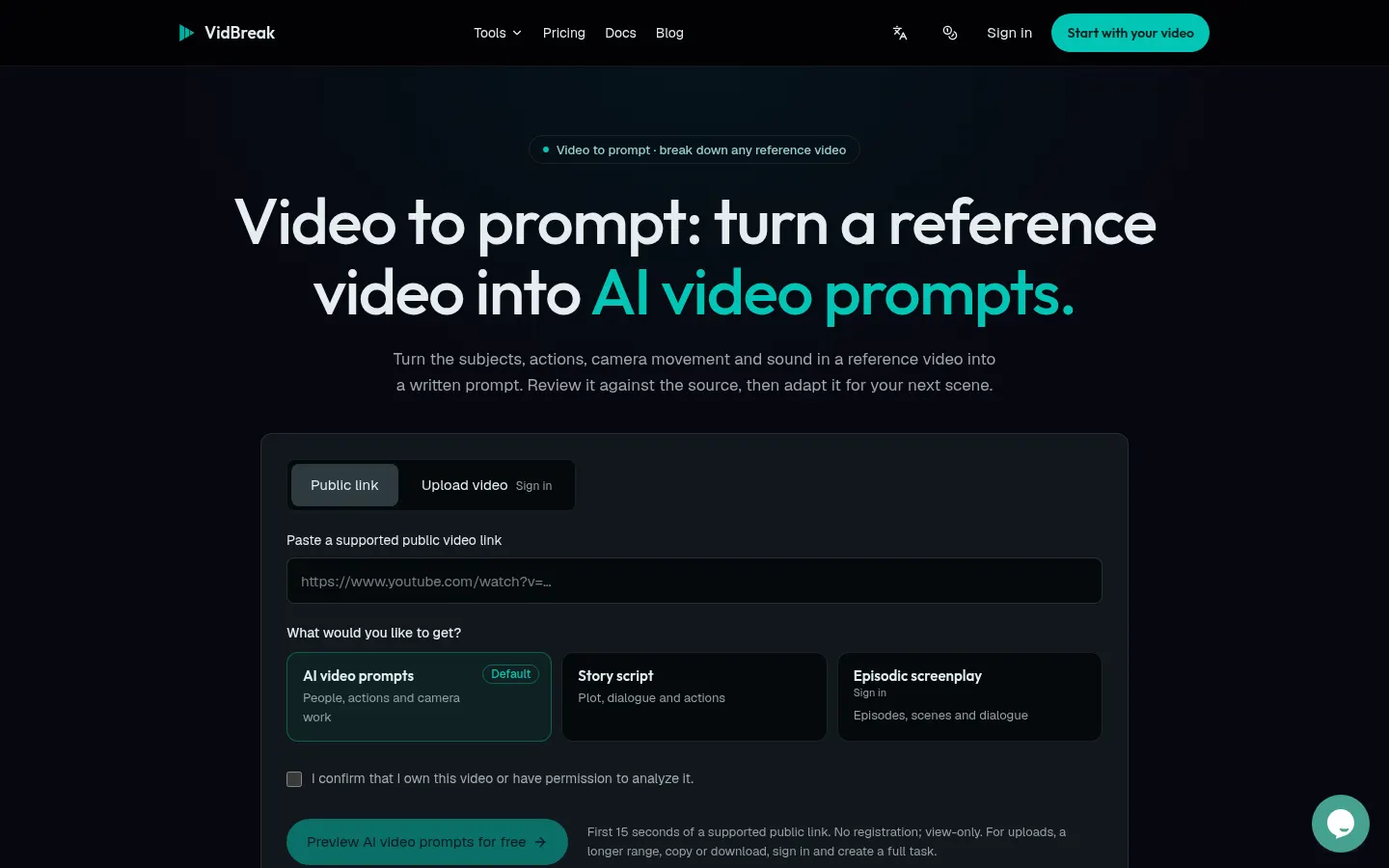
VidBreak is a video-to-prompt tool that analyzes a reference clip and breaks it down into structured text you can use to recreate or adapt the scene with AI video generators. It's aimed at AI video creators, short-drama makers and screenwriters who work from existing footage.
What does VidBreak produce from a video?
Each analysis returns one of three outputs. AI video prompts come in four layers: a shot overview (style, setting, mood and what to avoid), the characters with their look and actions, a timed action sequence setting the camera, action, dialogue, sound and end frame for each block, and nine camera and sound rules for the whole segment. It can also produce a timestamped story script or an episodic screenplay in English or Chinese from up to 60 minutes of footage.
How do you work with VidBreak?
You upload your own video or paste a supported public link, pick the output and the range (8 seconds to 10 minutes for prompts and story scripts) and confirm the estimated usage before starting. Then you check each prompt against the source and use Rewrite to adapt it to your own concept, following the target model's instructions. An optional Viral DNA analysis studies what makes a reference work, and there's also a YouTube video analyzer.
VidBreak pros and cons
- Pro: prompts split camera, action, dialogue and sound, which helps keep shots consistent.
- Pro: it's upfront that timings and mood intensity are interpretations, not exact measurements.
- Con: you should only analyze videos you own or have permission to use, and the no-sign-up preview is view-only.
- Con: the interface is in English and Chinese with no Spanish version, and episodic screenplays only come out in English or Chinese.
VidBreak features and use cases
How to use VidBreak
VidBreak FAQ
What is VidBreak?
It's a tool that turns a reference video into prompts for AI video generators or into structured scripts.
Is VidBreak free?
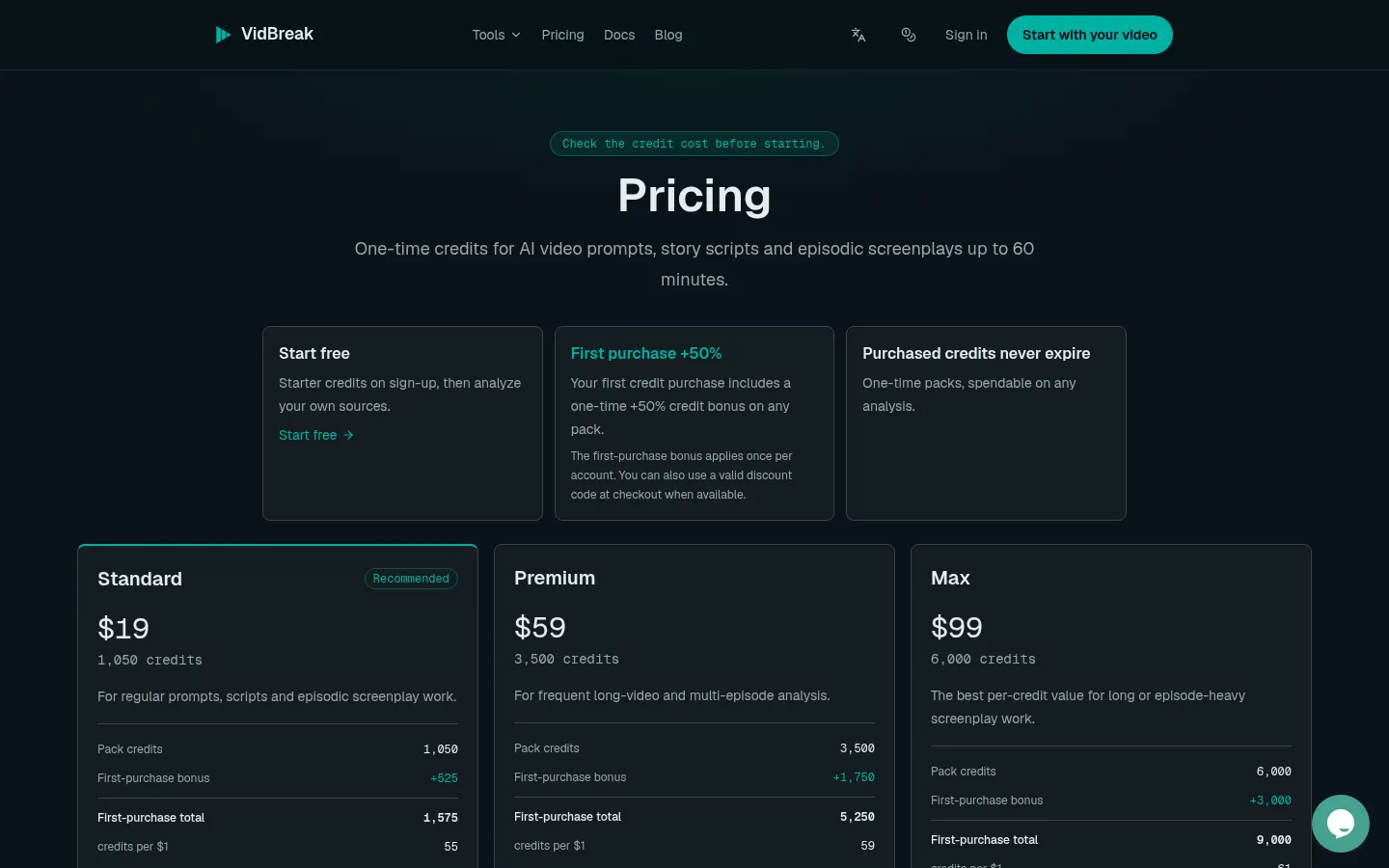
It offers starter credits and a free 15-second preview; after that you buy credit packs, see the pricing section.
Does VidBreak have an API?
It doesn't publish an API; you use it through the website.
Does VidBreak work in Spanish?
The interface is in English and Chinese, and episodic screenplays come out in English or Chinese; you can translate or rewrite prompts afterwards.
What's in a VidBreak prompt?
A shot overview, the characters, a timed action sequence and nine camera and sound rules.
How much video can I analyze?
From 8 seconds to 10 minutes for prompts and story scripts, and up to 60 minutes for episodic screenplays.
Can I analyze any video?
Only videos you own or have permission to analyze; the tool asks you to confirm this.
What is Viral DNA?
It's an optional analysis of what makes a reference work, available for prompts and story scripts.
Do credits expire?
No, purchased credits never expire.
What are some VidBreak alternatives?
Our directory lists VideoToScript and Descript for video-to-text work, plus AI Image to Prompt Promptsref if you start from images.
VidBreak pricing and plans
Reference price: 19 USD · one-time payment. Source · Verified: November 8, 2026
VidBreak uses one-time credit packs that never expire. You get starter credits on sign-up and can preview the first 15 seconds of a public link for free. Packs: Standard $19 (1,050 credits), Premium $59 (3,500) and Max $99 (6,000); your first purchase adds 50% bonus credits. For reference, one minute of video prompts uses 90 credits. Checked on: 08/11/2026.
VidBreak Screenshots
VidBreak user reviews
Write a review
Checking your session...
VidBreak Reviews
Loading reviews...
VidBreak alternatives


Markitdown Online
Convert PDF, Office, and images into structured Markdown for AI workflows. Streamline documentation and knowledge base creation with OCR support.

Suno Prompt
Generate prompts and lyrics to create music with AI. Customize styles, rhythms, and melodies to compose songs, soundtracks, and video games.

The Prompt Challenge
Sharpen your prompting skills with image and website description challenges. Features multiple difficulty levels, similarity scoring, and user leaderboards.

PrompTessor
Analyze and optimize AI prompts with detailed metrics. Reverse-engineer content to discover and refine high-performance LLM instructions.

Prompt Storm
Chrome extension with specialized prompts for ChatGPT, Gemini, and Claude. Optimize writing, marketing, and coding to boost your productivity with AI.