Screenshot to Code
Share
Screenshot to Code
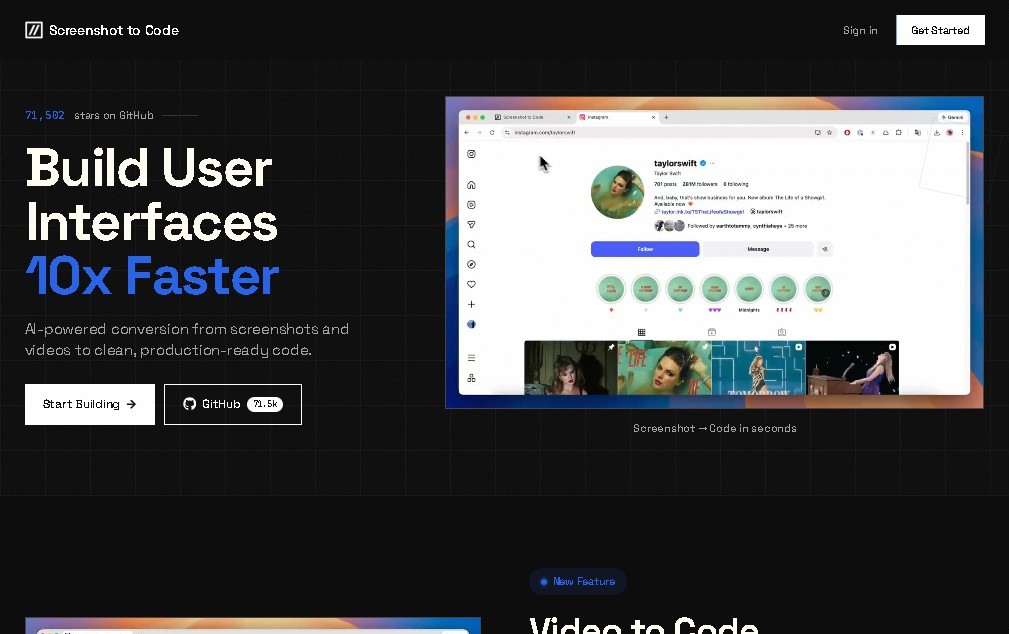
Convert screenshots and designs into ready-to-use frontend code. Generate HTML, Tailwind, React, and Vue to streamline web interface development using AI.
General Information about Screenshot to Code
Screenshot to Code is an AI tool designed to automate the transition between visual design and front-end development. Its primary function is to convert screenshots, mockups, or graphic designs directly into functional code, eliminating much of the manual work required when coding from scratch. This software is particularly valuable for web developers and UI/UX designers looking to streamline the interface creation process using advanced vision models.
The operation of Screenshot to Code is based on image processing using large language models with vision capabilities, such as GPT-4 Vision. By uploading an image of an existing website, a Figma file, or a simple wireframe, the AI analyzes the visual hierarchy and recognizes specific elements like buttons, forms, navigation menus, and content cards. Once the structure is interpreted, the tool instantly generates the corresponding markup and styles, ensuring a result that remains faithful to the original design.
This application stands out for its technical versatility and compatibility with various industry standards:
- Clean code generation in languages such as pure HTML and CSS.
- Support for modern framework components like React and Vue.
- Native integration with Tailwind CSS for responsive and modular design.
- Ability to work with styling libraries like Bootstrap.
- Conversion of complex designs into functional prototypes in seconds.
From a practical standpoint, Screenshot to Code acts as a programming assistant that drastically reduces the time spent on rapid interface prototyping. It is not limited to merely copying the visual appearance; it attempts to structure the code logically so that it is easily editable by a programmer on their computer. It is an ideal solution for teams that need to validate visual ideas quickly or for developers who want a solid foundation upon which to continue building the business logic of a web or mobile application.
By using this AI-powered web development tool, professionals can focus on higher-value tasks, delegating the repetitive work of visual layout to the AI. The ability to automatically convert design to code positions Screenshot to Code as an essential resource in the modern workflow, facilitating collaboration between design and development departments by delivering precise, production-ready technical results. Its functional approach allows any screenshot to be transformed into a real technical starting point, optimizing delivery times for digital projects.
Features and Use Cases of Screenshot to Code
How Screenshot to Code Works
Frequently Asked Questions about Screenshot to Code
What exactly is Screenshot to Code?
It is an AI-powered application that automatically converts screenshots or visual designs into front-end code.
Which languages and frameworks does Screenshot to Code support?
The tool generates HTML, CSS, and Tailwind code, as well as ready-to-use components for frameworks like React, Vue, and Bootstrap.
Is there a free version of Screenshot to Code available?
Yes, you can use the open-source version for free by providing your own API key for compatible vision models.
How much do the paid plans for Screenshot to Code cost?
Commercial plans typically start at around $9 per month for basic features and go up to $29 for full framework support and additional conversions.
What types of visual files can I upload to Screenshot to Code for processing?
You can use screenshots, Figma designs, hand-drawn sketches, or wireframes for the AI to analyze and convert into functional code.
Is the code generated by Screenshot to Code high quality?
Yes, the tool generates clean, structured, and optimized code that helps developers drastically reduce the time spent on manual layout work.
Do I need advanced knowledge to use Screenshot to Code?
You don't need to be an expert since the tool automates UI creation, though basic programming knowledge is recommended to integrate the output into a real project.
Screenshot to Code Pricing
Free / Open Source Plan
- Price: Free (requires your own OpenAI GPT-4 Vision API key or equivalent models).
- Access to basic screenshot-to-code conversion features.
- Direct use of the project's open-source version.
Basic Plan
- Price: Approximately 9 USD/month.
- Basic access to design-to-code conversion.
- Support for HTML and Tailwind generation.
- Subject to usage limits on the number of conversions.
Pro Plan
- Price: Approximately 29 USD/month.
- Support for additional frameworks such as React and Vue.
- Increased capacity and higher monthly conversion volume.
Enterprise Plan
- Price: Custom (contact via the official website).
- Unlimited conversions.
- Dedicated support.
- Advanced features designed for organizations.
Screenshot to Code Screenshots