Share
AI platform to create, schedule, and publish content. Generate images, videos, and presentations on a collaborative canvas while always maintaining your brand identity.
What is Shyne?
Shyne is an all-in-one creative platform powered by artificial intelligence, designed as an infinite canvas where brands and teams can ideate, generate, and publish content from a single location. This tool positions itself as a creative superapp that unifies design, copywriting, and social media management workflows, enabling the creation of presentations, documents, videos, and websites in a collaborative and fully synchronized environment.
At the core of Shyne is its ability to act as a real-time AI creative companion. Unlike other applications, it allows for the integration of external agents like Claude, ChatGPT, Gemini, or Grok via the MCP (Model Context Protocol). This means users can give direct instructions on the canvas using quick commands like ⌘K, allowing the AI to design, edit, or generate visual and textual elements right at the cursor. Shyne’s technology enables the AI to read the canvas context and write on it actively, functioning as another member of the team.
Key features and practical benefits include:
- Multimedia content generation: Create images, video clips, and voiceovers directly within the workspace.
- Centralized brand kits: Define colors, fonts, and logos once so that all production—whether human or AI-generated—maintains visual brand consistency.
- Video editing and animation: Includes a real-time timeline to animate elements and export MP4 files rendered directly from the browser or the desktop app.
- Planning and scheduling: Features an integrated content calendar to organize and publish posts on channels like Instagram, LinkedIn, and X, automatically adapting designs to each format.
- Prototyping and interaction: Canvas frames can be transformed into interactive prototypes and shared via live links.
- Universal export: Supports multiple output formats, including PDF, PNG, HTML, PowerPoint, and Google Slides, facilitating integration with other computer tools.
This tool is aimed at a wide range of professionals, from marketing teams and creative agencies to designers, startup founders, and content creators. Its multiplayer nature allows multiple users to work simultaneously with live cursors, eliminating version conflicts and optimizing the production of digital assets. Shyne presents itself as a robust solution for those seeking a generative AI tool that doesn't just create content, but also helps manage and distribute it professionally and efficiently.
Shyne features and use cases
How to use Shyne
Shyne FAQ
What is Shyne and who is this tool designed for?
Shyne is an AI creative companion that enables brands, teams, and creators to generate, schedule, and publish multimedia content from an infinite canvas.
What kind of content can I create using Shyne?
You can create presentations, documents, social media posts, images, videos, and interactive prototypes while always maintaining your project's visual consistency.
How does Shyne ensure that generated content stays true to my visual identity?
The tool allows you to set up brand kits with your colors, fonts, and logos, ensuring that both you and the AI agents generate consistent assets.
Can I collaborate with teammates on the canvas in real time?
Yes, the platform supports simultaneous work with live cursors and shared editing, allowing humans and AI agents to collaborate in the same workspace.
What formats can I use to export my Shyne projects?
You can export your work in universal formats such as PDF, PNG, JPG, MP4, and HTML, as well as files compatible with PowerPoint and Google Slides.
Can I connect my own AI models to Shyne?
Yes, you can integrate tools like Claude, ChatGPT, or Gemini via the MCP protocol, allowing your agents to read and write directly on your workspace canvas.
Is my data secure, and is it used to train AI models?
Your data is encrypted, and Shyne does not sell it or use it to train its own or third-party models, guaranteeing the privacy of all your professional information.
Is there a free version available to start using Shyne?
Yes, there is a free plan that includes full access to the canvas and 1,000 monthly AI credits so you can test all the features at no cost.
Shyne pricing and plans
Free Plan
Price: Free (no credit card required).
- Full canvas access.
- Standard text models.
- GPT-powered image generation.
- 1,000 AI credit limit per seat per month.
- 250 hosted MCP calls per organization per week.
- 2 GB shared organizational storage.
- Export in PNG, JPG, PDF, HTML, PowerPoint, and MP4 formats (hosted renders consume credits).
Pro Plan
Price: $20 per seat/month (or $16/month billed annually at $192).
- Access to all current text models, including Sol.
- Premium AI models for image and video generation.
- 2,000 AI credit limit per seat per month.
- 25,000 hosted MCP calls per organization per week.
- 100 GB shared organizational storage.
Ultra Plan
Price: $100 per seat/month (or $80/month billed annually at $960).
- Access to all current text models, including Sol.
- 12,000 AI credit limit per seat per month.
- 200,000 hosted MCP calls per organization per week.
- 500 GB shared organizational storage.
Enterprise Plan
Price: Contact us via the official website for a custom quote.
- Custom plans and seat counts.
- Personalized security and support requirements.
- Credits included per seat and pooled for the entire organization.
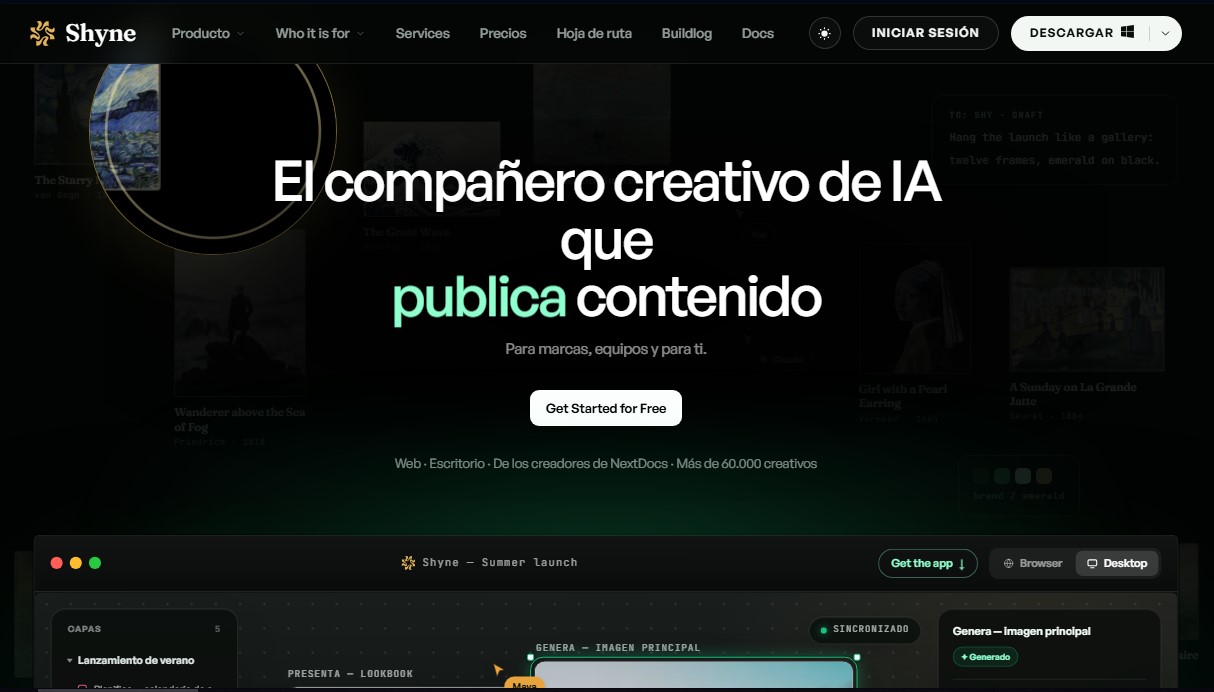
Shyne Screenshots
Shyne alternatives
Amplify AI
Automatically generate and post daily TikTok and Instagram videos with AI creators. Create viral content for your brand and manage multiple accounts without filming.
Kairosy AI
Audit and improve your brand reputation in AI search engines. Monitor mentions on ChatGPT or Claude, analyze sentiment, and optimize visibility to attract more customers.