
Share
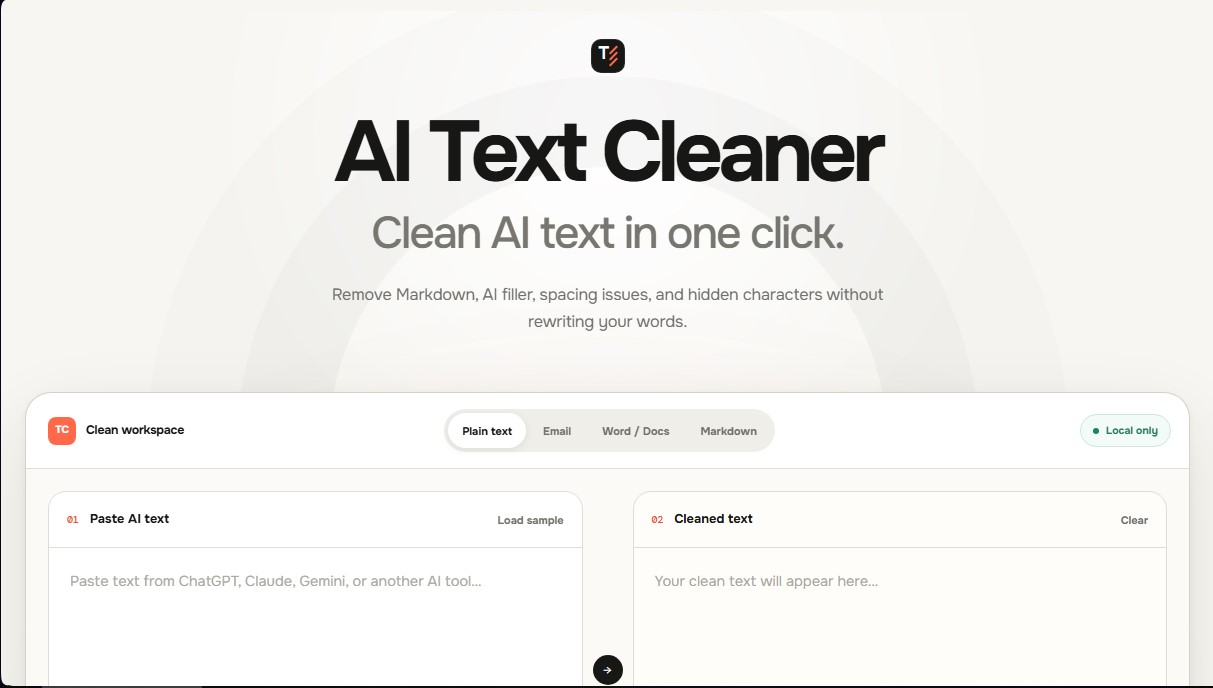
Clean up AI text by removing Markdown, filler phrases, spacing errors, and hidden characters without rewriting. Keeps original content completely intact.
What is TextCleaner?
TextCleaner is a web utility specifically designed to instantly and efficiently clean AI-generated text. Its primary function is to remove the visual and technical noise that often accompanies responses from assistants like ChatGPT, Claude, or Gemini, allowing you to obtain polished, ready-to-use content without the need to rewrite the message. Unlike automatic rewriters, this tool focuses on formatting cleanup and the removal of superfluous elements, keeping the authorship and original meaning of the text intact.
The operation of TextCleaner stands out for its commitment to user privacy. The cleaning technology runs entirely locally within your desktop or mobile browser, ensuring that content is never uploaded to external servers or processed in the cloud. This technical approach enables immediate and secure processing. Users simply paste their draft into the interface, activate the necessary cleaning rules, and copy the final result, which updates in real-time based on the selected options.
The functional capabilities of this AI text cleaner include:
- Markdown Removal: Automatically deletes bold tags, headers, code blocks, and list syntax to generate clean plain text.
- AI Filler Filtering: Removes typical filler phrases from language models, such as generic introductions ("Certainly," "Here you go") or unnecessary closings.
- Spacing Error Correction: Fixes double spaces, inconsistent line breaks, and trailing whitespace at the end of paragraphs.
- Hidden Character Cleanup: Eliminates zero-width spaces, soft hyphens, and other invisible characters that often cause formatting errors when pasting into Word, Google Docs, or email platforms.
- Emoji Management: Allows for the selective removal of icons to maintain a professional tone if the text's destination requires it.
This tool is an essential resource for writers and professionals looking to optimize their AI workflow. By providing granular editing control, TextCleaner allows you to transform AI outputs into publish-ready text much faster than manual editing. It is ideal for users who value precision and need a solution that removes traces of source formatting without altering the chosen words, ensuring a smooth transition to any destination platform. Notably, it requires no registration or subscriptions, facilitating quick and direct use from any browser.
TextCleaner features and use cases
How to use TextCleaner
TextCleaner FAQ
What is TextCleaner?
TextCleaner is a tool designed to remove Markdown formatting, AI filler phrases, and hidden characters without rewriting your original content.
How does TextCleaner help clean up AI-generated text?
This tool automatically removes headers, bolding, unnecessary spaces, and the generic introductory or closing phrases typically generated by virtual assistants.
Is it safe to use TextCleaner with private information?
Yes. Processing is done locally in your browser and your text is never uploaded to any servers, ensuring complete privacy.
Can TextCleaner rewrite or humanize my sentences?
No. The tool does not paraphrase or generate new sentences; instead, it applies fixed rules to clear out visual noise while keeping your original words intact.
Does TextCleaner work with text copied from ChatGPT or Claude?
Yes. It is optimized to process content from any language model, removing code remnants and formatting issues when pasting text into other documents.
Do I need a subscription to use TextCleaner?
No. The tool is completely free and does not require creating an account or spending AI model credits.
What kind of elements does this tool remove?
It allows you to remove formatting tags, double spaces, inconsistent line breaks, emojis, and invisible characters that cause errors when pasting text.
TextCleaner pricing and plans
Free Version
Price: 0 $
- One-click cleanup of AI-generated text without altering the original content.
- Removal of Markdown formatting (headers, bold text, lists, and code blocks).
- Filtering of common AI assistant filler phrases (e.g., "Certainly," "I hope this helps").
- Correction of spacing errors, excessive line breaks, and invisible hidden characters.
- Local in-browser processing to ensure privacy (text is never uploaded to servers).
- Unlimited use with no credit consumption and no registration or user account required.
TextCleaner Screenshots
TextCleaner alternatives

PropellaDocs
Automate business proposals and technical documents for IT consultants with AI. Create professional drafts and solution designs in minutes from notes or emails.