
Verla
Share
Create academic papers, presentations, and code for college. Detect AI, humanize text, and add citations based on rubrics, notes, and real sources.
What is Verla?
Verla is an AI personal assistant specifically designed for the university environment that centralizes the creation, review, and refinement of academic work. This tool allows students to manage complex tasks—from essays and presentations to programming projects—by integrating content generation, AI detection, and text humanization into a single workflow. Its primary goal is to optimize study time, moving from initial requirements to a structured and coherent result in approximately 20 minutes.
Verla’s functionality is based on processing specific reference materials provided by the user. Unlike generic chatbots, this platform allows users to upload files such as grading rubrics, PDF notes, books, and datasets. The technology uses these materials to align the structure, tone, and evidence of the work with the actual academic criteria of each subject. Additionally, it incorporates a verified academic reference system that links traceable sources in standard styles such as APA, MLA, Chicago, IEEE, Harvard, and Vancouver.
Among its most notable functional capabilities are:
- Academic Assignment Generator: Creates complete A+ level drafts organized by content blocks, including Python or SQL code and slides with speaker notes.
- High-Precision AI Detector: Performs a detailed sentence-by-sentence and paragraph-by-paragraph analysis to identify the probability of synthetic generation, with results aligned with institutional evaluation standards.
- Text Humanizer: Refines the writing to reduce patterns detectable by algorithms without compromising technical quality, citations, or the original meaning of the argument.
- Multi-format Online Editor: Allows for direct adjustments in the browser and exports the final document to standard formats like Word, PDF, or presentations.
This solution is highly beneficial for students in over 50 disciplines, covering areas such as STEM, Social Sciences, Health, Humanities, and Law. Verla is capable of processing more than 30 types of assignments, including lab reports, literature reviews, case studies, and data analysis. By automating source searching and structuring according to the rubric, the system helps significantly reduce the weekly workload, allowing users to focus on critical review and learning the content.
The platform guarantees privacy by design, ensuring that uploaded materials and activity history are protected and not shared publicly. By offering a transparent view of sources and detailed passage analysis, Verla positions itself as a support resource to boost confidence in academic submissions and ensure that the final result meets the expectations of university-level rigor.
Verla features and use cases
How to use Verla
Verla FAQ
What is Verla, and how can it help me during my college years?
Verla is a personal AI assistant designed to automatically generate high-quality academic papers, presentations, and coding projects.
How long does it take Verla to write a full paper?
The system processes your instructions and materials to deliver a finished, structured assignment in approximately 20 minutes.
Can I upload my own materials and the professor's rubric to Verla?
Yes, you can upload PDFs, notes, books, and grading rubrics so the tool can tailor the content exactly to your course requirements.
What citation styles and bibliographic references does the tool use?What citation styles and bibliographic references does the tool use?
Verla includes real, traceable academic references in the most common formats, such as APA, MLA, Chicago, IEEE, Harvard, and Vancouver.
How does the built-in AI detector in Verla work?
The detector performs a detailed sentence and paragraph analysis to identify passages that may appear AI-generated, providing an accurate probability score.
What is the purpose of Verla’s humanization feature?
This feature adjusts the tone and style of the text to reduce detectable AI patterns, making the writing sound more natural without sacrificing academic rigor.
What formats can I use to export my finished assignments?
Once the process is complete, you can edit the content online and export it directly to Word documents, PDFs, slides, or code files.
Is it safe to upload my personal documents and assignments to Verla?
The platform guarantees privacy by design, protecting your materials and activity history to ensure they are never shared publicly.
Which academic disciplines does the Verla assistant cover?
The tool supports more than 50 disciplines, including business, social sciences, engineering, mathematics, health, humanities, and law.
Does Verla offer a trial period for new users?
There is a seven-day trial that provides access to the assignment generator, AI detector, and humanizer to evaluate the platform's capabilities.
Verla pricing and plans
Free Version
A free starter option is available to begin your first project at no cost, though specific limits are not listed in the main pricing table.
Pro Trial: $2.99 / 7 days
A seven-day trial that includes:
1 use of the assignment generator.
3,000 words for AI detection.
1,000 words for the humanizer.
Access to the question and reference library.
Unlimited file uploads per assignment.
Output formats: text, PPT, and code.
Basic: $19.99/mo (or $7.99/mo billed annually)
A plan designed for simple writing tasks that includes:
3 uses of the assignment generator.
10,000 words for AI detection.
5,000 words for the humanizer.
Access to the question and reference library.
Up to 5 file uploads per assignment.
Text output format only.
Plus: $39.99/mo (or $15.99/mo billed annually)
An intermediate plan for comprehensive academic projects that includes:
8 uses of the assignment generator.
40,000 words for AI detection.
20,000 words for the humanizer.
Access to the question and reference library.
Up to 10 file uploads per assignment.
Output formats: text, PPT, and code.
Pro: $79.99/mo (or $31.99/mo billed annually)
A plan for power users with high project volumes that includes:
16 uses of the assignment generator.
100,000 words for AI detection.
60,000 words for the humanizer.
Access to the question and reference library.
Unlimited file uploads per assignment.
Output formats: text, PPT, and code.
Add-on Packs (Valid for 2 months)
Additional assignments: $9.99 for 3 assignments.
Additional AI detection: $4.99 for 20,000 words.
Additional humanizer: $6.99 for 10,000 words.
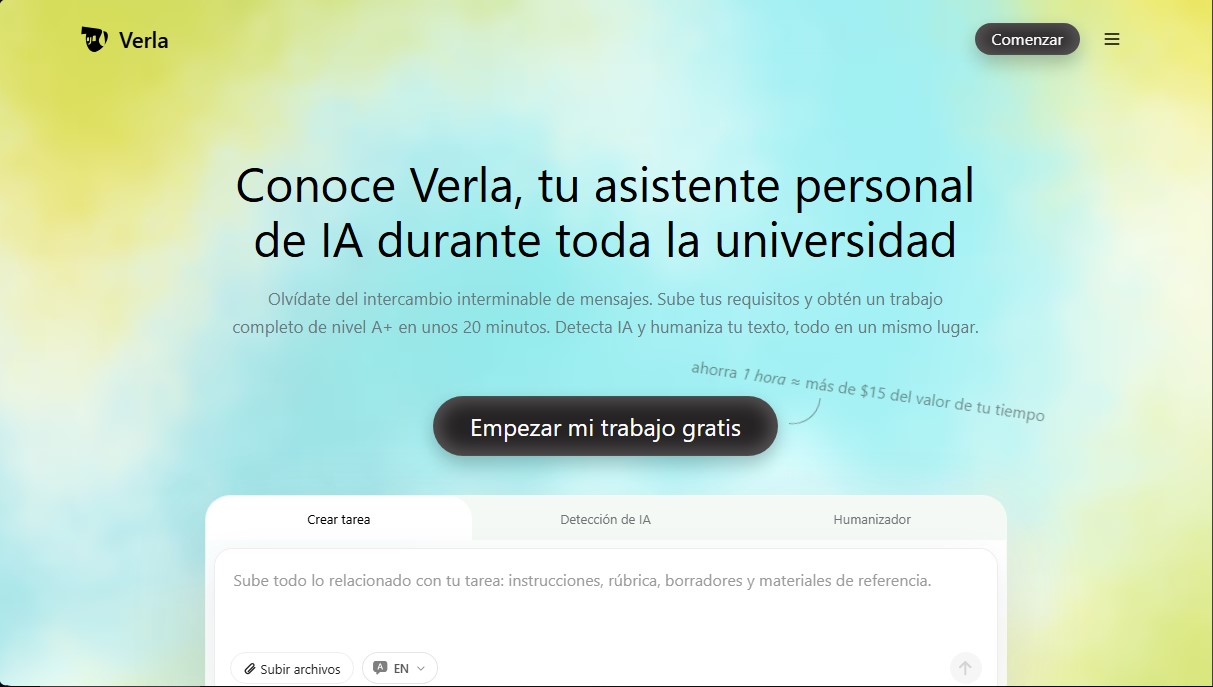
Verla Screenshots
Verla alternatives
Is My App Slop
Audits AI-built websites and apps for quality issues. Provides a score and prioritized solutions to improve design and usability.
UltraHumanizer
Transform AI text into natural, human-like content. Customize styles, process documents, and preserve the original meaning to bypass automatic detection.
AI Detector by Getsolved
Analyze writing patterns to detect AI text. Enhance clarity, verify facts, and check for plagiarism to ensure natural and original content.