

Share
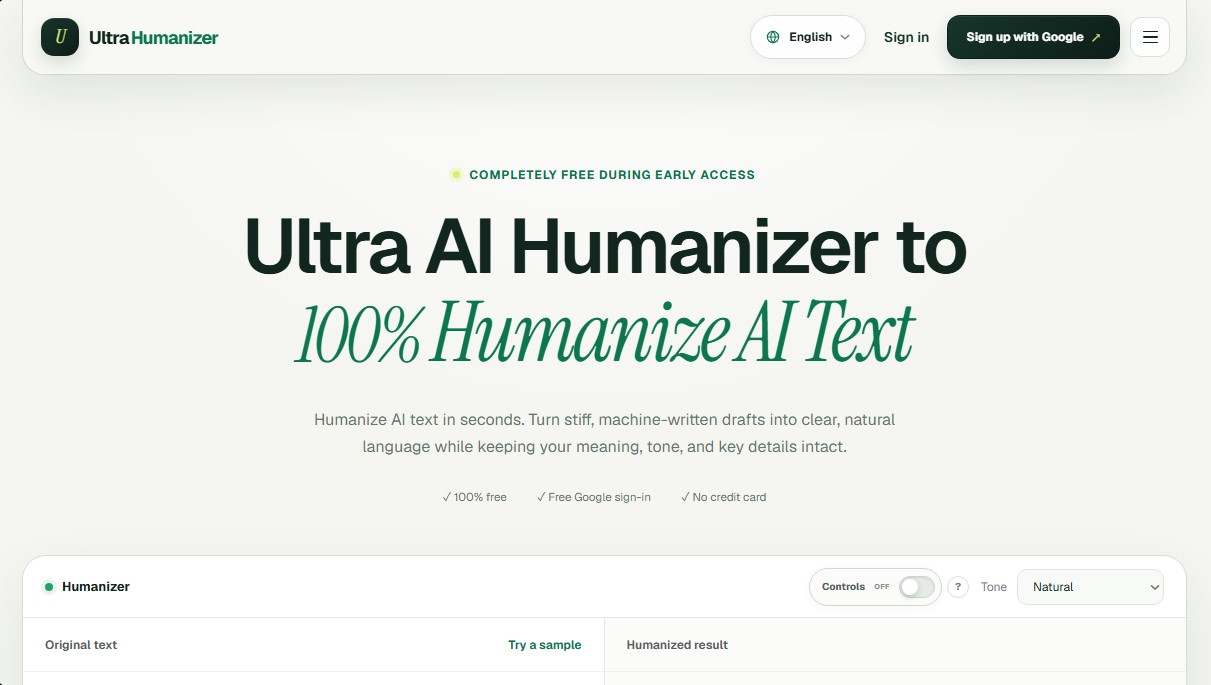
Transform AI text into natural, human-like content. Customize styles, process documents, and preserve the original meaning to bypass automatic detection.
What is UltraHumanizer?
UltraHumanizer is an AI tool specialized in transforming drafts generated by language models into content with natural structure and flow. Its primary function is to humanize AI text, eliminating the rigidity and predictable patterns of machines so the final result is indistinguishable from professional human writing. This solution is designed for writers, marketing specialists, and academics who need to improve the readability and tone of their work without losing the essence of the original message.
The operation of UltraHumanizer is based on a semantic rewriting approach that adjusts syntax and sentence variety. Unlike other basic editors, this AI text humanizer varies the writing's cadence, mixing short and long sentences to create an organic rhythm. Its technology allows key data, proper nouns, and technical context to remain intact, ensuring that the accuracy of the information is never compromised.
The platform offers advanced capabilities to adapt to different communication contexts:
- Custom Tone Control: Allows you to select between natural, conversational, or professional styles, adjusting the vocabulary to suit the target audience.
- Multi-format Document Management: Supports direct uploads of DOCX, PDF, PPTX, ODT, RTF, TXT, and Markdown files, facilitating a smooth workflow from your computer.
- Preservation of Meaning: Guarantees that facts, quotes, and the author's intent remain true to the initial draft throughout the optimization process.
- Multilingual Support: Capable of polishing writing in more than 30 languages, respecting local nuances and linguistic idioms.
- Processing Capacity: Allows you to work with texts of up to 12,000 words, making it useful for extensive reports or research papers.
Using an online AI humanizer like UltraHumanizer helps reduce the typical markers that trigger automated content detectors. By improving lexical variety and eliminating unnecessary filler, the text gains clarity and a more personal feel. It is a practical tool for converting technical notes into understandable updates or for adding a human touch to emails and marketing campaigns.
The workflow is simple and straightforward: the user enters the text into the editor, selects the desired tone, and receives a processed version that can be compared in real-time with the original. By offering a live preview, it allows for final adjustments before copying the definitive content for use on any platform or mobile device. UltraHumanizer positions itself as an editing assistant that prioritizes writing quality and user privacy during every step of the process.
UltraHumanizer features and use cases
How to use UltraHumanizer
UltraHumanizer FAQ
What is UltraHumanizer?
It’s a tool designed to transform AI-generated text into content with a more natural, human-like tone.
Is UltraHumanizer free to use?
Yes, the service is completely free during its early access phase and does not require a credit card.
What is the word limit for processing?
You can humanize drafts of up to 12,000 words per session and upload documents in various formats with a maximum file size of 20 megabytes.
Does UltraHumanizer guarantee that my text won't be detected as AI?
While it improves flow and reduces common AI patterns, no tool can guarantee an infallible result against every detector on the market.
What languages does the tool support?
The system allows you to refine writing in over 30 different languages while respecting local nuances and idioms.
What tone options can I choose for my text?
There are three main options: a natural tone for general use, conversational for social media, and professional for reports.
Is it safe to upload my documents to the platform?
The tool is designed to protect your privacy; drafts are processed solely to generate your requested output and are never published.
What file formats does UltraHumanizer support?
You can directly upload files in DOCX, PDF, PPTX, ODT, RTF, TXT, Markdown, or LaTeX formats for editing.
Do I need to create an account to get started?
Registration is not required to use the web tool, though a quick sign-in option via Google is available.
Does the tool maintain the original meaning of the text?
The system is configured to preserve facts, context, and original intent while improving the writing's pace and clarity.
UltraHumanizer pricing and plans
Free Version (Early Access)
Price: 0 € (Completely free during the early access phase).
Humanize AI-generated text to make it sound human-written.
Preserve original meaning, facts, names, and context.
Three tone settings available: Natural, Conversational, and Professional.
Multilingual support for over 30 languages.
Edit results directly in your browser.
Supports document uploads in DOCX, PDF, PPTX, ODT, RTF, TXT, MD, and TEX formats.
No registration required (Google sign-in option available).
No credit card required.
Limits: Up to 12,000 words per text and files up to 20 MB. Includes local OCR in English for the first 8 pages of scanned PDFs.
For other plans or changes after the early access phase, please visit the official website.
UltraHumanizer Screenshots
UltraHumanizer user reviews
Write a review
Checking your session...
UltraHumanizer Reviews
Loading reviews...
UltraHumanizer alternatives




Humanize Max
Transform AI text into natural, human-sounding content. Customize styles, adjust length, and rewrite sentences for free with no sign-up required.

AI Detector by Getsolved
Analyze writing patterns to detect AI text. Enhance clarity, verify facts, and check for plagiarism to ensure natural and original content.