

Share
Transform AI text into natural, human-sounding content. Customize styles, adjust length, and rewrite sentences for free with no sign-up required.
What is Humanize Max?
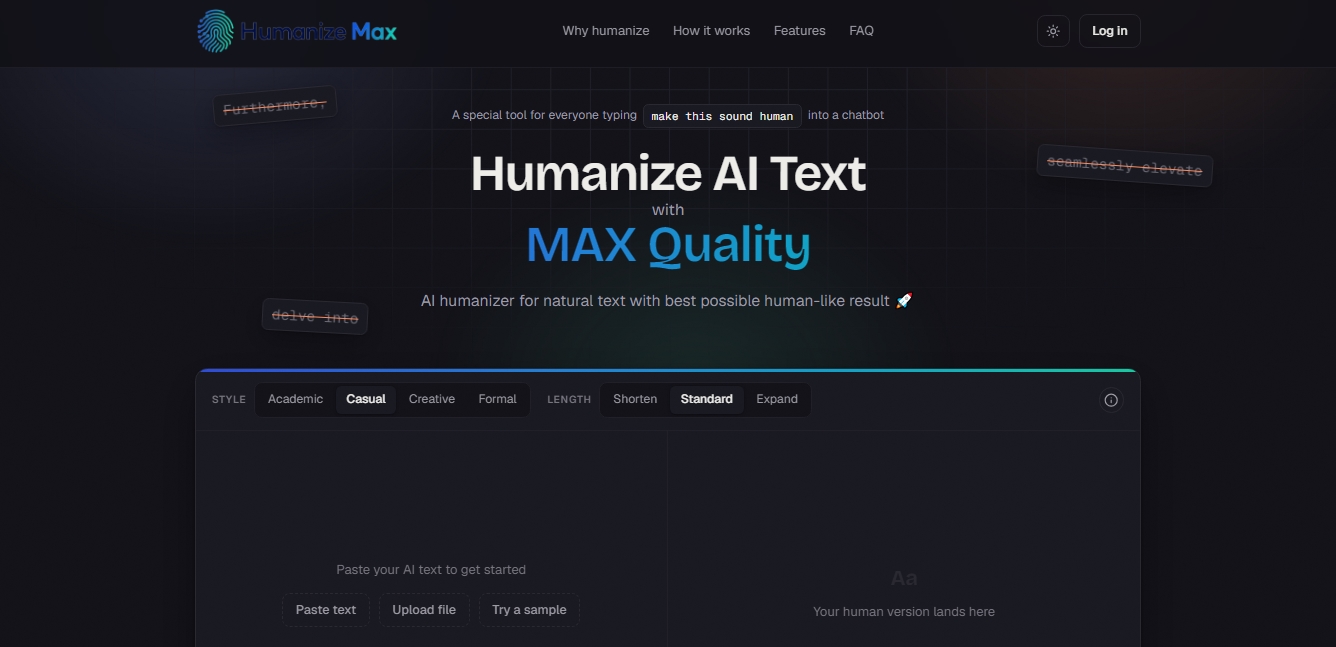
Humanize Max is a specialized tool for humanizing AI-generated text, designed to transform content from models like ChatGPT, Claude, Gemini, or DeepSeek into prose with a natural and authentic tone. Its primary function is to eliminate the repetitive patterns, uniform cadence, and predictable structures that often give away a piece of writing’s artificial origin. By adjusting rhythm and vocabulary, the application ensures the final result is indistinguishable from something written by a human. This is essential for maintaining a professional reputation and preventing readers from tuning out due to generic or overly mechanized text.
The operation of Humanize Max is based on a three-step process: the user inputs the text (either by pasting it directly or uploading a file), selects style preferences, and runs the conversion. The tool offers four specific writing styles: academic, informal, creative, and formal, allowing the tone to be adapted to any communication context—from a technical report to a social media post. Additionally, it features length control that allows you to shorten, maintain, or expand content according to project needs, ensuring the original intent remains intact while improving flow.
One of its most notable technical capabilities is the term lock feature, which allows users to mark brand names, specific keywords, or technical jargon so they remain unchanged during the humanization process. This is particularly useful for marketing and SEO specialists, as it guarantees that long-tail keywords and strategic terms maintain their exact positioning, boosting conversion without compromising search engine rankings. Furthermore, the tool allows for individual line rewriting, offering the ability to adjust specific sentences that don’t fit the desired tone without having to re-process the entire document.
Humanize Max is highly useful for various user profiles:
Writers and bloggers: To infuse personality into initial drafts and vary sentence structure, preventing content from feeling cookie-cutter.
Non-native speakers (ESL): To smooth out overly rigid constructions and correct unnatural phrasing, projecting greater fluency and linguistic competence.
Students and researchers: To transform dense drafts into clear, easy-to-follow arguments, making the final review process easier.
Corporate teams: To unify the tone of reports and emails, stripping away filler language and excessively formal structures that hinder readability.
Unlike other services, this platform allows for unlimited runs and requires no registration or subscriptions to access its full features. As a free-access tool without paywalls, it facilitates a streamlined workflow for those who need to process large volumes of text regularly on their computer or mobile device, ensuring the final content truly connects with the reader.
Humanize Max features and use cases
How to use Humanize Max
Humanize Max FAQ
What exactly is Humanize Max?
It is a specialized tool designed to transform AI-generated text so it sounds natural and authentically human.
Is Humanize Max free to use?
The platform is completely free and allows for unlimited text processing without the need for subscriptions or additional fees.
Do I need to register to humanize a text?
No account creation or personal information is required to access any of the features available on the site.
What writing styles can I choose from in Humanize Max?
You can choose from academic, informal, creative, or formal styles to ensure the output perfectly fits your target audience.
Does the tool work with content from ChatGPT or Claude?
Yes, the system is compatible with text from any current model, including ChatGPT, Claude, Gemini, and DeepSeek.
Can I protect specific terms or brand names?
The tool allows you to lock keywords or proper nouns to ensure they aren't modified during the humanization process.
Does Humanize Max maintain the original meaning of the message?
The system is designed to improve the flow and rhythm of the text without altering the original meaning or information in any way.
Is there a word limit for processing?
There are no word limits or restrictions on how many times you can re-process the same text until you are satisfied with the result.
Can I adjust the length of the final text?
You have the option to maintain the original length, shorten the content, or expand it depending on your specific needs.
What if I only want to change a specific sentence?
The tool allows you to rewrite individual lines separately so you don't have to re-process the entire document.
Humanize Max pricing and plans
Free Plan - 0 €
Humanize Max is a completely free tool with no paywalls or sign-up required.
Access to 4 writing styles: Academic, Informal, Creative, and Formal.
Text length control: Shorten, Standard, or Expand.
Feature to lock terms (names or keywords) to prevent them from being modified.
Selective rewriting for individual sentences.
Unlimited reruns to generate new versions of the text.
2,000-word limit per use.
No total word limits or usage restrictions.
Humanize Max Screenshots
Humanize Max user reviews
Write a review
Checking your session...
Humanize Max Reviews
Loading reviews...
Humanize Max alternatives



UltraHumanizer
Transform AI text into natural, human-like content. Customize styles, process documents, and preserve the original meaning to bypass automatic detection.


AI Detector by Getsolved
Analyze writing patterns to detect AI text. Enhance clarity, verify facts, and check for plagiarism to ensure natural and original content.