

Share
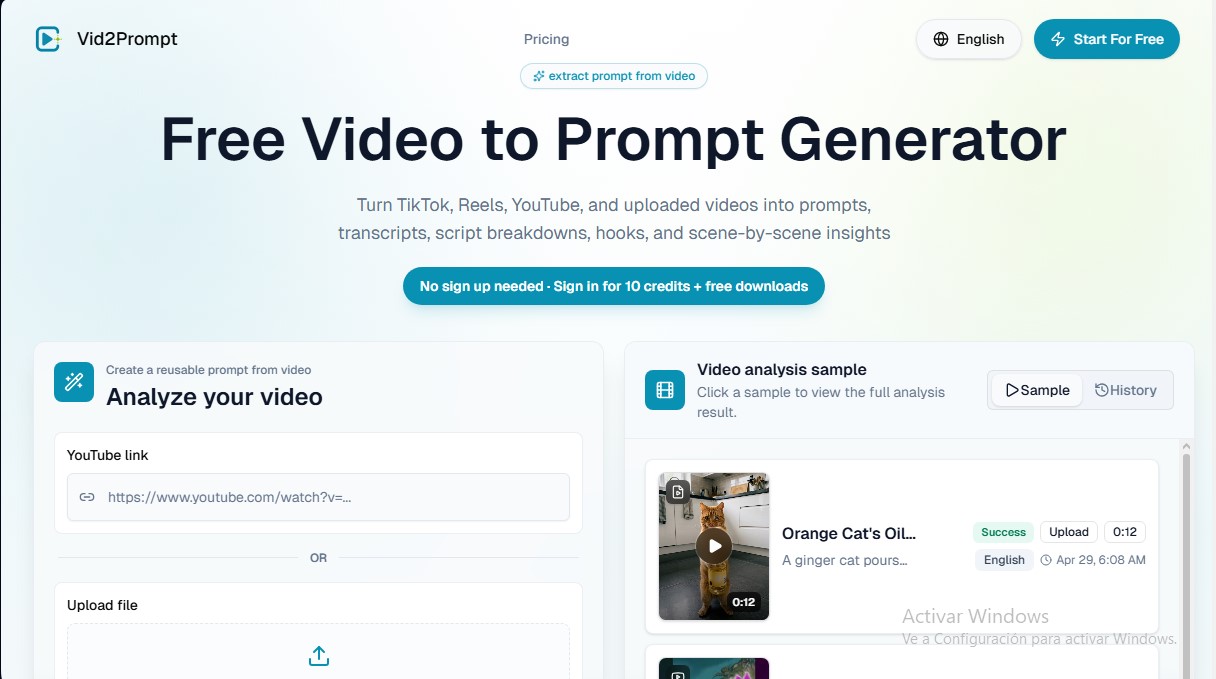
Extract prompts, transcripts, and scene analysis from any video. Identify hooks and visual details to streamline AI content creation and scriptwriting.
What is Vid2Prompt?
Vid2Prompt is an AI tool specializing in converting video content into reusable prompts, full transcriptions, and detailed script breakdowns. Its primary function is to help users extract the creative and technical logic from any audiovisual piece, allowing them to transform videos from platforms like TikTok, Instagram Reels, and YouTube, or files uploaded from a computer, into structured and actionable information.
The application operates through a deep analysis of multimedia content. By entering a URL or uploading a file in MP4, MOV, or WebM formats (with a 50MB limit), Vid2Prompt technology processes both audio and visual elements. The system automatically identifies the initial hook, the main points of the message, the call to action, and the cinematic details of each scene. This structured video understanding approach allows the user to obtain not just the text, but also the visual context and narrative rhythm.
Key functional capabilities of the tool include:
- Video-to-prompt extraction: Generates precise descriptions that can be integrated into AI video generation workflows.
- Scene-by-scene analysis: Details aspects of composition, camera movements, lighting, and cinematic language.
- Automatic transcription and tagging: Provides the full script and assigns smart tags to organize the reference library.
- Script quality assessment: Offers a score based on clarity, structure, and message impact.
- Ad and demo breakdown: Enables the study of successful ad structures (UGC) and SaaS product demonstrations.
This platform is especially useful for short-form content creators who want to analyze viral trends to replicate effective structures. Marketers and agencies use it to conduct competitor research and understand which elements convert best on social media. Additionally, AI video creators benefit by obtaining technical descriptions that serve as a foundation for new generative projects.
Vid2Prompt eliminates the need for manual note-taking, optimizing creative research time. By converting videos into reusable frameworks, the tool helps users understand why content works, allowing teams and individual creators to improve their own script logic and visual communication effectiveness. It is a practical solution for transforming visual inspiration into a technical and organized workflow.
Vid2Prompt features and use cases
How to use Vid2Prompt
Vid2Prompt FAQ
What exactly is Vid2Prompt?
It is a tool that converts videos into structured prompts, including transcripts, opening hooks, and scene breakdowns for creative repurposing.
How do I convert a video into a prompt using this tool?
Simply paste a YouTube link or upload a video file, and the system will analyze the content to generate technical and narrative details.
Can I use Vid2Prompt with YouTube videos?
Yes, the platform allows you to process direct YouTube links without needing to download the video file beforehand.
What file formats does the platform support for manual uploads?
You can upload files in MP4, MOV, or WebM format with a maximum size of 50 megabytes per video.
Can Vid2Prompt be used for free?
There is a free plan that offers initial credits to test the workflow and prompt extraction before signing up for a subscription.
What specific information does the generator extract from each video?
You will receive the full transcript, the opening hook, key points, the call to action, and a detailed visual analysis of every scene.
How many credits does each video analysis consume?
Each video analysis performed on the platform costs four credits, which are deducted from your available balance.
Can the results from Vid2Prompt be used to generate new AI videos?
Yes, the prompts and scene breakdowns are designed to serve as a technical foundation for creating content through other artificial intelligence video tools.
What type of videos work best with this tool?
The best results are achieved with short-form videos, advertisements, product demos, tutorials, and cinematic clips with a clear structure.
Do I need to register to try Vid2Prompt?
Registration is not required to try the tool, although signing in allows you to obtain additional credits and free downloads.
Vid2Prompt pricing and plans
Free: 0 $ per month
20 monthly credits.
Limit of 5 video analyses per month (each analysis consumes 4 credits).
No technical support.
Starter: 9,99 $ per month (or 3,99 $ per month billed annually)
200 monthly credits.
Limit of 50 video analyses per month.
Email support.
Standard: 19,99 $ per month (or 7,99 $ per month billed annually)
500 monthly credits.
Limit of 125 video analyses per month.
Email support.
Team & Company: 69,99 $ per month (or 27,99 $ per month billed annually)
5,000 monthly credits.
Limit of 1,250 video analyses per month.
24/7 technical email support.
Vid2Prompt Screenshots
Vid2Prompt alternatives


Amplify AI
Automatically generate and post daily TikTok and Instagram videos with AI creators. Create viral content for your brand and manage multiple accounts without filming.


Kairosy AI
Audit and improve your brand reputation in AI search engines. Monitor mentions on ChatGPT or Claude, analyze sentiment, and optimize visibility to attract more customers.