
Share
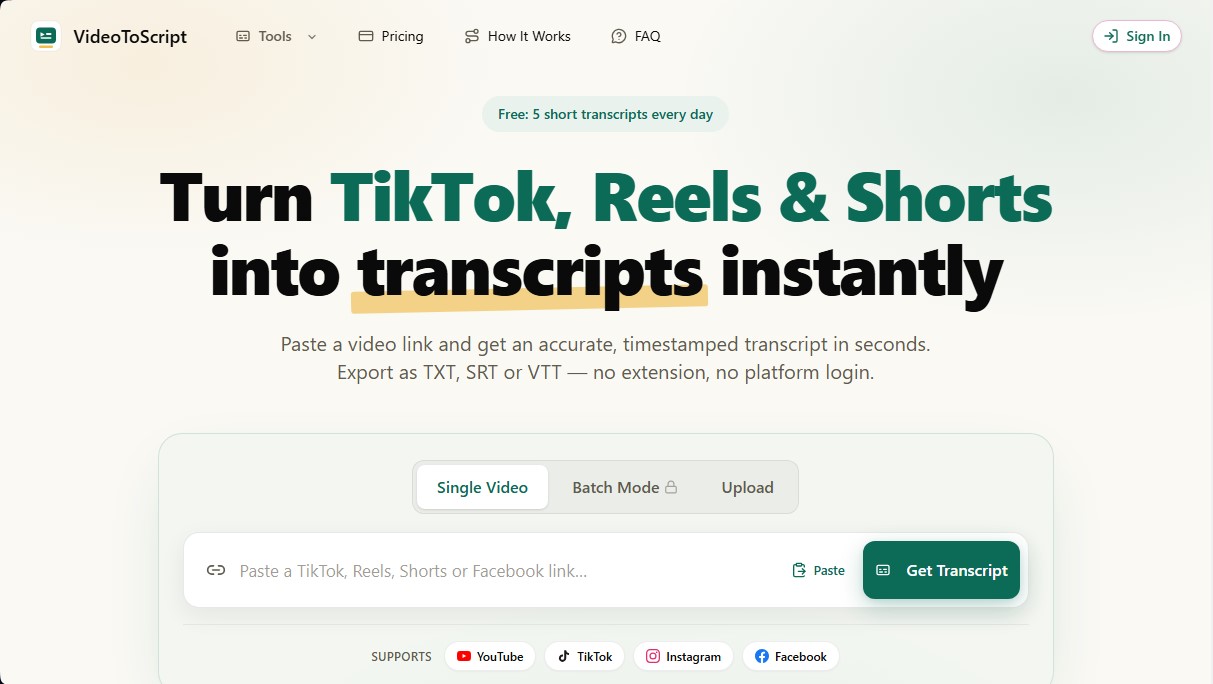
Convert TikTok, Reels, Shorts, and Facebook videos into timestamped transcripts. Export to TXT, SRT, or VTT quickly without installing extensions.
What is VideoToScript?
VideoToScript is an AI-powered tool designed for instant and accurate short-form video transcription. Its primary function is to convert content from social platforms like TikTok, Instagram Reels, YouTube Shorts, and Facebook into structured text with timestamps. This web application allows users to obtain the script of any public video simply by pasting the link, eliminating the need to install computer extensions or log into the original social media platforms.
The tool's operation is based on an advanced speech recognition engine optimized specifically for the fast-paced dialogue and characteristic voiceovers of vertical videos. The technical process is straightforward: after entering the content URL, the AI processes the audio within an interval of 3 to 10 seconds. The technology used ensures an accuracy level exceeding 95%, allowing speech to be clearly identified even in environments with background music or rapid-fire narration.
VideoToScript offers various functional capabilities for content management:
- Batch Processing: Allows for managing multiple links simultaneously to save time during research tasks.
- Multi-format Export: Results can be downloaded in TXT for simple notes, or in SRT and VTT formats, which are essential for workflows requiring subtitle creation.
- Direct Upload: In addition to working with links, it allows users to upload video files directly from their device.
- Privacy and Security: Files are processed securely without being shared with third parties, maintaining data integrity.
This solution is particularly useful for professionals who need to optimize their content workflow. Content creators use it to analyze viral video structures and transform ideas into new scripts. Digital marketing professionals can research competitors' advertising messages and repurpose proven content across different channels. Additionally, students and researchers find this AI to be a fast way to transcribe audiovisual sources, generate summaries, and cite exact statements in their projects.
As a browser-accessible tool, it works on both mobile devices and desktop computers without requiring complex configurations. The platform positions itself as an effective technical resource to improve video accessibility and facilitate content repurposing through a clean interface and a focus on execution speed. It is a robust option for those looking for an AI transcription tool specialized in short-form formats that does not depend on the native tools of each social network.
VideoToScript features and use cases
How to use VideoToScript
VideoToScript FAQ
What is VideoToScript and what is this tool used for?
It is a web application that converts social media videos into accurate, timestamped transcripts in just a few seconds.
Can I use VideoToScript for free?
Yes, you get five free transcriptions for short videos every day with no registration or credit card required.
Which platforms are supported by the text extractor?
You can generate transcripts for public videos hosted on TikTok, Instagram Reels, YouTube Shorts, and Facebook.
Do I need to install an extension to use VideoToScript?
No installation or social media accounts are necessary—the tool works simply by pasting the video link directly into the site.
What file formats can I download the results in?
The platform allows you to export text as a TXT file for simple notes, or in SRT and VTT formats for subtitling workflows.
How long does it take to generate a video transcript?
The process is extremely fast, with most content ready in as little as three to ten seconds.
How does the paid credit system work?
We offer one-time credit bundles with no monthly subscriptions. These credits remain active for twelve months from the date of purchase.
What happens if VideoToScript cannot process my video?
If the video has no speech, the audio quality is too low, or the link is private, the task will fail and no credits will be deducted from your account.
VideoToScript pricing and plans
Free Plan
5 short transcriptions per day.
Export in TXT, SRT, and VTT formats.
Access to instant transcriptions with timestamps.
Starter ($9.99 - One-time payment)
200 credits valid for 12 months.
Up to 200 transcriptions for videos under 5 minutes.
Includes Batch Mode for processing multiple links.
Export in TXT, SRT, VTT, ZIP, and CSV formats.
Popular ($19.99 - One-time payment)
1,000 credits valid for 12 months.
Up to 1,000 transcriptions for videos under 5 minutes.
Includes Batch Mode.
Export in TXT, SRT, VTT, ZIP, and CSV formats.
Best Value ($39.00 - One-time payment)
3,000 credits valid for 12 months.
Up to 3,000 transcriptions for videos under 5 minutes.
Includes Batch Mode.
Export in TXT, SRT, VTT, ZIP, and CSV formats.
Credit Restrictions: 1 credit covers a video up to 5 minutes long. Longer videos consume 1 additional credit for each additional 5-minute block. Failed transcription tasks do not consume credits. Credit packs do not auto-renew.
VideoToScript Screenshots
VideoToScript alternatives
Transistor Transcription
Automatically transcribe podcast episodes with high accuracy. Features speaker identification, timestamps, and an editor to improve accessibility and SEO.




PropellaDocs
Automate business proposals and technical documents for IT consultants with AI. Create professional drafts and solution designs in minutes from notes or emails.