

Wakeman
Share
AI receptionist for plumbing, HVAC, and electrical. Handles calls, schedules appointments, and texts job details 24/7.
What is Wakeman?
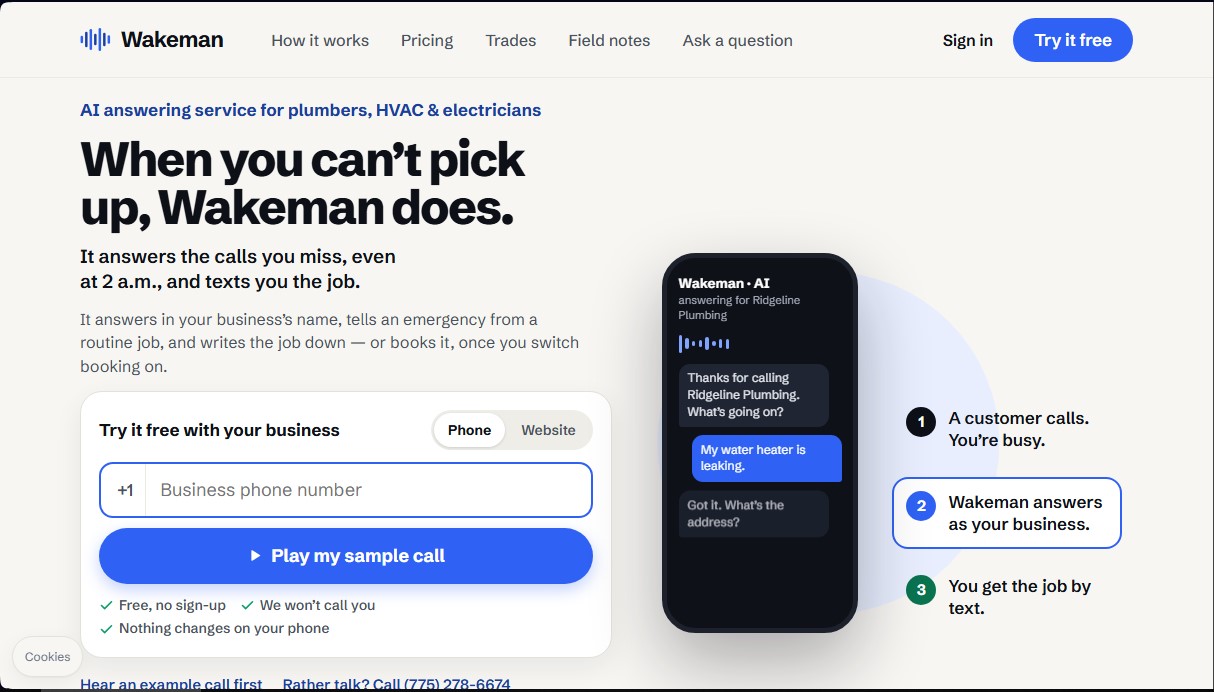
Wakeman is an AI receptionist solution designed specifically for technical service companies and repair professionals, such as plumbers, electricians, and HVAC technicians. Its primary function is to manage incoming calls that the professional can't answer, ensuring no business opportunity is lost due to a lack of response—even in the middle of the night. Unlike traditional voicemail, this tool actively interacts with customers on behalf of the business to gather critical information regarding the requested service.
Wakeman operates using advanced AI voice models that listen, process, and respond in real time. The initial setup is incredibly fast, as the system can analyze the company's public information on Google and its website to learn about the services offered and personalize its responses. Once activated via a simple call-forwarding code on a cell phone or computer, the AI handles missed calls, transparently identifying itself as a recorded virtual assistant.
The core capabilities of this AI tool include:
- Emergency Classification: The system detects critical situations such as gas leaks, exposed wires, or flooding, immediately notifying the technician on call while the customer remains on the line.
- Job Data Capture: It collects the customer's name and the reason for the call, and performs an automatic address verification to ensure the location is accurate.
- Jobber Integration: Booked jobs can be synced directly with management software, while also sending a detailed summary via text message.
- Spam and Robocall Filtering: It identifies and discards unwanted commercial calls, allowing the professional to focus solely on potential leads.
- Flexible Availability Management: It can be configured to run only after business hours or as constant support during the day, so no one has to stop their hands-on work to answer the phone.
For the user, Wakeman acts as an operational safety net that transforms missed calls into structured work orders. The dashboard allows you to view pending tasks, confirmed appointments, and calls requiring a manual callback at a glance with a single tap. If a customer insists on speaking with a person, the technology is programmed to transfer the call to the professional, ensuring that human contact is maintained for complex cases. It is an automated customer service solution aimed at improving efficiency and profitability for contractors and technical service businesses.
Wakeman features and use cases
How to use Wakeman
Wakeman FAQ
What exactly is Wakeman, and what is it used for?
It is an AI-powered answering service designed for repair professionals that handles the calls you can’t get to and texts you the job details.
Do I have to change my business number to use Wakeman?
No changes are necessary. You keep your current number and simply activate a call-forwarding code so that any unanswered calls are sent directly to the assistant.
How does Wakeman distinguish between a routine inquiry and a serious emergency?
The system identifies critical situations like gas leaks or fires and immediately contacts your on-call technician while keeping the customer on the line to ensure a rapid response.
Will customers know they are talking to an artificial intelligence?
Yes. All calls begin with a brief disclaimer informing them that they are being assisted by an AI and that the conversation will be recorded for security purposes.
Can I connect Wakeman to my Jobber account?
Yes. Once you activate the booking feature, the system allows you to sync booked jobs directly into Jobber, including customer data and verified addresses.
What happens if the AI assistant can’t help the customer?
In that case, the system takes a detailed message with the customer's name and issue, which is then displayed on your management dashboard with a button to easily return the call.
How much does the service cost after the trial period ends?
Monthly plans vary based on call volume, starting at $149 for after-hours coverage up to $829 for high-volume businesses.
Can I try the tool for free before signing up for a paid plan?
You have access to a 14-day or 500-minute free trial with no credit card required, allowing you to set up the system and see how it works for yourself.
Wakeman pricing and plans
Free Trial
Free for 14 days or 500 minutes (whichever comes first). No credit card required to get started.
After Hours Plan
$149 per month.
Service active only during nights and weekends.
Includes 300 minutes per month.
$0.59 for each additional minute.
Spam calls do not count toward your minute limit.
Emergency screening and address verification.
Job notifications via text message.
Front Desk Plan
$349 per month.
Service active for any missed call, day or night.
Includes 750 minutes per month.
$0.39 for each additional minute.
Spam calls do not count toward your minute limit.
Jobber integration available.
Ability to set a monthly spending limit.
Dispatch Plan
$829 per month.
Designed for high-volume businesses with multiple vehicles.
Includes 2,000 minutes per month.
$0.29 for each additional minute.
Spam calls do not count toward your minute limit.
First-month money-back guarantee.
Keep your existing business phone number.
Wakeman Screenshots
Wakeman alternatives



ChatVisor AI Dating Tip Generator
Get personalized dating tips, conversation strategies, and help decoding messages. Level up your social skills and succeed on your dates with this AI.

FateMaster
AI system integrating Eastern wisdom and astrology to analyze destiny, compatibility, and daily fortune, facilitating rational decision-making.

BaZi Calculator
Analyze your destiny with Four Pillars Chinese astrology. Get predictions for love, career, and fortune based on your birth date and the five elements.