Share
Generate professional AI voiceovers in 50 languages. Clone voices and create natural narrations for videos, podcasts, and audiobooks with studio quality.
What is AnySpeech?
AnySpeech is a professional AI voice generation platform designed specifically for content creators, podcasters, and businesses. This tool allows users to convert text into natural-sounding speech through a virtual voice studio, making it easy to produce high-quality voiceovers without hiring professional voice actors or investing in expensive recording equipment. Its primary focus is providing a versatile text-to-speech (TTS) solution that adapts to various formats, from short social media videos to full-length audiobooks.
The technology behind AnySpeech is based on deep learning models that analyze context, syntax, and semantics to generate audio with human-like pauses and intonations. The catalog includes over 100 realistic AI voices across more than 50 languages and regional accents, including Castilian Spanish, Mexican Spanish, British and American English, among others. The platform organizes its voices into categories such as Standard, Advanced, and Pro, utilizing advanced technologies like WaveNet and Neural2 to achieve superior expressiveness for narrative or promotional content.
Key functional capabilities include:
- Voice Cloning: The ability to create an exact digital replica of a specific voice using an audio sample of just 10 to 30 seconds.
- High-Volume Text Support: Allows for processing up to 50,000 characters per request, streamlining the creation of long-form projects like audiobooks.
- Audio Parameter Control: Granular adjustments for speed, pitch, and emphasis to tailor the voice to the message’s intent.
- Use Case Navigation: Pre-configured voices for specific roles such as news anchors, tutorials, vlogs, or luxury content.
- Developer Integration: Features a text-to-speech API to implement these functions into apps, websites, or video games.
This tool is highly beneficial for YouTubers and TikTok creators who require consistent voiceovers, as well as e-learning managers who need to quickly generate educational narrations in multiple languages. Furthermore, its included commercial license ensures that generated audio can be used in advertisements, corporate IVR systems, and any professional project without copyright conflicts. By supporting downloads in MP3 and WAV formats, the tool guarantees seamless workflow integration from any computer.
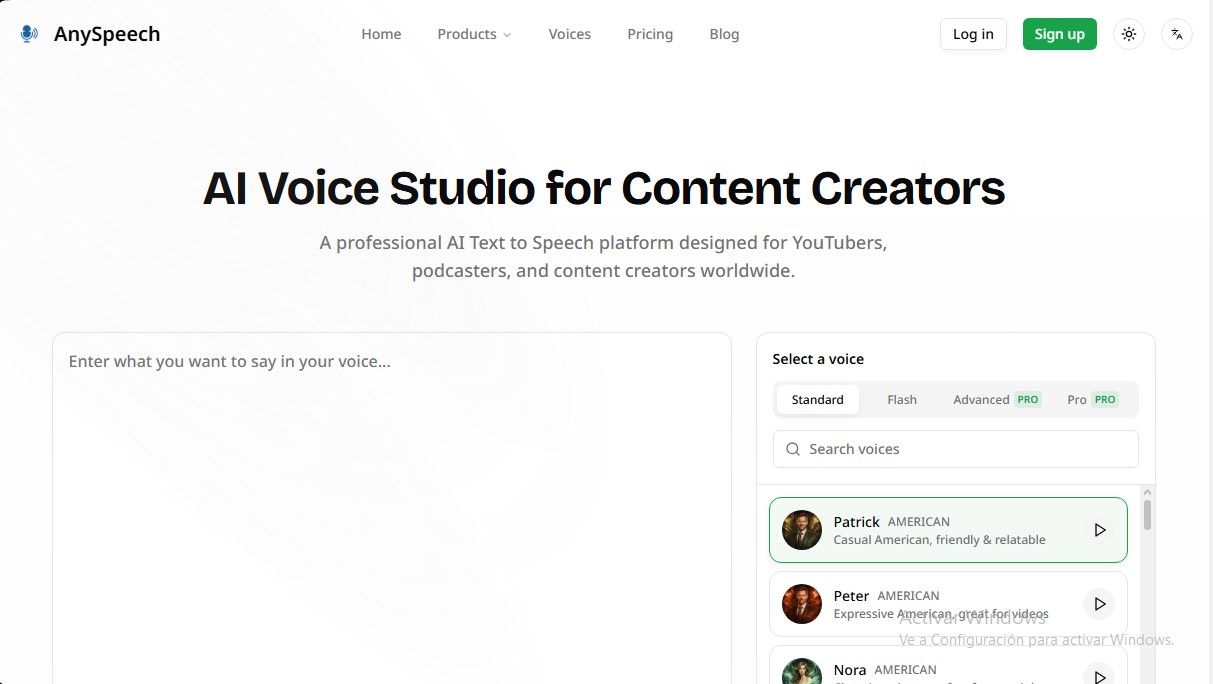
The interface is optimized for a streamlined process: simply enter the text, select the desired voice profile, and generate the file. This eliminates the technical and financial barriers of traditional audio production, delivering studio-quality results accessible to all users seeking natural synthetic voices.
AnySpeech features and use cases
How to use AnySpeech
AnySpeech FAQ
What is AnySpeech, and who is it for?
It is an AI-powered voice studio designed for content creators, podcasters, and video editors to convert text into realistic voiceovers.
Does AnySpeech offer a free option for new users?
Yes, when you sign up, you receive 5,000 free credits to test the tool, and you can process requests of up to 5,000 characters each.
How many languages and voices are available on the platform?
You have access to over 100 natural-sounding voices and support for more than 50 different languages and accents, including Spanish from both Spain and Latin America.
Can I use the audio generated with AnySpeech for commercial projects?
Yes, paid plans include a commercial license that allows you to use the voiceovers for YouTube, advertising, online courses, and other professional projects.
How does the voice cloning feature work?
Simply upload a clear audio sample between 10 and 30 seconds long to create a digital replica that you can then use to generate any text.
What is the maximum character limit I can convert at once?
Paid plan users can process up to 50,000 characters per request, which is ideal for audiobooks or long-form videos.
What file formats can I download after generating the audio?
The tool allows you to download voiceovers in MP3 format for general use or WAV format for productions requiring high-end professional quality.
Is it possible to adjust the speed or pitch of the voices?
Yes, the platform allows you to adjust various settings to customize the audio output, ensuring the voiceover perfectly fits your specific needs.
AnySpeech pricing and plans
Free
Price: 0 $
- 5,000 credits (one-time payment).
- 5,000 character limit per request.
- Preview all available voices.
- Download files in MP3 format.
- Access to Advanced and Pro voices.
Basic
Price: 9,99 $ per month (95,9 $ per year)
- 50,000 monthly credits.
- Up to 50,000 characters per request.
- Commercial use license.
- Credit usage: Advanced voices (1x) and Pro voices (2x).
Standard
Price: 19,9 $ per month (191,04 $ per year)
- 100,000 monthly credits.
- Up to 50,000 characters per request.
- Commercial use license.
- Credit usage: Advanced voices (1x) and Pro voices (2x).
Professional
Price: 49,9 $ per month (479,04 $ per year)
- 350,000 monthly credits.
- Up to 50,000 characters per request.
- Commercial use license.
- Credit usage: Advanced voices (1x) and Pro voices (2x).
Premium
Price: 99 $ per month
- 800,000 monthly credits.
- Up to 50,000 characters per request.
- Commercial use license.
- Credit usage: Advanced voices (1x) and Pro voices (2x).
Max
Price: 199 $ per month
- 2,000,000 monthly credits.
- Up to 50,000 characters per request.
- Commercial use license.
- Credit usage: Advanced voices (1x) and Pro voices (2x).
AnySpeech Screenshots
AnySpeech user reviews
Write a review
Checking your session...
AnySpeech Reviews
Loading reviews...
AnySpeech alternatives

TextInMyVoice
Clone your voice with a short sample to turn text into natural voiceovers. Generate and download MP3s in your own tone for free, no registration required.
SpeakCrate
Open-source API for local, private speech synthesis. Generate multilingual audio on your own servers with OpenAI standard compatibility.

Vidverse AI
Vidverse AI brings several AI video, image and voice models into one web and mobile app, so you can turn text or photos into clips, images and voiceovers.