
SpeakCrate
Share
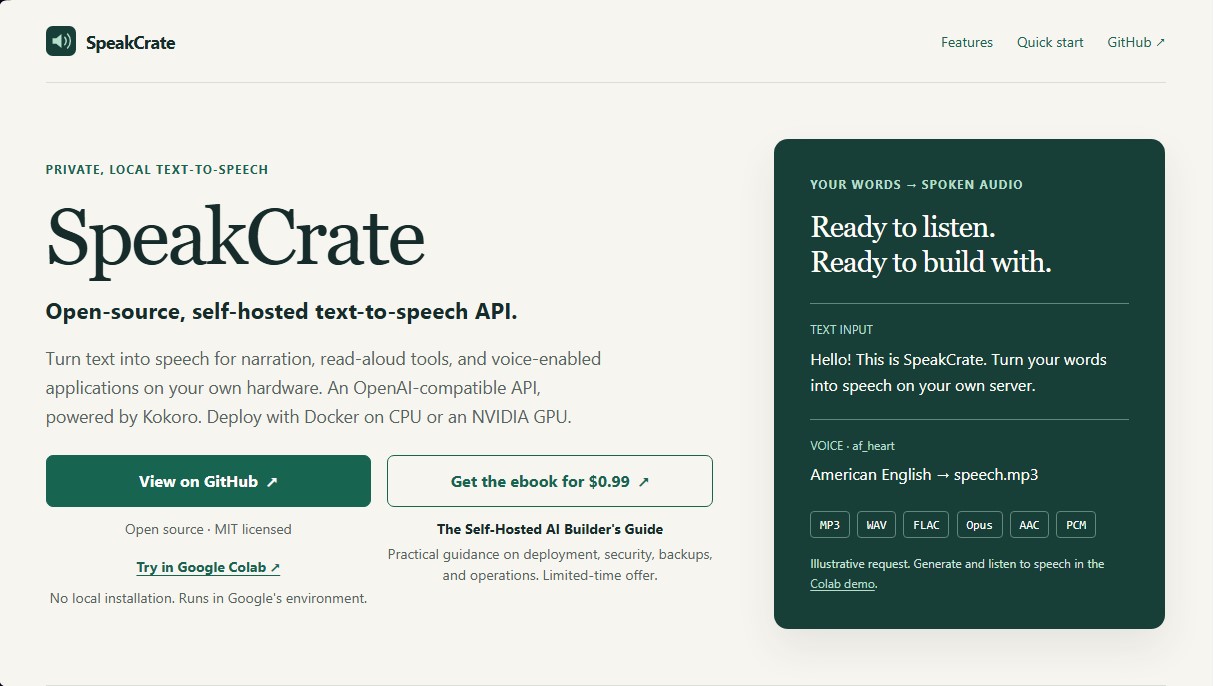
Open-source API for local, private speech synthesis. Generate multilingual audio on your own servers with OpenAI standard compatibility.
What is SpeakCrate?
SpeakCrate is an open-source solution designed for local and private text-to-speech (TTS) generation. This tool allows developers and advanced users to convert text into narrated audio without relying on third-party cloud services, maintaining full control over the processing. By functioning as an OpenAI-compatible API, it facilitates integration into applications that already use this standard, eliminating the need for external connections or sending data to third-party servers. Its primary focus is data privacy and hardware efficiency.
The technology powering SpeakCrate is the Kokoro synthesis model, known for its high quality and speed. The application is deployed via Docker containers, ensuring compatibility with both standard computers (amd64 or arm64 CPUs) and systems equipped with NVIDIA graphics cards using CUDA acceleration. This local voice processing system allows the synthesis engine to operate completely offline once the initial models have been downloaded, ensuring service autonomy.
Key technical capabilities and functional benefits include:
- Multilingual Support: It features a library of 54 voices across nine languages, including Spanish, English (American and British), French, Japanese, Mandarin Chinese, Hindi, Italian, and Brazilian Portuguese.
- Versatile Output Formats: Allows for the generation of audio files in multiple professional formats such as MP3, WAV, FLAC, Opus, AAC, and PCM.
- Real-Time Audio Streaming: The ability to stream audio as sentences are synthesized using audio bytes or Server-Sent Events (SSE) for an immediate response.
- Simplified Integration: Uses the standard /v1/audio/speech endpoint, allowing the use of existing OpenAI SDKs by mapping voice names.
- Optimized System Requirements: Can run with a minimum of 1.5 GB of RAM, making it suitable for home servers and resource-constrained environments.
SpeakCrate is an ideal tool for developers looking to implement automated narration systems, read-aloud tools, or audio outputs in custom applications. As a self-hosted solution under the MIT license, it offers a robust alternative for those wanting to avoid per-character costs on commercial platforms. Its cache persistence and advanced local configuration options make it a key component for building a secure and private artificial intelligence ecosystem.
SpeakCrate features and use cases
How to use SpeakCrate
SpeakCrate FAQ
What is SpeakCrate and what is it used for?
It is an open-source tool that allows you to convert text to speech locally and privately through an OpenAI-compatible API.
Is it free to use SpeakCrate on my own server?
Yes, the software is free under the MIT license, so you only need to cover the hardware or hosting costs you choose to use.
Do I need an NVIDIA graphics card to run the tool?
It is not mandatory, as it can run on both standard CPUs and NVIDIA graphics cards if you are looking for faster processing speeds.
What languages and voices does SpeakCrate currently offer?
It features fifty-four voices across nine languages, including Spanish, English, French, and Mandarin Chinese.
Can SpeakCrate work without an internet connection?
Yes, after an initial model download, the system allows for completely offline use by configuring the necessary file caching.
What does it mean for the tool to be OpenAI-compatible?
It means you can use applications and development tools designed for OpenAI without needing an account or a paid API key from that platform.
What audio file formats does the platform generate?
The tool allows you to export audio in various formats such as MP3, WAV, FLAC, Opus, AAC, or PCM, depending on your project's needs.
Do I need an external account to use SpeakCrate?
No, no third-party accounts or keys are required, as all voice processing is handled locally on your own machine.
SpeakCrate pricing and plans
Free Plan (Open Source) - Free
MIT License for use on self-hosted hardware or cloud servers.
Local and private text-to-speech processing without requiring an OpenAI account.
OpenAI-compatible API for seamless integration into existing applications.
Access to 54 voices across 9 languages, including Spanish, English, Japanese, and French.
Supported output formats: MP3, WAV, FLAC, Opus, AAC, and PCM.
Support for sentence-based audio streaming via bytes or Server-Sent Events.
Runs via Docker on CPU or with NVIDIA GPU acceleration.
Offline mode available after initial model and voice downloads.
Requirements: Hardware with a minimum of 1.5 GB of available RAM.
Google Colab Demo - Free
Test the tool in the Google environment with no local installation required.
Instantly generate and listen to audio samples.
Subject to Google Colab's data practices and availability.
Developer’s Guide (Ebook) - $0.99 (One-time payment)
"The Self-Hosted AI Builder's Guide" practical manual.
Includes guidance on deployment, security, backups, and operations.
Limited-time offer for users looking to dive deeper into self-hosted AI infrastructure.
SpeakCrate Screenshots
SpeakCrate alternatives
TextInMyVoice
Clone your voice with a short sample to turn text into natural voiceovers. Generate and download MP3s in your own tone for free, no registration required.

MusicGenerater.com
Generate songs with vocals and music from descriptions or lyrics. Create any genre, extend tracks, and easily separate vocals from instruments.



AI ReFounder
24/7 AI voice agent for online stores. Automatically handle calls, resolve inquiries, and close sales with seamless Shopify integration.