
Share
Create cinematic 2K videos with AI. Features total camera control, audio and lip sync, and maintains character consistency across every scene.
What is SeeGen AI?
SeeGen AI is an advanced AI video generation platform designed to transform ideas into high-quality cinematic content. Unlike basic tools, this multimodal system allows you to combine text, images, video clips, and audio files for total creative control. Its primary function is to facilitate the creation of visual content with 2K resolution, ensuring fluid movement and professional visual consistency without requiring advanced technical knowledge in editing or post-production.
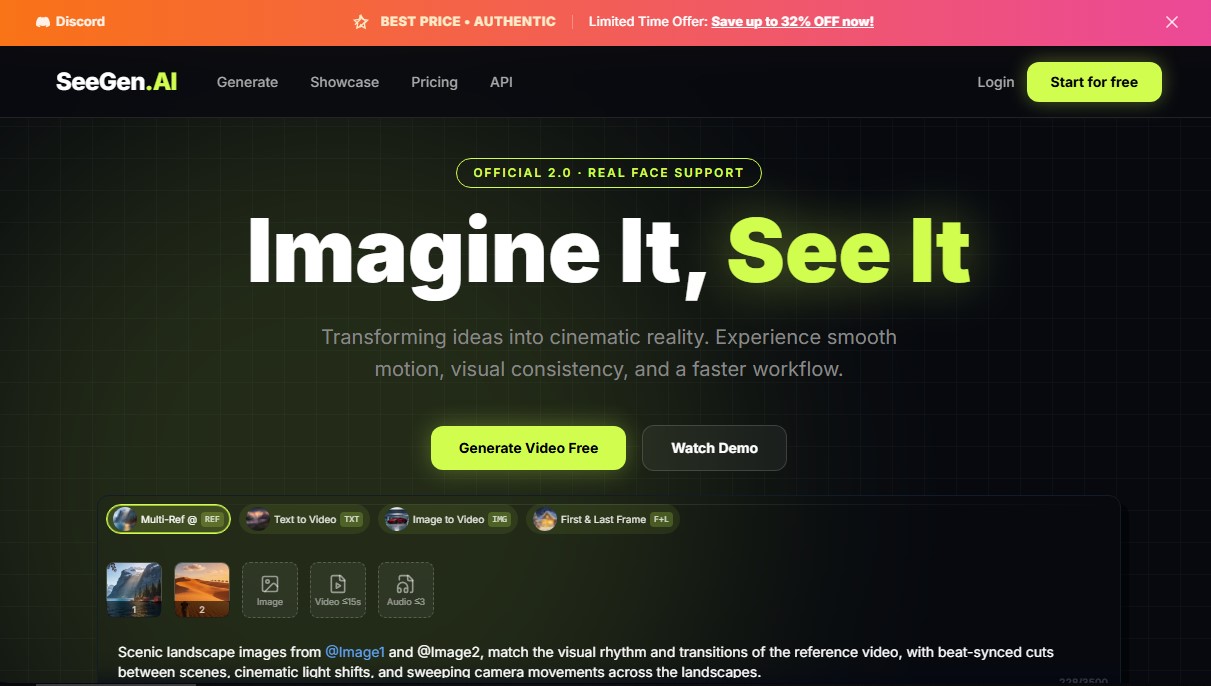
The technology behind SeeGen AI is based on a multi-reference system that uses the "@" command to link specific assets within a prompt. Users can upload up to 9 images, 3 videos, and 3 audio files simultaneously to define the scene's composition, style, and rhythm. In addition to text-to-video and image-to-video modalities, the platform supports a first and last frame feature, allowing you to define the start and end of a sequence for precise narrative control. This approach enables the AI to accurately interpret which elements should appear, achieving predictable and personalized results.
One of the greatest benefits of this tool is its character consistency algorithm, which prevents visual distortions and involuntary changes to physical traits between shots. This keeps the protagonist's identity and the scene design stable across different clips. Regarding motion, SeeGen AI offers smooth camera control, eliminating jerky transitions. Creators can replicate complex camera movements, such as cinematic tracking shots or pans, simply by uploading a reference video that the AI analyzes and applies to the new generation.
- Lip-Sync: Precise alignment of mouth movements with audio in multiple languages through a native audio-video architecture.
- Video Extension: Allows existing clips to be extended by 4 to 15 seconds while maintaining the original lighting, style, and narrative flow.
- Beat Sync: Automatically adjusts cuts and visual movement to the rhythm of uploaded music for high-impact videos.
- Realistic Emotional Expressions: Characters display natural gestures and human body language, moving beyond traditional static aesthetics.
- Integrated Editing: Includes tools to trim and adjust generated content directly within the app, optimizing turnaround time.
This solution is ideal for directors, marketers, and content creators looking to streamline their workflow. SeeGen AI is especially useful for producing product ads, short films, and social media videos where technical precision is essential. Accessible via desktop and featuring Discord integration, it enables any user to generate professional-level content quickly, efficiently, and at scale.
SeeGen AI features and use cases
How to use SeeGen AI
SeeGen AI FAQ
What is SeeGen AI and what can I create with it?
SeeGen AI is an AI-powered video generation platform that allows you to combine text, images, and audio to create cinematic clips with total control over the final output.
How long are the videos generated by SeeGen AI?
The tool allows you to generate individual clips ranging from 4 to 15 seconds in length, consistently maintaining visual stability and fluid motion.
Does SeeGen AI offer high-quality resolution for professional use?
Yes, the system generates content with cinematic resolution up to 2K, ensuring an optimal level of detail for advertising and high-end creative projects.
How does SeeGen AI ensure that characters remain consistent between scenes?
The platform utilizes an advanced character consistency algorithm that keeps physical appearance and clothing stable across different shots and frames.
Is it possible to sync audio with lip movements in SeeGen AI?
Absolutely. SeeGen AI features a native architecture that perfectly aligns facial movements with any audio or voice track uploaded to the platform.
Can I use SeeGen AI without any prior video editing experience?
No special technical skills are required, as the tool is designed so that any user can direct professional videos using simple prompts or reference files.
Is there an option to try SeeGen AI for free?
All new users receive free trial credits upon registration, allowing them to explore the tool's core features before deciding on a credit pack.
Do videos created with SeeGen AI include commercial use rights?
Content generated through any paid plan includes a commercial use license, provided the user owns the rights to the reference materials used.
Does SeeGen AI allow you to extend the length of an existing clip?
Yes, the video extension feature allows you to upload a clip and prolong the action while maintaining absolute consistency in lighting, style, and the original narrative.
How are camera movements controlled in SeeGen AI?
You can replicate complex movements by uploading a reference video, from which the AI learns the trajectory and framing to apply them directly to your new creation.
SeeGen AI pricing and plans
Free
Free.
- 200 trial credits (upon joining Discord).
- Access to all AI generation features.
- No watermark.
- Commercial use allowed.
Starter Pack
$17.99 (one-time payment, discounted from $19.99).
- 3,000 credits (approximately 19 5-second videos).
- Access to all AI generation features.
- No watermark.
- Commercial use allowed.
- Credits never expire.
XL Pack
$99.99 (one-time payment, discounted from $146.66).
- 22,000 credits (over 137 5-second videos).
- Access to all AI generation features.
- No watermark.
- Full commercial license.
- Credits never expire.
- Best value per credit (video generation starting at $0.14/second).
SeeGen AI Screenshots
SeeGen AI alternatives



Osmo Studio
AI animation studio for professional motion graphics and videos. Control every detail, collaborate with teams, and export with transparent backgrounds.

Victoria Secret Runway
Create fashion show videos by integrating your face into real scenes. Just upload a photo to replace professional models and walk the runway.


VideoWeb Video Generator
Generate professional AI videos from text or images. Features realistic avatars, automated scripts, and optimized formats for marketing and social media.