

VideoWeb Video Generator
Share
Generate professional AI videos from text or images. Features realistic avatars, automated scripts, and optimized formats for marketing and social media.
What is VideoWeb Video Generator?
VideoWeb Video Generator is an advanced artificial intelligence platform designed for the automated creation of high-quality visual content. This application allows users to instantly convert creative ideas, text descriptions, or static images into professional videos. Its primary function is to streamline the production of persuasive ads and social media content, eliminating the need for traditional recording equipment or complex editing processes. It is a solution specifically tailored for marketers, content creators, and businesses seeking agility in their visual communication from a computer or compatible devices.
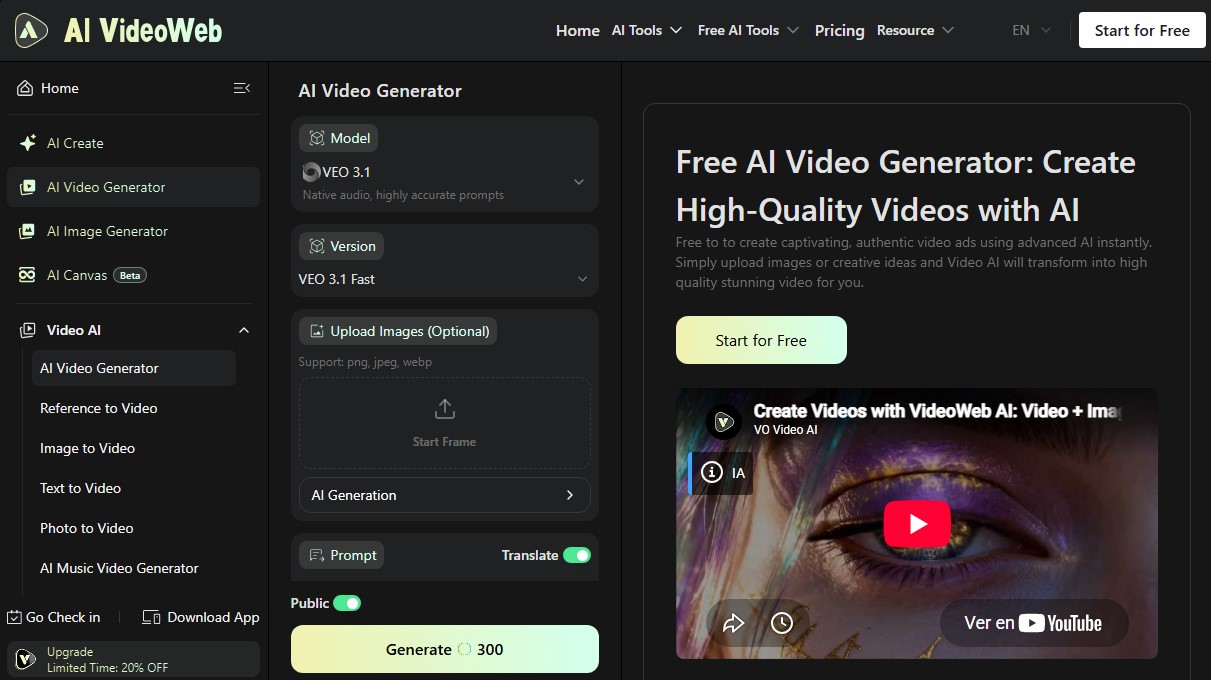
The technology powering VideoWeb Video Generator includes state-of-the-art models such as VEO 3.1 and Wan 2.2 Animate, which guarantee high precision in following instructions or prompts and the integration of native audio. The system enables versatile workflows, including text-to-video, image-to-video, and photo-to-video. The process is straightforward: the user enters a text command or uploads files in PNG, JPEG, or WEBP formats, and the AI processes the information to generate content with adjustable resolutions and optimized formats, such as 16:9 for presentations or vertical formats for mobile.
Key features and functional benefits include:
- Hyperrealistic AI Avatars: A selection of digital characters that mimic human gestures, voices, and styles to present products in a natural and relatable way.
- Intelligent Script Extraction: The ability to analyze product links or digital assets and automatically generate conversion-focused scripts.
- Instant Editing and Customization: Quickly modify voiceovers, languages, music, and pacing, facilitating rapid content iteration.
- Multi-format Optimization: Export videos configured for different channels, ensuring the aspect ratio is perfectly suited for social media or e-commerce platforms.
Utilizing this AI video generation tool offers clear operational advantages, such as the accelerated delivery of materials for seasonal campaigns or brand launches. By reducing production costs, companies can scale their presence in international markets by creating multilingual content without the need for local film shoots. Additionally, AI VideoWeb is extremely useful for A/B testing ad variations, allowing for the production of multiple versions of a message to identify which one generates the greatest impact on the audience.
The tool's versatility extends to specific use cases such as creating synthetic UGC (User Generated Content), videos for TikTok, Instagram Reels, and product animations. Thanks to its focus on efficiency, it enables any user—regardless of their technical editing skills—to achieve professional results with a cinematic finish and visual consistency across their entire brand identity.
VideoWeb Video Generator features and use cases
How to use VideoWeb Video Generator
VideoWeb Video Generator FAQ
What is VideoWeb Video Generator and what is its purpose?
It is an AI-powered solution designed to automatically transform text, ideas, or images into professional, high-quality videos.
Can I use VideoWeb Video Generator for free?
Yes, the platform offers a free plan that provides new users with initial credits and allows them to earn additional credits through daily check-ins.
What file types can I upload to create a video?
The tool allows you to upload images in PNG, JPEG, and WEBP formats to use as a foundation for your video content.
Does VideoWeb Video Generator include commercial rights for the creations?
Commercial rights are guaranteed for users who subscribe to any of the premium plans, allowing the content to be used in advertising campaigns.
Is it possible to generate videos in different languages?
Yes, the AI allows you to instantly localize your videos into multiple languages and dialects to reach an international audience.
What output formats and resolutions does the tool offer?
You can configure your videos in various aspect ratios, such as 16:9, and select high-definition resolutions like 720p for an optimal presentation.
How do the AI avatars work?
The platform features a selection of digital characters that mimic real human gestures, voices, and styles to make your ads feel more natural and persuasive.
What advantages does the Pro subscription offer over the free plan?
Paid plans provide a higher number of credits, faster processing in the generation queue, extended history, and access to advanced editing features.
VideoWeb Video Generator pricing and plans
Free Plan
$0
40 credits for new users.
20 daily check-in credits.
Basic image generation.
Use free AI tools up to 50 times per day.
Shared generation queue.
15-day history.
Standard Plan (Monthly)
$9.99 per month ($7.99 per month billed annually)
5,000 monthly credits.
Unlimited premium features.
High-quality video, image, and music generation.
Unlimited use of free AI tools.
Fast generation queue.
365-day history.
Private generations and commercial rights.
Popular Plan (Monthly)
$19.99 per month ($15.99 per month billed annually)
13,000 monthly credits.
Unlimited premium features.
High-quality video, image, and music generation.
Unlimited use of free AI tools.
Fast generation queue.
365-day history.
Private generations and commercial rights.
Professional Plan (Monthly)
$49.99 per month ($39.99 per month billed annually)
35,000 monthly credits.
Unlimited premium features.
High-quality video, image, and music generation.
Unlimited use of free AI tools.
Fast generation queue.
365-day history.
Private generations and commercial rights.
Ultra One-Time Plan (One-time payment)
$19.99
10,000 credits.
Unlimited premium features and high-quality video/image/music generation.
Unlimited use of free AI tools and fast queue.
365-day history, private generations, and commercial rights.
More One-Time Plan (One-time payment)
$49.99
26,000 credits.
Unlimited premium features and high-quality video/image/music generation.
Unlimited use of free AI tools and fast queue.
365-day history, private generations, and commercial rights.
Max One-Time Plan (One-time payment)
$99.99
56,000 credits.
Unlimited premium features and high-quality video/image/music generation.
Unlimited use of free AI tools and fast queue.
365-day history, private generations, and commercial rights.
Super One-Time Plan (One-time payment)
$199.99
112,000 credits.
Unlimited premium features and high-quality video/image/music generation.
Unlimited use of free AI tools and fast queue.
365-day history, private generations, and commercial rights.
VideoWeb Video Generator Screenshots
VideoWeb Video Generator alternatives

Motion Transfer AI Video Generator
Animate character photos using reference videos. Precisely transfer gestures, dances, and body movements from a clip to an image for realistic results.

AlreadyRan
AlreadyRan brings dozens of AI image, video and audio models into one web studio with a single credit balance and the cost shown before every generation.


Vidverse AI
Vidverse AI brings several AI video, image and voice models into one web and mobile app, so you can turn text or photos into clips, images and voiceovers.


Comik AI-Anime Character Creator
Design anime characters using text or images. Generate multi-view design sheets to ensure visual consistency across comics, manga, and animated videos.