
Motion Transfer AI Video Generator
Share
Animate character photos using reference videos. Precisely transfer gestures, dances, and body movements from a clip to an image for realistic results.
What is Motion Transfer AI Video Generator?
Motion Transfer AI Video Generator is a generative AI tool designed to transform static photos into animated videos using an external motion reference. The primary function of this application is to transfer gestures, facial expressions, and body movements from a source video to a still image while maintaining the appearance and features of the original character. It is a solution geared toward content creators, designers, and users who need to animate character photos accurately without resorting to manual video editing processes.
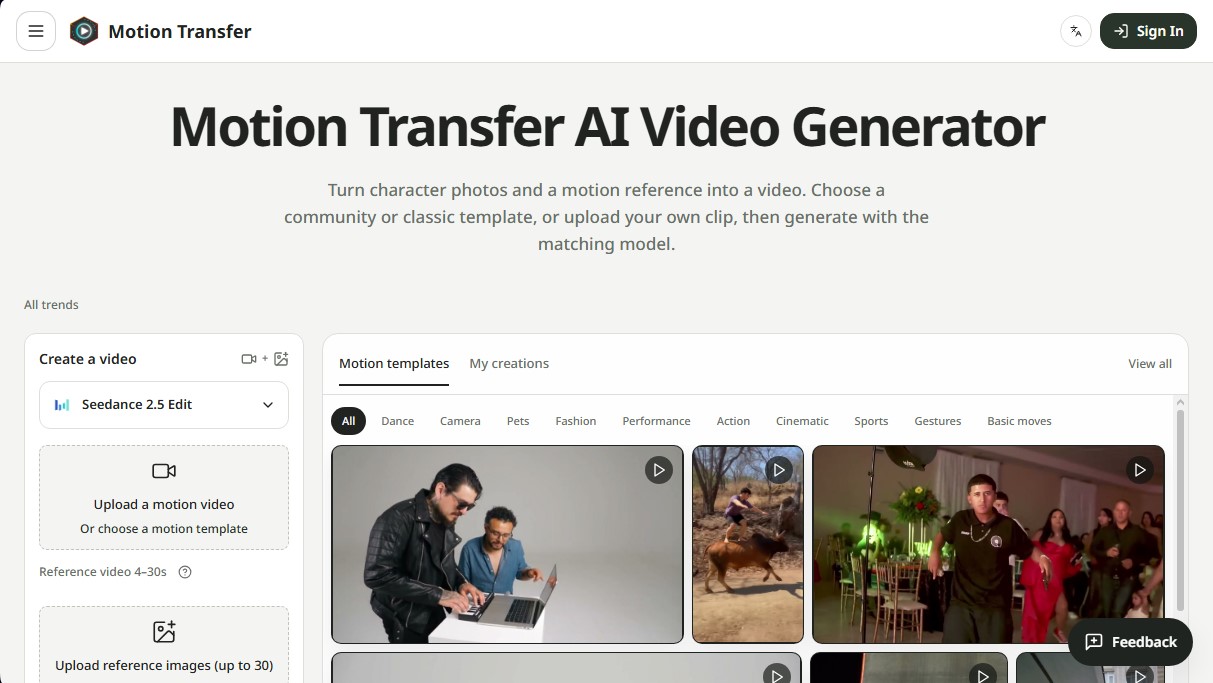
The operation of Motion Transfer AI is based on the combination of two data inputs: a reference image (in formats such as JPEG, PNG, or WebP) and a video clip that acts as a motion guide. The system employs advanced AI models, such as Kling 3.0 Motion Control, Wan 2.2, and Seedance 2.5, to interpret the choreography or gestures of the clip and replicate them onto the subject of the photo. Users can upload their own clips ranging from 2 to 30 seconds or select community motion templates that include dances, cinematic scenes, and viral trends.
To maximize output quality, the platform offers various functional capabilities and technical settings:
- Specific Model Selection: Allows switching between different AI engines based on the complexity of the desired action.
- Framing Configuration: Options like Match photo or Match video to determine whether the character's orientation should follow the structure of the original image or the dynamics of the reference video.
- Customizable Resolution: Support for generating high-definition content suitable for viewing on a computer or mobile device.
- Trends Library: Access to a database of pre-configured movements to facilitate quick content creation.
This technology is especially valuable when the required action is difficult to describe through text. By using a visual reference, Motion Transfer AI Video Generator captures subtle details like the exact timing of a wave or the fluidity of a sports movement. For optimal performance, it is recommended that the photograph has clear lighting and that the subject's limbs are visible, especially in full-body animations.
The workflow is straightforward: files are uploaded, resolution and model parameters are adjusted, and a preview is generated. Once processed, the user can review the consistency of movements in the hands and face before downloading the final file. This tool eliminates the need for complex descriptive prompts, allowing the visual motion itself to dictate the outcome of the AI animation.
Motion Transfer AI Video Generator features and use cases
How to use Motion Transfer AI Video Generator
Motion Transfer AI Video Generator FAQ
What is Motion Transfer AI Video Generator?
It is an artificial intelligence tool that animates a static photo using the movements, gestures, and expressions from a reference video.
How can I create a video with Motion Transfer AI?
You need to upload a photo of your character, choose a template or upload your own motion video, adjust the resolution, and click the generate button.
What are the requirements for the images and videos I upload?
Images must be in JPEG, PNG, or WebP format, while reference videos should be between three and thirty seconds long and show clear movements.
What do the "Match photo" and "Match video" options in Kling mean?
These settings determine whether the orientation and composition of the final result should prioritize the look of the original photo or the action of the reference video.
Can I try Motion Transfer AI Video Generator for free?
Yes, new users receive eighteen free credits upon signing up to test the tool before deciding on a paid plan.
Why might the face or background in my video vary?
The tool generates a new scene based on the references, so details may change if the lighting is poor or if the movements in the video are highly complex.
Where can I view and download the videos I have generated?
Your creations are saved in the "My Creations" tab of your workspace, where you can review them and download them directly to your device.
Is it necessary to write a text prompt for the tool to work?
It is not required, as the motion comes directly from the reference video, though you can add optional notes about the scene to better guide the AI.
Motion Transfer AI Video Generator pricing and plans
Basic
Price: 0 $
18 one-time credits upon signup.
Includes generation history.
Watermarked previews and downloads.
Limit of up to 3 images or 1 video.
Starter (Monthly)
Price: 29,9 $ per month
800 credits per month.
Generate up to 133 images or 44 videos (depending on the model).
Up to 4K quality for images and HD for videos.
Image editing, video creation, and motion transfer tools.
Watermark-free downloads.
Generation history saved to your account.
Starter (Annual)
Price: 8,3 $ per month (billed annually at 100 $)
2,400 credits per year.
Generate up to 400 images or 133 videos per year.
Up to 4K quality for images and HD for videos.
Watermark-free downloads and access to all editing tools.
Generation history in your account.
Pro (Monthly)
Price: 49,9 $ per month
1,800 credits per month.
Generate up to 300 images or 100 videos.
Up to 4K quality for images and HD for videos.
Use credits across all image and video models.
Watermark-free downloads and generation history.
Pro (Annual)
Price: 30,0 $ per month (billed annually at 360 $)
21,600 credits per year.
Generate up to 3,600 images or 1,200 videos per year.
Up to 4K quality for images and HD for videos.
Full access to editing and motion transfer tools.
Watermark-free downloads.
Business (Monthly)
Price: 99,9 $ per month
4,000 credits per month.
Generate up to 666 images or 222 videos.
Up to 4K quality for images and HD for videos.
Flexible credit usage across image and video models.
Watermark-free downloads and generation history.
Business (Annual)
Price: 49,9 $ per month (billed annually at 599 $)
48,000 credits per year.
Generate up to 8,000 images or 2,666 videos per year.
Up to 4K quality for images and HD for videos.
Premium access to all editing and transfer features.
Watermark-free downloads.
Motion Transfer AI Video Generator Screenshots
Motion Transfer AI Video Generator alternatives

VideoWeb Video Generator
Generate professional AI videos from text or images. Features realistic avatars, automated scripts, and optimized formats for marketing and social media.

AlreadyRan
AlreadyRan brings dozens of AI image, video and audio models into one web studio with a single credit balance and the cost shown before every generation.


Vidverse AI
Vidverse AI brings several AI video, image and voice models into one web and mobile app, so you can turn text or photos into clips, images and voiceovers.

Comik AI-Anime Character Creator
Design anime characters using text or images. Generate multi-view design sheets to ensure visual consistency across comics, manga, and animated videos.