

AI Image to Prompt Promptsref
Share
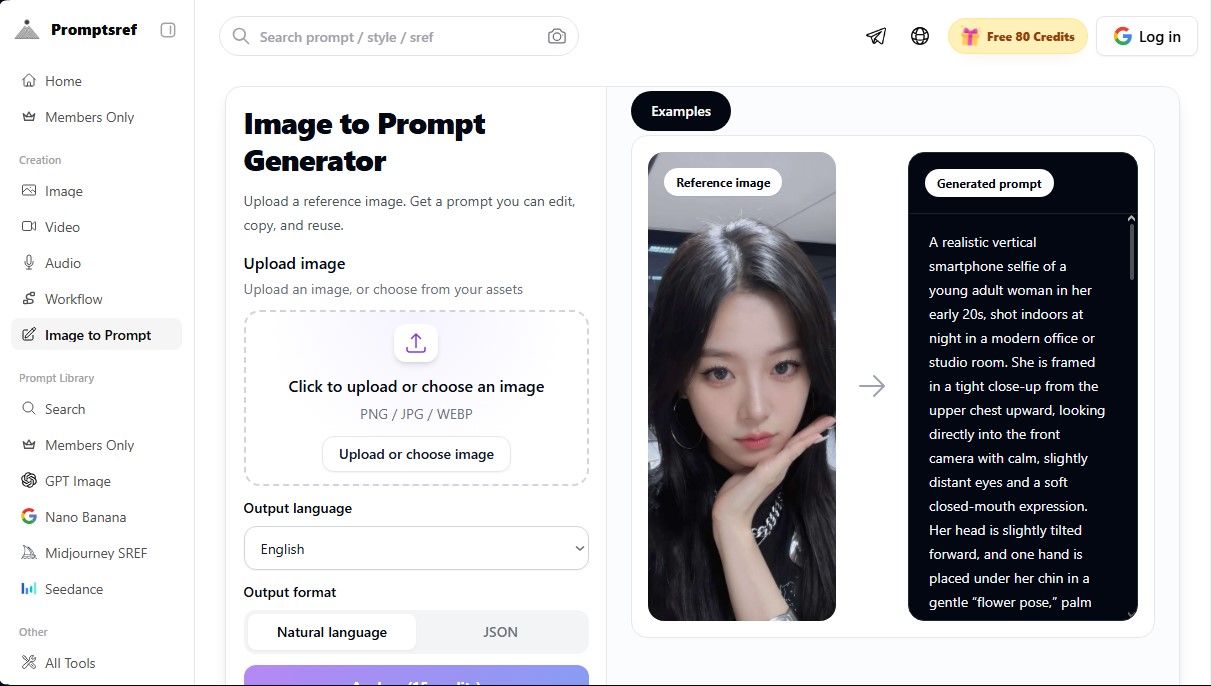
Convert images into detailed prompts to replicate style, lighting, and composition. Generate natural language and JSON descriptions compatible with Midjourney and GPT.
What is AI Image to Prompt Promptsref?
AI Image to Prompt Promptsref is a reverse engineering tool designed for creators who need to transform visual references into precise text instructions for image generation models. Its primary function is to analyze PNG, JPG, or WEBP files to extract the key elements that define an image, allowing users to copy, edit, and reuse the resulting prompt across various artificial intelligence platforms.
Unlike basic caption generators, this application uses a deep analysis approach that goes beyond the main subject. The AI Image to Prompt Promptsref technology breaks down the image into several technical dimensions:
- Subject and Scene: Identifies objects, actions, and spatial relationships between visible elements.
- Style and Medium: Determines if it is cinematic photography, 3D illustration, anime, editorial style, or a product shot.
- Lighting and Color: Captures light direction, contrast, color palette, shadows, and the prevailing atmosphere.
- Composition and Camera: Translates framing, angles, lens types, perspective, and depth of field into technical prompt language.
- Details and Textures: Analyzes materials, clothing, environment, and emotions to provide a nuanced description.
The tool offers two distinct output formats to adapt to different workflows. First, it generates a highly structured JSON format prompt, ideal for those seeking total control, as it breaks down aspects like pose, background, "vibe," and constraints or negative prompts. Alternatively, it provides a shorter, more direct natural language prompt, optimized for quick insertion from a desktop or mobile device.
AI Image to Prompt Promptsref is especially useful for Midjourney, GPT Image 2.0, and Nano Banana users, as it allows them to match complex visual styles or explore SREF codes with greater precision. Design professionals and prompt engineering experts can benefit from this utility to deconstruct the aesthetics of a poster, product photo, or illustration, facilitating the creation of consistent variations without losing the original visual direction. Additionally, it features multilingual support, allowing the analysis to be delivered in the user's working language while maintaining the technical consistency required for AI models to generate high-quality results. It is a functional solution for anyone looking to learn how detailed descriptions influence the final outcome of an AI-generated image.
AI Image to Prompt Promptsref features and use cases
How to use AI Image to Prompt Promptsref
AI Image to Prompt Promptsref FAQ
What is AI Image to Prompt Promptsref and what is it used for?
It is a tool that analyzes a reference image to generate a detailed descriptive prompt, which you can then use to create similar images in other AI models.
How many credits does each image analysis consume?
Each analysis process requires a total of fifteen credits from your user account.
What visual elements does the AI Image to Prompt Promptsref tool analyze?
The system identifies the main subject, artistic style, lighting, camera composition, and environmental details to construct the prompt.
In what formats does the platform deliver the results?
You will receive an easy-to-copy natural language prompt, as well as a more structured JSON format containing detailed technical parameters.
Can I get the prompts in Spanish with AI Image to Prompt Promptsref?
Yes, the tool allows you to select the output language before processing the image, ensuring the results meet your specific needs.
What types of image files are supported for upload?
You can upload your own reference images in standard formats such as PNG, JPG, or WEBP for the system to process.
Can the generated prompts be used in Midjourney or GPT?
Prompts generated by Promptsref serve as an excellent foundation for creating new images in Midjourney, GPT Image, Nano Banana, and other popular models.
Is it possible to edit the text after the analysis?
Yes, once the tool generates the prompt, you are free to edit, copy, or reuse it however you like before using it in your preferred image generator.
AI Image to Prompt Promptsref pricing and plans
Free Plan
Price: 0 $ (80 credits included).
Each image analysis to generate a prompt consumes 15 credits.
Image-to-prompt conversion in natural language and structured JSON format.
Support for multiple output languages.
Monthly Plan
Price: 9.9 $ per month.
Access to over 6,000 prompts on the website.
Exclusive SREF code combinations with prompts and examples.
Daily updates with new SREF codes.
Exclusive member badge.
Cancel anytime.
Annual Subscription
Price: 3.5 $ per month (billed annually at 50% off).
Access to all SREF codes and exclusive member combinations.
Access to the full library of over 6,000 prompts.
Daily updates with new content and codes.
Exclusive member badge.
Lifetime Access
Price: 89 $ (one-time payment).
Permanent access to all SREF codes and exclusive combinations.
Unlimited access to over 6,000 prompts on the website.
Daily content updates included for life.
Exclusive member badge.
No recurring subscription fees.
AI Image to Prompt Promptsref Screenshots
AI Image to Prompt Promptsref user reviews
Write a review
Checking your session...
AI Image to Prompt Promptsref Reviews
Loading reviews...
AI Image to Prompt Promptsref alternatives

Convly AI Image-to-Prompt
Reverse engineer images into prompts to replicate styles. Includes free Midjourney and Stable Diffusion settings. No registration required.
Reverse Prompt
Transform images and videos into structured AI prompts. Decode styles, shots, and negative parameters for Midjourney, Stable Diffusion, ChatGPT, ComfyUI, and more.
ImaginPrompt
Convert images into detailed prompts for Midjourney or DALL-E. Extract styles, lighting, and technical specs to replicate visual aesthetics with total precision.
Face Analysis Lab
Face Analysis Lab scans your face with AI in the browser and measures face shape, symmetry, ratios and profile, with an optional paid full report.
Rock Identify
Identify rocks, crystals, and minerals using photos. Analyze features like texture and grain to suggest types, explain properties, and answer geological questions.

ImageToSTL.org
Convert JPG and PNG images into STL files for 3D printing using AI. Generate detailed 3D models ready for instant download.