

Share
Reverse engineer images into prompts to replicate styles. Includes free Midjourney and Stable Diffusion settings. No registration required.
What is Convly AI Image-to-Prompt?
Convly AI Image-to-Prompt is a free prompt reverse-engineering tool designed to break down and analyze any image, whether AI-generated or a real photograph. Its primary function is to transform a visual file into a detailed text-to-image prompt, allowing users to understand the technical and aesthetic structure behind a digital creation. This resource is essential for creators, designers, and generative AI specialists looking to replicate specific styles, compositions, or lighting in their own projects.
The application operates based on an advanced vision-language model. Unlike simple metadata readers, which only work if the file retains its original information (a rarity after being uploaded to social media platforms like Instagram or Discord), Convly AI Image-to-Prompt analyzes the image pixels directly. Through this computer vision approach, the tool reconstructs an accurate prompt estimation, identifying key elements, artistic styles, and technical settings that would otherwise be inaccessible.
Among its core capabilities, the tool provides:
- A detailed prompt ready to copy and use in any image generator.
- An optimized negative prompt to filter out unwanted elements.
- A visual style breakdown, analyzing the work's technique and atmosphere.
- Specific parameters for Midjourney, including aspect ratio (--ar) estimates and stylization levels (--stylize).
- Configuration suggestions for Stable Diffusion, such as sampler type, step count, and CFG scale.
Convly AI Image-to-Prompt is compatible with a wide range of models, including DALL-E, Flux, and Ideogram. As a browser-based tool, users can complete the entire process from their computer or mobile device without installing heavy software or requiring a powerful graphics card, unlike local solutions such as CLIP Interrogator.
The platform stands out for its accessibility, as it is completely free, requires no registration, and supports common formats like PNG, JPG, and WEBP up to 6 MB. Furthermore, the system can process images in seven different languages, facilitating global use. It is a practical solution for those who need to perform prompt engineering quickly and efficiently, delivering results that closely mirror the original settings of the analyzed image.
Convly AI Image-to-Prompt features and use cases
How to use Convly AI Image-to-Prompt
Convly AI Image-to-Prompt FAQ
What is Convly AI Image-to-Prompt and what does it do?
It is a free tool that analyzes any image to reverse-engineer it, generating a detailed prompt, a style breakdown, and recommended settings for recreation.
Is Convly AI Image-to-Prompt free to use?
Yes, it is completely free. It requires no registration and has no daily limits for standard use, allowing you to process images in seconds.
Can I retrieve the exact original prompt from an AI image?
It isn’t possible to retrieve the exact prompt or seed because that data isn't stored within the pixels, but the tool provides a high-quality estimation that is very close to the original.
Does the tool work with real photos that weren't created by AI?
Yes. Convly AI Image-to-Prompt analyzes visual content, so it can describe real photos or drawings to help recreate their lighting and composition in AI models.
Which image generation models is this tool compatible with?
It is compatible with Midjourney, Stable Diffusion, DALL-E, and Flux, providing model-specific parameters such as aspect ratio or CFG scale.
Do I need to register to use the generator?
No, you can use the tool immediately without creating an account or providing personal data—simply upload or paste your image into the site.
Why is it sometimes possible to read prompt data directly from a file?
This only occurs if the file retains its original metadata from tools like Stable Diffusion; however, most social media platforms automatically strip this information when an image is shared.
What file types can I upload to Convly AI Image-to-Prompt?
The platform supports PNG, JPG, and WEBP files with a maximum size of 6 MB per image.
Convly AI Image-to-Prompt pricing and plans
Free Plan: 0 €
Reverse engineer images to generate detailed text prompts.
Style breakdowns and specific parameter suggestions for Midjourney (such as --ar and --stylize) and Stable Diffusion (sampler, steps, and CFG scale).
Compatible with images generated by Midjourney, Stable Diffusion, DALL·E, and Flux, as well as real photographs or drawings.
No registration or account creation required.
No watermarks on results.
Available in 7 languages.
No daily limits for normal usage.
Supports PNG, JPG, and WEBP files up to 6 MB.
For other services or advanced platform tools, please visit the official website.
Convly AI Image-to-Prompt Screenshots
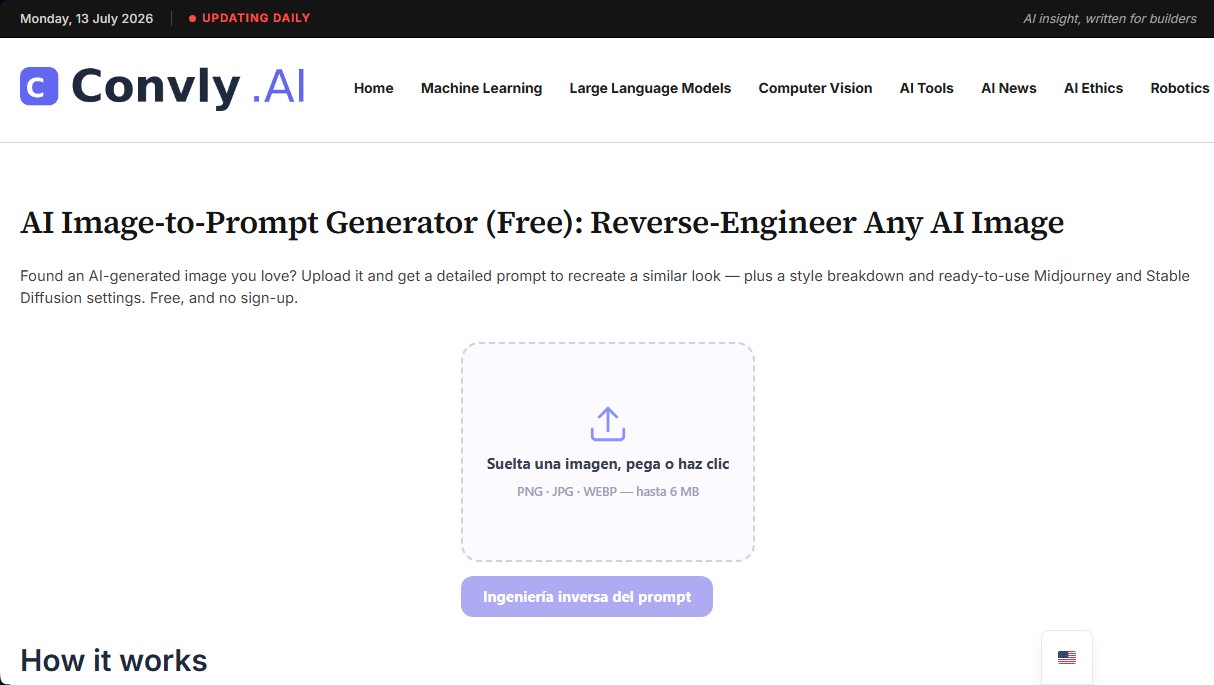
Convly AI Image-to-Prompt user reviews
Write a review
Checking your session...
Convly AI Image-to-Prompt Reviews
Loading reviews...
Convly AI Image-to-Prompt alternatives

AI Image to Prompt Promptsref
Convert images into detailed prompts to replicate style, lighting, and composition. Generate natural language and JSON descriptions compatible with Midjourney and GPT.
Reverse Prompt
Transform images and videos into structured AI prompts. Decode styles, shots, and negative parameters for Midjourney, Stable Diffusion, ChatGPT, ComfyUI, and more.
ImaginPrompt
Convert images into detailed prompts for Midjourney or DALL-E. Extract styles, lighting, and technical specs to replicate visual aesthetics with total precision.
Face Analysis Lab
Face Analysis Lab scans your face with AI in the browser and measures face shape, symmetry, ratios and profile, with an optional paid full report.
Rock Identify
Identify rocks, crystals, and minerals using photos. Analyze features like texture and grain to suggest types, explain properties, and answer geological questions.

ImageToSTL.org
Convert JPG and PNG images into STL files for 3D printing using AI. Generate detailed 3D models ready for instant download.