

Share
Generate professional invoices and estimates with AI. Includes PDF templates, works offline, and offers cloud backups with no registration required.
What is AI Invoice Maker?
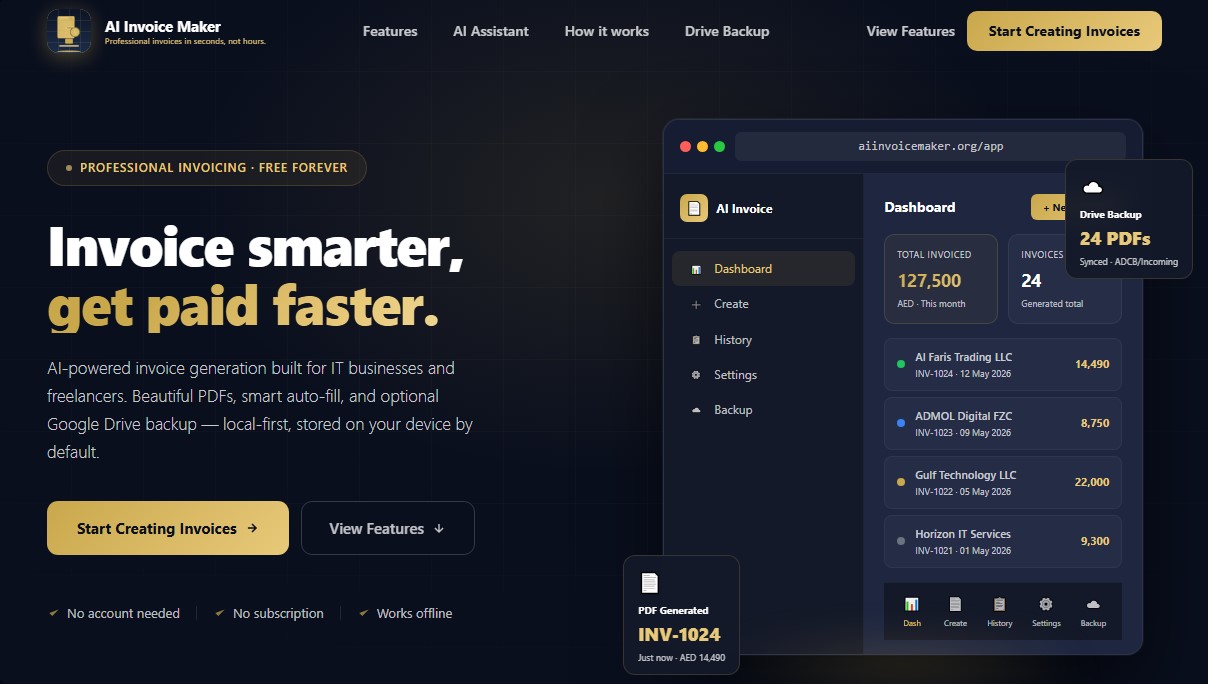
AI Invoice Maker is a specialized digital tool for creating professional invoices using artificial intelligence. Primarily geared toward IT companies, consultants, and freelancers, this application allows users to generate financial documents in PDF format in a matter of seconds directly from their browser, without the need for software installations or mandatory user registration.
The platform's operation is powered by an AI assistant that utilizes natural language processing. Users can enter a simple command specifying the client's name, the service provided, and the amount; the system then interprets this data to automatically build a structured invoice draft. Additionally, it features smart autocomplete that generates detailed technical descriptions for over 50 types of technology services—such as cybersecurity, cloud infrastructure, and software development—eliminating the need for repetitive generic text.
The architecture of AI Invoice Maker stands out for its local-first approach, ensuring that sensitive information, client data, and bank details are stored exclusively on the user's computer or mobile device. To streamline document management, it offers optional Google Drive integration, enabling automated backups organized into folders based on the bank and invoice type (sent or received).
Key capabilities include:
- Diverse Document Generation: Create tax invoices, quotes, proforma invoices, estimates, and professional receipts.
- Visual Customization: Access 15 professional templates with real-time previews, including options to add logos, company stamps, and digital signatures drawn directly within the app.
- Multi-Bank Management: Easily configure multiple bank accounts, automatically inserting the corresponding IBAN and SWIFT code into every document.
- Offline Functionality: The tool remains fully operational without an internet connection, processing PDF generation locally on the device.
This application is a practical solution for agencies and contractors who require an agile, private administrative workflow. By not requiring subscriptions, AI Invoice Maker positions itself as an efficient choice for those looking to professionalize their billing through AI tools without compromising financial data security. Its interface is compatible with both desktop and mobile devices, ensuring accessibility in any work environment.
AI Invoice Maker features and use cases
How to use AI Invoice Maker
AI Invoice Maker FAQ
What is AI Invoice Maker and who is it for?
It is an invoicing tool specifically designed for freelancers and tech companies that allows you to create professional documents in seconds.
Do I need to create an account to use AI Invoice Maker?
No registration or account creation is required, as the app runs locally on your device by default.
How does the AI assistant for creating invoices work?
Simply type a brief description including the client's name and the services provided, and the AI will automatically generate a draft that is ready for review.
Is there a cost to use AI Invoice Maker?
The tool is completely free and requires no subscriptions or additional fees to access its professional invoicing features.
Where are my data and invoices stored?
For privacy reasons, all your data is stored locally on your own device. It is only processed on secure servers when you use the AI features or send an invoice via email.
Can AI Invoice Maker be used without an internet connection?
Yes, the app is designed to work offline, allowing you to generate and manage your PDF invoices from anywhere without relying on a network.
How does the Google Drive backup work?
You can connect your Google account to automatically organize your invoices into folders structured by bank and transaction type, making document management easy.
Can I customize the PDF invoice designs?
AI Invoice Maker offers fifteen different professional templates and allows you to include logos, company stamps, and signatures drawn directly within the interface.
Is it possible to issue invoices with taxes or VAT?
The tool includes specific fields for tax identification numbers and allows you to add tax line items to comply with legal invoicing requirements.
Can I manage multiple bank accounts with this tool?
Yes, you can configure multiple bank accounts and automatically select which one should appear on each invoice based on your needs.
AI Invoice Maker pricing and plans
Free Forever Plan: Free
AI-powered invoice generation using natural language prompts.
Export professional PDFs with 15 customizable templates.
Local and offline functionality—no registration or subscription required.
Optional backups and automatic organization via Google Drive.
Smart autocomplete for IT services and management for multiple bank accounts.
Store client and vendor profiles for automatic form-filling.
Additional tools to create quotes, estimates, receipts, and pro-forma or VAT invoices.
Support for handwritten digital signatures and company seal uploads.
AI Invoice Maker Screenshots
AI Invoice Maker user reviews
Write a review
Checking your session...
AI Invoice Maker Reviews
Loading reviews...
AI Invoice Maker alternatives


PropHours-Material Participation
Track rental tasks and material participation hours with AI. Attach evidence and generate reports to maximize tax deductions.

FactorialHR
AI platform centralizing HR, finance, and IT. Automate payroll, time tracking, and expenses to streamline management and boost your company's productivity.


Bank Statement Converter
Convert PDF bank statements and images to Excel or CSV. Securely edit transactions and validate balances against the original without sharing login credentials.