
Share
AI tool to animate and swap video characters. Transfer expressions and motion from real footage to any image with realistic lip-syncing.
What is Animove AI?
Animove AI is an advanced video generation platform designed for AI character animation and subject swapping in existing footage. This tool utilizes the state-of-the-art Wan 2.2 Animate model, based on a Mixture-of-Experts (MoE) architecture, to bring static images to life by accurately replicating the movements and expressions of a reference video. Its primary function is to allow any user to create realistic animations from their computer without needing deep technical knowledge in post-production or traditional motion capture.
The operation of Animove AI is based on transferring motion data and facial expressions from a real performer to a digital character. By using spatially aligned skeleton signals for the body and implicit facial features for expression recreation, the tool ensures high-precision AI motion control. This approach allows the resulting character to maintain solid visual consistency throughout the entire sequence.
Key capabilities of the tool include:
AI Character Swap: Allows for replacing characters in videos while maintaining the original environment's lighting and color tones, thanks to Relighting LoRA technology.
Perfect Lip-Sync: Accurately adjusts mouth and teeth movements to the reference video's audio to achieve natural performances.
Photo-to-Animation: Transforms images in JPG, PNG, or WEBP format into dynamic characters that follow a specific choreography or dialogue.
Advanced Motion Control: Facilitates the transfer of complex body movements and subtle facial gestures with high fidelity.
This solution is especially useful for content creators, animation studios, and marketing agencies looking to optimize their workflows. Game developers can use it to prototype character behaviors, while educators can animate historical figures for instructional materials. Animove AI can process videos up to 30 seconds long and offers resolution options in 480p and 720p, ensuring optimized results for professional projects or social media.
The creation process is straightforward and functional: the user uploads a character image and a performer video, the system processes the information through its AI engine, and generates a high-fidelity video file. By combining the precision of motion capture with the flexibility of synthetic generation, Animove AI positions itself as a key tool for AI content creation that requires a high level of realism and expressiveness.
Animove AI features and use cases
How to use Animove AI
Animove AI FAQ
What is Animove AI, and what exactly is it used for?
It is a video platform that allows you to animate characters or perform face swaps in clips using the advanced Wan 2.2 Animate model.
How does the animation process work on Animove AI?
Simply upload a character image and a reference video, and the system will automatically replicate the movements and gestures.
Can I use Animove AI for free?
New users receive free trial credits, and there are subscription plans available to obtain more credits and additional features.
What output resolution do the generated videos offer?
You can generate content in 480p at a cost of one credit per second or in 720p at a cost of two credits per second.
How long does it take to generate a video with Animove AI?
Creation is typically completed within one to three minutes, depending on the video length and current server demand.
What image file types does the tool accept?
The platform supports JPG, PNG, and WEBP files with a size limit of up to 10 megabytes per uploaded image.
Is commercial use allowed for the created videos?
Yes, users with active subscription plans can use their generated videos for commercial and professional purposes without any additional restrictions.
Who legally owns the animations created with Animove AI?
You retain ownership of the generated videos, though you are responsible for holding the necessary rights to any original material you upload.
What is the maximum length for reference videos?
The system can process reference videos up to 30 seconds long to capture movement and facial expression data.
What are the advantages of the Wan 2.2 Animate model in Animove AI?
This next-generation model provides high precision in body movement transfer and perfect lip-syncing for animations.
Animove AI pricing and plans
Free Plan: 0 $
Includes free credits for new users to test the technology and animation features.
Lite Plan: 19,90 $ per month
100 credits per month.
Limit of up to 20 videos or 100 images.
Access to all AI models.
Priority processing speed.
Commercial use allowed.
Priority customer support.
Pro Plan: 39,90 $ per month
400 credits per month.
Limit of up to 80 videos or 400 images.
Access to all AI models.
Priority processing speed.
Commercial use allowed.
Priority customer support.
Max Plan: 99,90 $ per month
1,250 credits per month.
Limit of up to 250 videos or 1,250 images.
Access to all AI models.
Priority processing speed.
Commercial use allowed.
Priority customer support.
Credit Usage Restrictions:
480p Generation: 1 credit per second (5-credit minimum per clip).
720p Generation: 2 credits per second (10-credit minimum per clip).
Reference videos can be up to 30 seconds long.
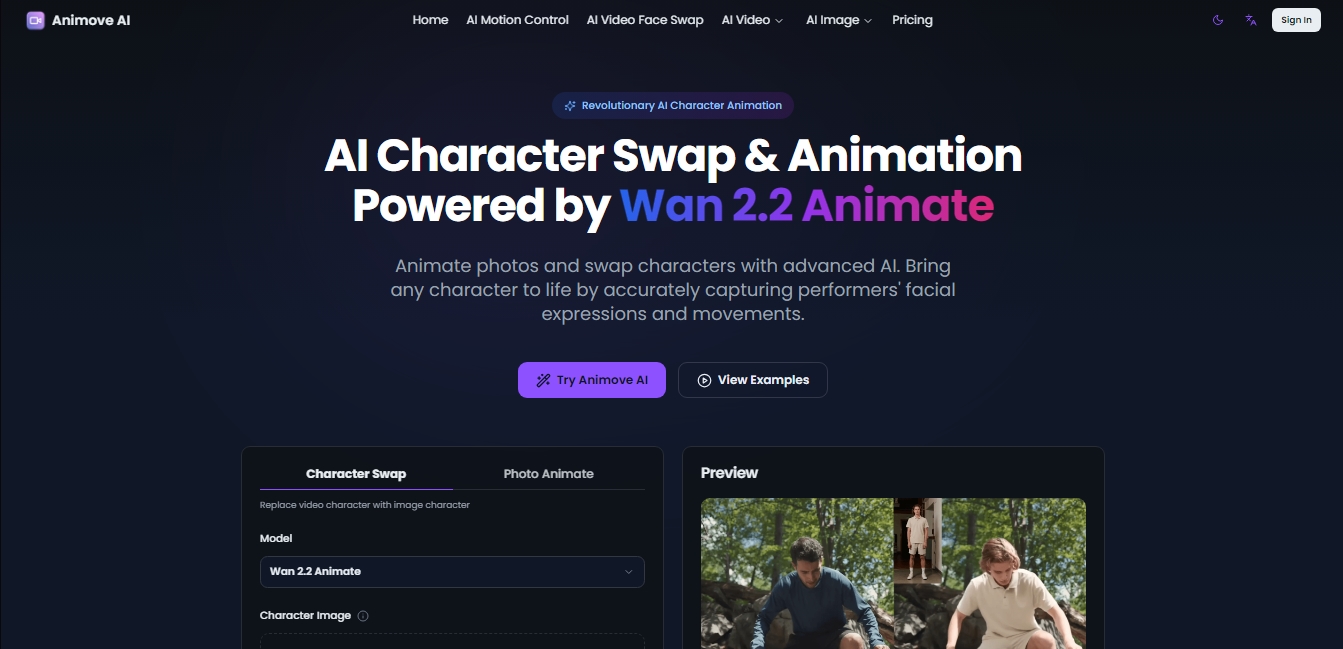
Animove AI Screenshots
Animove AI alternatives

Victoria Secret Runway
Create fashion show videos by integrating your face into real scenes. Just upload a photo to replace professional models and walk the runway.
AI Migos Video
Turn two photos into a Hotel Lobby-style music video. Automatically generate a rap performance with your faces, original choreography, and music in seconds.
Magic Hour
All-in-one AI tool for video and image generation. Features face swapping, photo animation, lip-syncing, and 4K text-to-video conversion.
