

Share
Extension that generates and autofills optimized metadata for stock images across five platforms. Quickly boost the ranking and sales of your AI-generated photos.
What is autokeyworder?
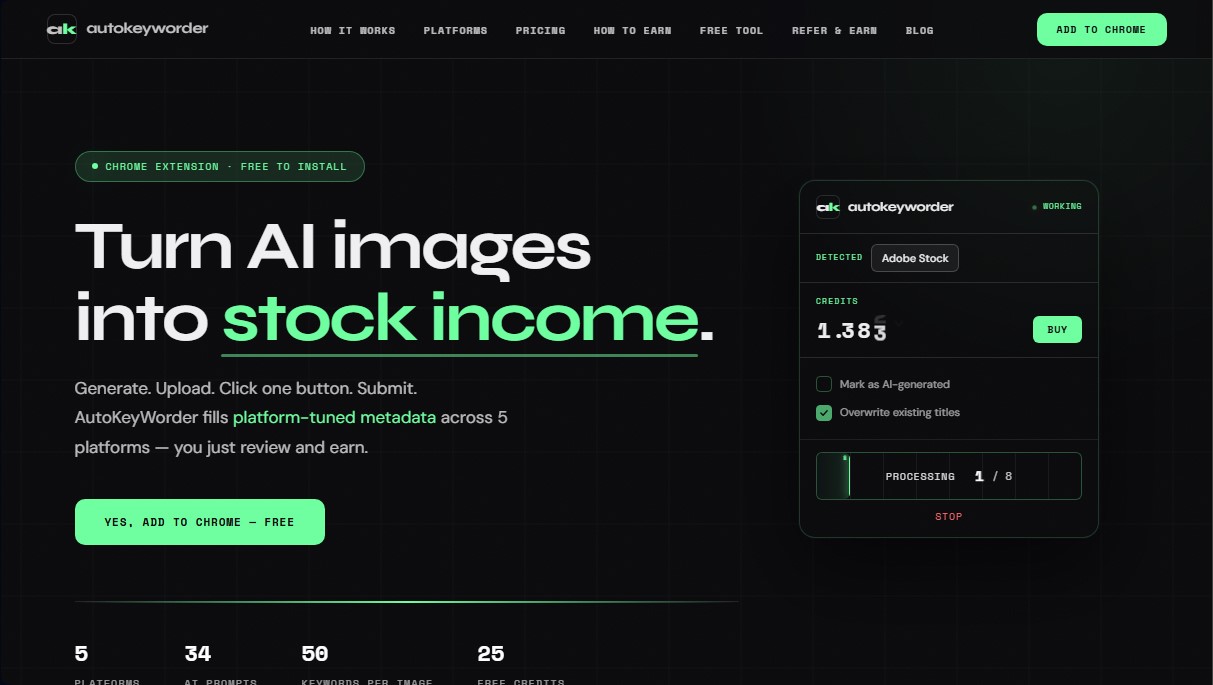
autokeyworder is a Chrome extension designed to optimize the workflow for content creators looking to monetize AI-generated images on stock platforms. This tool automates the creation of specific metadata, allowing users to efficiently transform visual files into passive income. Its primary function is to automatically generate and fill in titles, keywords, and categories directly into the upload forms of major microstock agencies, eliminating the need for repetitive manual tasks.
The technology behind autokeyworder is based on advanced computer vision models, utilizing GPT Vision and Gemini as backups. Unlike other generic generators, it uses 34 platform-specific prompts, tailoring results to the search algorithms and category taxonomies of sites like Adobe Stock, Shutterstock, Zedge, Displate, and TeePublic. The system analyzes the image in real-time to extract precise visual concepts and generate up to 50 keywords per file, ensuring the content is indexable and relevant to buyers.
One of its most notable features is its direct browser integration, which eliminates the need to export CSV files or manage spreadsheets. Users simply upload their images to their chosen platform and click a button for the extension to populate the necessary fields. Practical benefits include:
- Batch Processing: Allows for tagging multiple images simultaneously using the "Process All" function, saving hours of technical work.
- Video Analysis: Performs a 5-frame extraction to detect camera movements such as panning, tracking, or aerial shots, generating specific technical metadata for stock video.
- Algorithmic Optimization: Adjusts the number of tags and title types according to the specific limits and requirements of each stock agency.
- Auto-Detection: The extension recognizes the website the user is visiting and configures the AI parameters without manual intervention.
This tool is ideal for digital artists and stock contributors who use generators like Midjourney, DALL-E, or Stable Diffusion. The workflow is simplified into three steps: generate the image, upload it to the stock portal, and run autokeyworder for smart tagging. By avoiding generic tags, users improve their portfolio's visibility and increase their chances of a sale. Additionally, the tool facilitates regulatory compliance by allowing content to be automatically marked as AI-generated, protecting the integrity of the contributor's account.
autokeyworder features and use cases
How to use autokeyworder
autokeyworder FAQ
What is autokeyworder, and how does it help optimize my images?
It is a Chrome extension that uses artificial intelligence to automatically generate titles, categories, and platform-specific keywords for various stock photo sites.
Do I need an OpenAI API key to use autokeyworder?
No, you don't need to set up any external keys. All processing is handled directly within the tool itself.
How many free credits are included with the initial installation?
Upon installation, you will receive 25 free credits so you can test the workflow at no cost.
Can I use autokeyworder with images generated by Midjourney or DALL-E?
Yes, the tool works with any final image, regardless of which AI software you used to create it.
Which stock platforms are compatible with the extension?
It currently supports Adobe Stock, Shutterstock, Zedge, Displate, and TeePublic, with plans to add more platforms soon.
Is there a risk of my stock account being banned for using this tool?
No. The extension simulates human behavior with natural delays, and you always maintain full control to review everything before submitting.
What happens to my images after they have been analyzed?
Your data is safe. Images are analyzed in real-time to generate metadata and are never stored on our servers.
How are credits deducted when processing content?
Each image analyzed and completed with its metadata consumes exactly one credit from your available balance.
Can I edit the titles and tags generated by the AI?
Of course. While the tool fills in the fields automatically, it allows you to manually modify any text before final publication.
autokeyworder pricing and plans
Free Plan
Price: 0 €
- 25 free credits included upon installing the extension.
- Access to metadata generation for all 5 supported platforms.
Starter Subscription
Price: 7,99 $/mo
- 750 credits per month (1 credit per image; 3 credits per video).
- Access to all 5 platforms (Adobe Stock, Shutterstock, Zedge, Displate, and TeePublic).
- Standard AI quality.
- 10% discount on additional credit pack purchases.
- Cancel anytime.
Pro Subscription
Price: 19,99 $/mo
- 2,500 credits per month (1 credit per image; 3 credits per video).
- Access to all 5 supported platforms.
- 20% discount on additional credit pack purchases.
- Cancel anytime.
Starter Credit Pack (One-time payment)
Price: 4,99 $
- 300 credits (1 credit per image; 3 credits per video).
- Purchased credits never expire.
- No monthly subscription commitment.
Standard Credit Pack (One-time payment)
Price: 10,99 $
- 1,000 credits (1 credit per image; 3 credits per video).
- Purchased credits never expire.
- No monthly subscription commitment.
Pro Credit Pack (One-time payment)
Price: 49,99 $
- 5,000 credits (1 credit per image; 3 credits per video).
- Purchased credits never expire.
- No monthly subscription commitment.
autokeyworder Screenshots
autokeyworder user reviews
Write a review
Checking your session...
autokeyworder Reviews
Loading reviews...
autokeyworder alternatives

Rock Identify
Identify rocks, crystals, and minerals using photos. Analyze features like texture and grain to suggest types, explain properties, and answer geological questions.




The Muse Shop
Turn Pinterest photos and boards into a personalized shop. This AI identifies your aesthetic to offer real clothes and accessories you can buy directly.

PhotoKeyworder
Generate AI titles, descriptions, and keywords for photos, videos, and vectors. Automate microstock metadata and streamline your workflow with batch processing.