
Share
Generate original royalty-free music from text, lyrics, or images. Create custom tracks, export MIDI, and apply AI voices to your creative projects.
What is BeatBun?
BeatBun is a comprehensive AI music generator designed to transform text descriptions into original, high-quality audio tracks. This tool functions as a virtual production studio where any user, regardless of their technical expertise, can generate compositions from scratch. Unlike other systems that simply combine pre-recorded loops, BeatBun’s technology analyzes the requested tone, genre, and structure to compose unique melodies, harmonies, and rhythms, offering an efficient and professional text-to-song workflow.
The platform integrates several advanced features covering the entire sound creation cycle:
- Lyrics Generator: Allows for the creation of coherent verses and choruses that serve as the foundation for subsequent musical composition.
- Song Extender: A feature designed to seamlessly lengthen tracks, eliminating abrupt cuts and allowing the music to adapt to the necessary project duration.
- AI Voice Cover: The ability to swap voices on any track, allowing users to apply new vocal identities or clone specific registers to refresh demos.
- MIDI Export: Facilitates obtaining editable files so advanced producers can adjust melodies, chords, and instruments on their own computer using a DAW.
- Photo-to-Music Conversion: Uses artificial intelligence to interpret the atmosphere and mood of an image, translating them into a unique soundscape.
Using BeatBun is especially useful for creative professionals who require royalty-free music quickly and consistently. Content creators and YouTubers can generate personalized soundtracks for their videos, avoiding copyright claims and monetization issues. Indie game developers will find this tool to be a solution for creating adaptive music and cinematic atmospheres. Likewise, podcasters can design intros and outros that reinforce their brand identity without depending on generic stock libraries.
The operating process is divided into three straightforward phases: the user enters a descriptive prompt with the desired style or mood; the artificial intelligence processes the information and generates several versions based on the instructions; and finally, a mastered file is obtained, ready for download. For those seeking professional results, the tool allows for the commercial use of tracks on platforms such as Spotify, Apple Music, or YouTube. BeatBun thus positions itself as a versatile resource for optimizing audio production times and reducing costs in the creation of original audio assets, allowing teams and solo artists to maintain total creative control over their musical projects.
BeatBun features and use cases
How to use BeatBun
BeatBun FAQ
What is BeatBun and what is it used for?
BeatBun is an artificial intelligence platform designed for creators and developers to instantly generate original songs from text descriptions.
How does BeatBun’s AI generate music?
The system analyzes your style and genre prompts to compose melodies and rhythms from scratch without using pre-recorded stock music loops.
Can I use BeatBun songs for commercial purposes?
Users with an active subscription own the commercial rights to their creations and can monetize them on platforms like YouTube and Spotify or in video games.
What additional features does the tool offer besides creating music?
BeatBun allows you to auto-generate lyrics, extend track lengths, create versions with AI vocals, and export MIDI files.
How long are my files saved if I don’t have a subscription?
Files generated by free users are stored on encrypted servers for seven days and are then permanently deleted.
Are the tracks generated on BeatBun royalty-free?
Yes, all songs are completely royalty-free, ensuring that content creators do not receive copyright claims on their posts.
Can I try BeatBun for free?
The platform offers a free plan that includes trial credits to generate songs for personal use and explore the model's capabilities.
How does the credit system for downloads work?
Downloads are reserved for subscribers, and the system consumes monthly credits that are allocated based on the user's chosen plan.
What is the platform's refund policy?
Due to high processing costs, refunds are evaluated on a case-by-case basis and are primarily limited to verifiable technical system errors.
Who can benefit most from using BeatBun?
It is an ideal tool for podcasters, video editors, indie game developers, and musicians looking for inspiration or quick demos.
BeatBun pricing and plans
Free
$0/month
20 AI credits.
Access to Lite mode only.
4 song generations.
No downloads permitted.
No commercial license (personal use only).
Starter
$16.99/month
1,000 AI credits per month.
Access to all available models.
200 song generations.
Free downloads.
Commercial license included.
Professional
$29.99/month
2,000 AI credits per month.
Access to all available models.
400 song generations.
Free downloads.
Commercial license included.
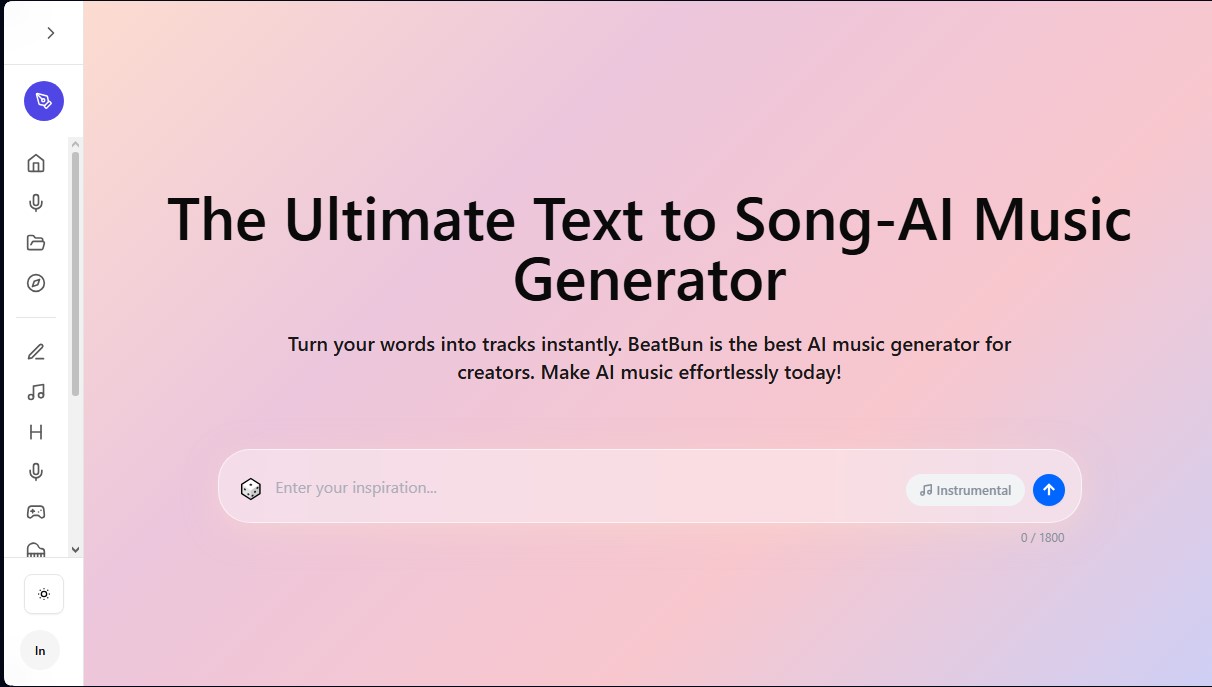
BeatBun Screenshots
BeatBun alternatives



MusicGenerater.com
Generate songs with vocals and music from descriptions or lyrics. Create any genre, extend tracks, and easily separate vocals from instruments.

Personalized Gifts
Create personalized gift songs. Add personal details and AI crafts a unique track with lyrics and music to surprise loved ones on birthdays, weddings, or anniversaries.

Image to Music AI
Transform your photos into original music. This tool analyzes color, light, and mood to automatically create a track that reflects the image's atmosphere.