Share
Transform your photos into original music. This tool analyzes color, light, and mood to automatically create a track that reflects the image's atmosphere.
What is Image to Music AI?
Image to Music AI is an advanced technological solution that allows you to convert images into music automatically through the use of neural networks. Its goal is to facilitate the creation of original soundtracks using a photograph as the primary reference, eliminating the need to write complex text descriptions or possess knowledge of music theory. This tool is especially valuable for digital creators looking for automated musical composition that perfectly matches the visual aesthetic of their projects, whether from a computer or a mobile device.
The system operates under an approach where the image acts as the creative "brief." Upon uploading a file, the artificial intelligence analyzes critical factors such as color palette, lighting, contrast, and the arrangement of elements to establish the track's tone, rhythm, and density. For example, a photograph of a misty forest will automatically suggest an ambient and melancholic atmosphere, while an image of a vibrant party will result in more energetic and dynamic rhythms. The technology powering this process integrates the Lyria 3 Pro and Music 3.0 models, which ensure high audio fidelity and a coherent interpretation of visual data.
The process is straightforward and efficient, designed for quick reading and execution:
- File Upload: Supports JPG, PNG, and WebP formats with a maximum size of 10 MB. Sharp images are recommended for better AI interpretation.
- Optional Text Guidance: Although the image leads the creation, users can include a short prompt to suggest specific instruments, musical genres, or a particular tempo.
- Track Generation: The system processes the information and returns a unique original track in a matter of seconds.
- Content Management: Allows for previewing, downloading, and storing generated tracks in a personal library.
One of the greatest advantages of Image to Music AI is its ability to iterate on the same concept. If the first result isn't exactly what you're looking for, you can keep the same image and add a small text adjustment to refine the sound mix without losing the original visual essence. This provides granular creative control ideal for scoring personal memories, travel videos, or brand presentations.
This AI tool stands out by removing the barrier to entry for music creation, allowing any user with a visual file to generate exclusive audio content. As an independent product utilizing specialized APIs, it offers a practical experience for those who require immediate professional results, avoiding the use of generic and overused audio libraries.
Image to Music AI features and use cases
How to use Image to Music AI
Image to Music AI FAQ
What is Image to Music AI and how does it work?
It is an artificial intelligence tool that analyzes the colors, lighting, and composition of a photo to create an original music track that reflects its atmosphere.
How many credits are used for each song generated in Image to Music AI?
Every time you generate a music track from an image, 8 credits are deducted from your available balance.
What types of image files can I upload to the platform?
The system accepts files in JPG, PNG, and WebP formats with a maximum file size of 10 megabytes per upload.
Is it mandatory to add a text description with my image?
It isn't mandatory, as the image serves as the primary guide; however, you can add optional prompts regarding genre or instruments to customize the result.
Do I need musical composition experience to use Image to Music AI?
No prior musical knowledge is necessary, as the AI automatically translates visual content into sound.
What options do I have once the music has been generated?
You can preview the track, download it directly to your device, or save it to your personal music section within the platform.
What AI technology does this service use?
The image-to-music conversion currently uses the Lyria 3 Pro model to ensure an original composition that aligns with the provided photograph.
Can I use Image to Music AI for free?
You must log in to generate content. While new accounts may receive complimentary credits, additional generations require a credit purchase or a subscription.
Image to Music AI pricing and plans
Starter Credits (Free Version)
- Price: Free for new accounts (while the grant is active).
- Allows you to test the tool with initial complimentary credits.
- Restrictions: Each music generation consumes 8 credits.
Starter
- Price: $5.90 per month (or $4.08 per month with $49 annual billing).
- 120 monthly credits (1,200 credits per year on the annual plan).
- Approximately 15 music generations per month (150 per year on the annual plan).
- Access to Lyria 3 Pro and Music 3.0 models.
- Includes AI lyrics and "Lyrics to Song" feature.
- Private generation history.
- High-quality audio downloads.
- Limits: Each generation costs 8 credits and monthly credits reset every month.
Pro
- Price: $9.90 per month (or $6.58 per month with $79 annual billing).
- 240 monthly credits (2,000 credits per year on the annual plan).
- Approximately 30 music generations per month (250 per year on the annual plan).
- Access to Lyria 3 Pro and Music 3.0 models.
- Includes AI lyrics and "Lyrics to Song" feature.
- Private generation history.
- High-quality audio downloads.
- Limits: Each generation costs 8 credits and monthly credits reset every month.
Creator
- Price: $19.90 per month (or $9.92 per month with $119 annual billing).
- 520 monthly credits (3,200 credits per year on the annual plan).
- Approximately 65 music generations per month (400 per year on the annual plan).
- Access to Lyria 3 Pro and Music 3.0 models.
- Includes AI lyrics and "Lyrics to Song" feature.
- Private generation history.
- High-quality audio downloads.
- Limits: Each generation costs 8 credits and monthly credits reset every month.
Image to Music AI Screenshots
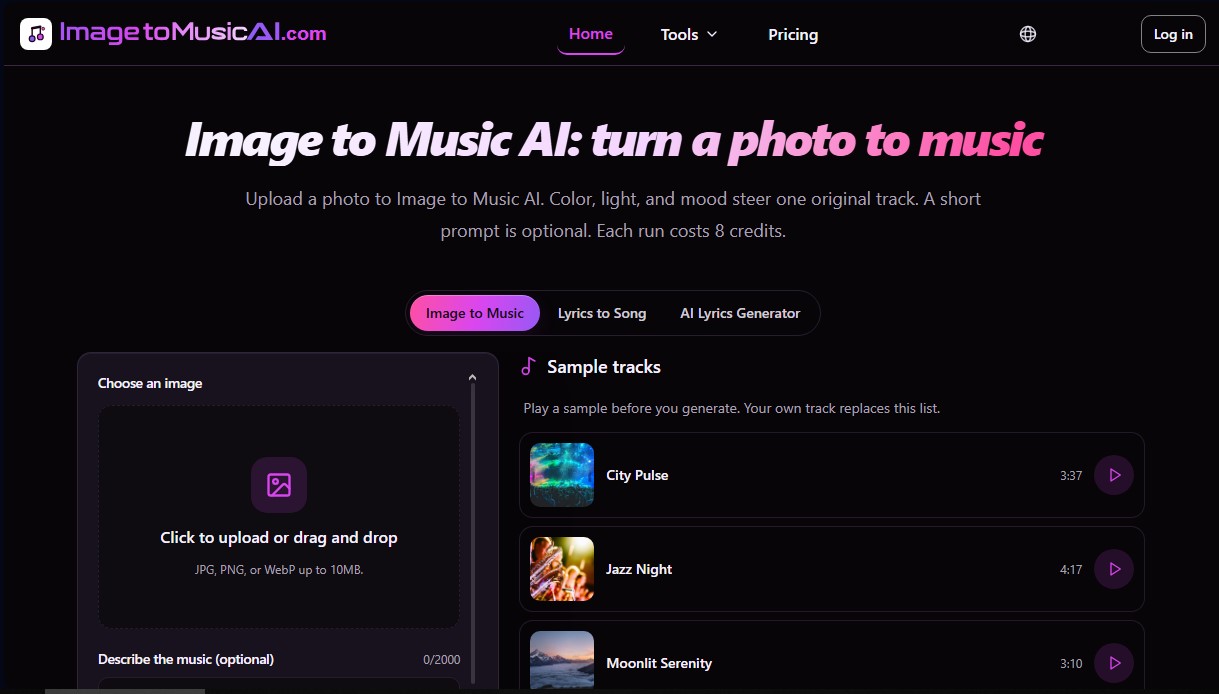
Image to Music AI alternatives

ImageToSTL.org
Convert JPG and PNG images into STL files for 3D printing using AI. Generate detailed 3D models ready for instant download.

AI Translate Manga.com
Translate Japanese manga into English or Simplified Chinese directly in the panels. Supports PNG, JPG, and PDF files, plus a Chrome extension for online reading.


image2slides
Convert screenshots and photos into editable PowerPoint slides. Extract text and graphics to modify and export them in PPTX format.