
Share
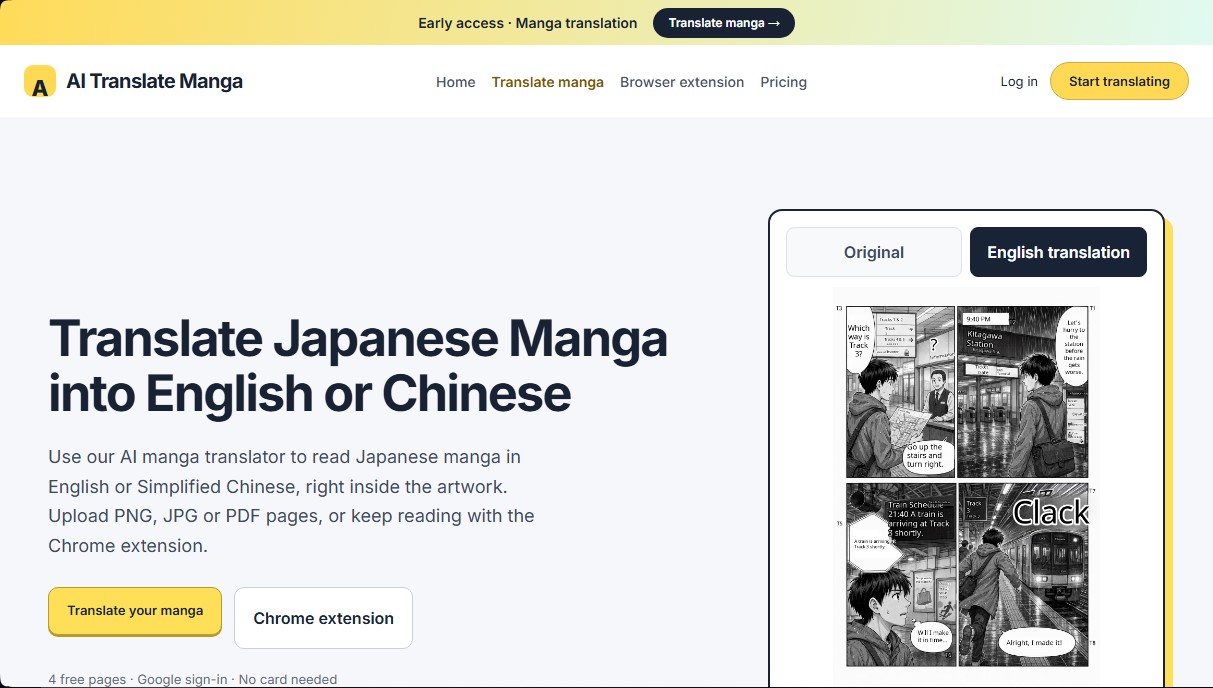
Translate Japanese manga into English or Simplified Chinese directly in the panels. Supports PNG, JPG, and PDF files, plus a Chrome extension for online reading.
What is AI Translate Manga.com?
AI Translate Manga is a specialized tool for the automatic translation of Japanese manga into English and Simplified Chinese. Its primary function is to make graphic works easier to read by removing language barriers through the use of AI-powered image processing. This application is designed for both manga enthusiasts wanting to read unreleased chapters and users needing a supportive tool to quickly and efficiently understand complex text within sequential art.
The operation of AI Translate Manga is divided into three key technological stages: first, the system performs precise dialogue detection within panels and speech bubbles using computer vision; second, it translates the story while maintaining context; and finally, it integrates the translated text directly into the original work. The technology used allows online manga translation to be performed seamlessly, overlaying the new language cleanly onto the image so as not to disrupt the reader's visual experience.
Among the practical capabilities and benefits of this tool are:
- Translation of PDF, PNG, and JPG files with a limit of up to 50 MB for documents and 5 MB for individual images.
- Batch processing that supports uploading up to 20 pages simultaneously, optimizing the user's workflow.
- Chrome extension for desktop that allows content to be translated directly while browsing, linking the website account without the need to configure external API keys.
- Visual comparison system that allows users to toggle between the original Japanese version and the translated result to verify the work's accuracy.
- Compatibility with in-browser reading that keeps the original art in place while the text replacement is performed.
To use the service, users can upload their own files or use the extension on desktop Chrome-compatible browsers. It is essential to note that the system requires users to log in with their Google account to sync results and the history of processed pages between the website and the extension. The platform focuses on offering a simple user experience, where no advanced technical knowledge is required to obtain a functional AI manga translation.
This solution stands out for its practical approach, allowing users to save results and manage translated pages in an organized manner. Its ability to detect text in complex panel and speech bubble structures makes it a robust option for those seeking a fast alternative to manual translation, ensuring that the user can follow the narrative flow without leaving their computer.
AI Translate Manga.com features and use cases
How to use AI Translate Manga.com
AI Translate Manga.com FAQ
What is AI Translate Manga.com?
It is a tool that uses artificial intelligence to translate manga dialogue from Japanese into English or Simplified Chinese directly on the original images.
What file formats does the platform support?
You can upload PNG or JPG images up to 5 MB and PDF documents up to 50 MB, with a limit of 20 pages per batch.
Can I try AI Translate Manga.com for free?
Yes, when you sign in with your Google account, you receive 4 free pages valid for 30 days, with no credit card information required.
What languages are available for translation?
The tool allows you to translate text originally written in Japanese into English or Simplified Chinese while maintaining the manga's aesthetic.
How does the AI Translate Manga.com Chrome extension work?
The extension allows you to translate content while reading in your desktop browser using your web account credits, with no additional configuration required.
How much do the page packs cost?
You can purchase a 100-page pack for a one-time payment of $4.99, which is valid for 12 months.
Can the tool be used on mobile devices?
The browser extension is only compatible with computers, but you can use the web-based file upload tool from any mobile phone.
What happens if a translation is not completed correctly?
If a translation task fails, the system automatically restores the reserved credits to your account balance so you do not lose your credits.
Do AI Translate Manga.com credits renew automatically?
No, the service operates via one-time payments for page packs, and no automatic charges are made when your balance runs out.
Do I need an API key to use the extension?
No API key setup is necessary, as the extension directly uses the credit balance from your logged-in account on the website.
AI Translate Manga.com pricing and plans
Free Trial
- Price: 0 $.
- Includes 4 free translation pages when you sign in with Google.
- Valid for 30 days.
- No credit card required.
100-Page Pack
- Price: 4,99 $ (one-time payment).
- Includes 100 manga translation credits (1 credit per successfully translated page).
- Valid for 12 months.
- No automatic renewal.
- Shared balance between the web tool and the Chrome extension.
- Supports PNG/JPG (up to 5 MB) and PDF (up to 50 MB) files.
- 20-page limit per upload batch.
AI Translate Manga.com Screenshots
AI Translate Manga.com alternatives



Kapwing Hinglish Subtitles Generator
Generate automatic Hinglish captions for videos in 100+ languages. Includes AI-powered editing and dubbing tools to reach bilingual audiences.

Ask BONBON
AI assistant for electricians that answers NEC and CEC code questions with official citations. Includes calculation tools, blueprint analysis, and a voice assistant.

GLMImage AI Scientific Illustration Generator
Generate precise, labeled scientific illustrations from text. Covers 9 disciplines, including botany and anatomy, for articles and educational materials.

Slides Translator
Translate presentations and PDFs while preserving original layouts, images, and formatting. Review each slide and download the final result as a PDF.