
Share
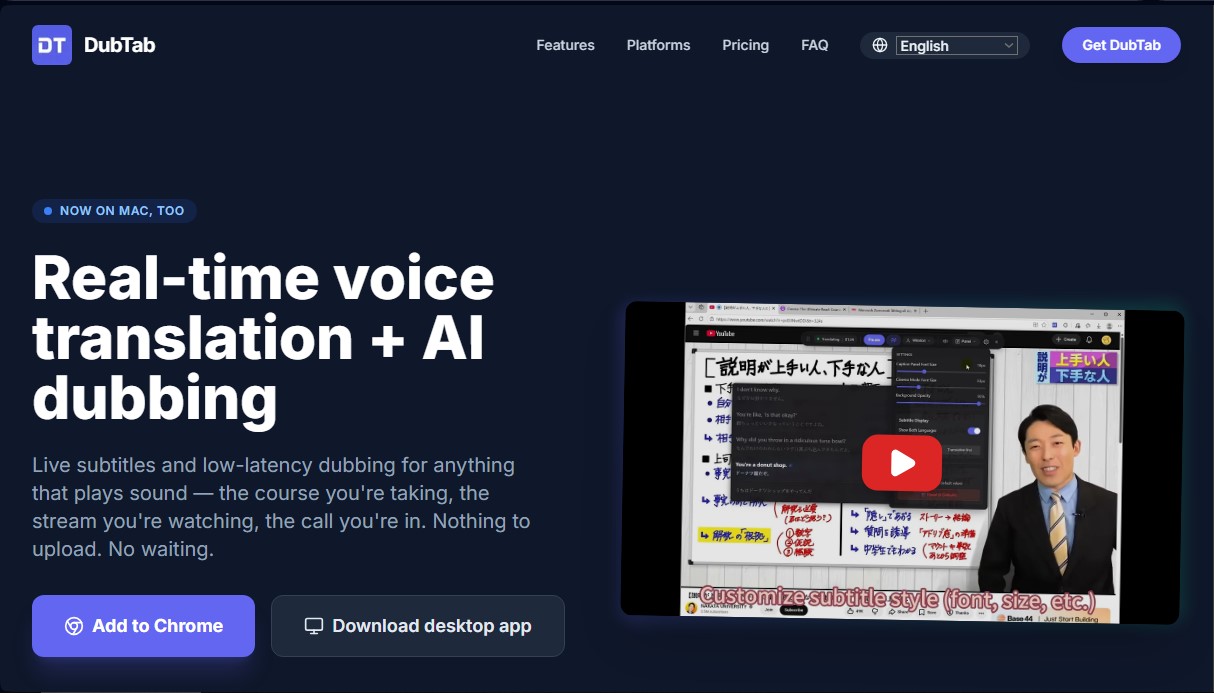
Real-time AI voice translation and dubbing for videos, courses, and meetings. Generate instant low-latency captions in your browser and desktop apps.
What is DubTab?
DubTab is an advanced artificial intelligence solution focused on real-time voice translation and automated dubbing. Its primary goal is to facilitate the understanding of audio content in various languages without any wait times, processing audio directly as it plays on your computer. Unlike other services, this tool does not require manual file uploads, as it works instantly on any sound stream emitted by the system or browser.
The tool is distributed through two main formats: a browser extension for Chromium-based browsers, such as Chrome and Edge, and a desktop application compatible with Windows 11 and recent versions of macOS. DubTab’s technology stands out for its low latency, successfully generating translations and synthetic voices in an interval of just 0.5 seconds. This processing speed makes it ideal for environments where immediacy is critical, such as live streams on Twitch or YouTube, as well as international video calls via Zoom, Microsoft Teams, or Google Meet.
Key capabilities and functional benefits include:
- Dubbing with natural voices: It uses AI models to generate fluid and realistic voiceovers in more than 60 languages, allowing the original audio to be replaced with a translated version.
- Real-time bilingual subtitles: It offers the ability to view the original and translated text simultaneously, which is highly useful for language learning and verifying technical terms.
- Audio Ducking: The system allows for automatic adjustment of the original sound volume so that the AI-generated voice stands out without losing the context of the background audio.
- Universal compatibility: It is fully functional on online learning platforms like Coursera, Udemy, Skool, or Whop, as well as local applications such as video players and communication tools.
DubTab's operation is simplified and efficient. After installation, the user only needs to point the tool toward the desired sound source—whether it’s a specific tab or the global system audio—and select the input and output languages. The AI handles the transcription and instant dubbing seamlessly for the user.
Regarding data management, the application processes audio in real time and, by default, does not store original recordings. Privacy is built into its design, allowing only the history of AI-generated voices to be saved if the user chooses to configure it that way. Thanks to its focus on AI-driven productivity, this tool positions itself as an essential resource for students and professionals who need to eliminate language barriers in their daily digital content consumption.
DubTab features and use cases
How to use DubTab
DubTab FAQ
What exactly is DubTab and what is it used for?
It is a real-time voice translation and AI dubbing tool that allows you to add subtitles and translated audio to any video, online course, or meeting.
What devices and browsers can I use DubTab on?
You can install the extension on Chrome and Edge for Windows, macOS, and Linux, or use the desktop application on Windows 11 and macOS versions 14.2 or higher.
How long does it take for the translation to appear during a live stream?
Translation and dubbing are near-instantaneous with a lag of barely half a second, making it ideal for following live broadcasts or participating in global meetings.
Do I need to pay extra for subtitles if I am already using DubTab's dubbing?
No, your plan's minute usage remains the same regardless of whether you use just subtitles, just dubbing, or both features simultaneously.
How many languages are currently available on the platform?
The system supports over sixty languages for transcription and translation, featuring natural AI voices for the world's most widely spoken languages.
What happens to my audio privacy when using this tool?
Neither the original audio from web pages nor the system sound is recorded, and translated audio is only stored in your private history if you choose to manually enable that option.
Does the DubTab free plan offer renewable minutes every month?
No, the free version includes fifteen total minutes as a one-time trial so you can test how the tool works before signing up for a subscription.
What is the difference between the browser extension and the desktop app?
The extension works for any content played within a browser tab, while the app allows you to translate audio from local programs like Zoom or video files.
DubTab pricing and plans
Free Plan: 0 $
15 minutes total (one-time trial, does not reset).
3 AI credits for summaries and queries.
Ultra-low latency real-time dubbing.
Optional bilingual subtitles.
Access to 60+ languages and multiple natural voices.
Email support and Discord community.
Starter Plan: 19 $ per month (or 15.8 $ per month billed annually)
9 hours per month (or 108 annual hours allotted upfront).
30 AI credits per month.
Ultra-low latency real-time dubbing.
Optional bilingual subtitles.
Access to 60+ languages and multiple natural voices.
Email support and Discord community.
Pro Plan: 39 $ per month (or 32.5 $ per month billed annually)
20 hours per month (or 240 annual hours allotted upfront).
100 AI credits per month.
Ultra-low latency real-time dubbing.
Optional bilingual subtitles.
Access to 60+ languages and multiple natural voices.
Email support and Discord community.
Power Plan: 69 $ per month (or 57.5 $ per month billed annually)
40 hours per month (or 480 annual hours allotted upfront).
300 AI credits per month.
Ultra-low latency real-time dubbing.
Optional bilingual subtitles.
Access to 60+ languages and multiple natural voices.
Email support and Discord community.
Ultra Plan: 129 $ per month (or 107.5 $ per month billed annually)
80 hours per month (or 960 annual hours allotted upfront).
1,000 AI credits per month.
Ultra-low latency real-time dubbing.
Optional bilingual subtitles.
Access to 60+ languages and multiple natural voices.
Email support and Discord community.
Team Plan: Custom pricing (Contact sales)
Flexible seats (add or remove members at any time).
Shared pool of hours for the entire team.
Dedicated account support and onboarding assistance.
DubTab Screenshots
DubTab alternatives
AI Translate Manga.com
Translate Japanese manga into English or Simplified Chinese directly in the panels. Supports PNG, JPG, and PDF files, plus a Chrome extension for online reading.

Kapwing Hinglish Subtitles Generator
Generate automatic Hinglish captions for videos in 100+ languages. Includes AI-powered editing and dubbing tools to reach bilingual audiences.
Ask BONBON
AI assistant for electricians that answers NEC and CEC code questions with official citations. Includes calculation tools, blueprint analysis, and a voice assistant.

GLMImage AI Scientific Illustration Generator
Generate precise, labeled scientific illustrations from text. Covers 9 disciplines, including botany and anatomy, for articles and educational materials.
Slides Translator
Translate presentations and PDFs while preserving original layouts, images, and formatting. Review each slide and download the final result as a PDF.