Share
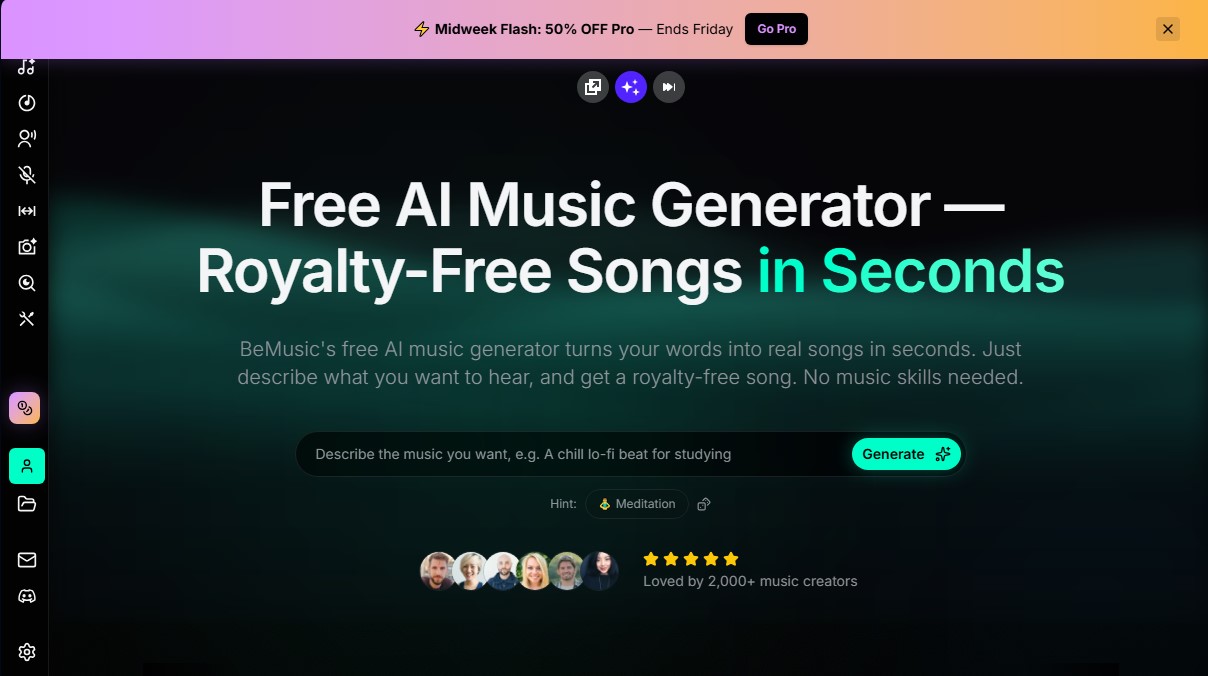
Generate original, royalty-free songs from text. Create custom tracks in seconds for videos and commercial projects. No musical skills required.
What is BeMusic?
BeMusic is an AI music generator designed to transform text descriptions into complete, original songs in a matter of seconds. This tool allows any user, regardless of technical expertise in composition or music theory, to create high-quality audio tracks simply by writing a natural language prompt. Its primary goal is to democratize sound production, offering a fast solution for obtaining royalty-free music for various digital projects.
The platform operates using advanced generative artificial intelligence models that comprehensively manage the stages of composition, arrangement, and mixing. Users enter a detailed description—specifying genre, mood, tempo, or instruments—and the system processes the information to deliver a finished track in under 30 seconds. BeMusic’s technology is not limited to generating generic loops; instead, it builds complex musical structures with studio-quality depth, utilizing real instrument samples and rich sonic textures.
Among its most notable technical and functional capabilities are:
- Text-to-Music Generation: Creating full tracks from simple written instructions.
- AI Lyrics Generator: An integrated tool for composing verses and choruses that can be incorporated into the melody.
- Wide Variety of Genres: Support for over 50 styles, including lo-fi chill, hip-hop, rock, electronic, cinematic, R&B, and ambient.
- Advanced Editing Tools: Features such as a vocal remover, stem splitter, and the ability to extend existing songs.
- Professional Formats: Download files in high-fidelity WAV (48kHz) and MP3, optimized for use on any computer or mobile device.
The value of BeMusic lies in its versatility for different professional profiles. Content creators on platforms like YouTube, TikTok, or Instagram can generate custom soundtracks while avoiding copyright claims. For indie game developers and marketing agencies, it represents an efficient alternative for obtaining background music and sound effects without the costs of a traditional studio. Additionally, musicians can use the tool as a creative collaborator to overcome writer's block, using the generated demos as a foundation for new compositions.
A fundamental aspect is that the generated tracks are 100% royalty-free, ensuring that users maintain ownership of their creations. This allows for distribution on streaming services like Spotify or Apple Music and commercial use in ads or podcasts without the risk of legal penalties. As a browser-based tool, it requires no complex software installation, facilitating a streamlined workflow for any project in need of a unique sonic identity. Its practical approach allows you to go from an abstract idea to a professional audio file almost instantaneously.
BeMusic features and use cases
How to use BeMusic
BeMusic FAQ
What is BeMusic and how exactly does it work?
It is an AI music generator that transforms your text descriptions into original, royalty-free songs in just a few seconds.
Do I need prior musical knowledge to use BeMusic?
No technical or musical experience is necessary. You simply describe the style or mood you’re looking for, and the tool composes the track for you.
Is it possible to use BeMusic for free?
Yes, the free plan offers initial credits so you can generate your first songs and test the platform's main features with no commitment.
Can I use the generated songs in my YouTube or TikTok videos?
Absolutely. All tracks are original and royalty-free, allowing you to post them on social media without the risk of receiving copyright claims.
Who legally owns the music created with this tool?
You retain full ownership and copyright of every track you generate, so you can distribute it freely and keep all the royalties or earnings you receive.
In what audio formats can I download my BeMusic creations?
You can download all your songs in high-quality MP3 and WAV formats to use them directly in your professional projects, podcasts, or commercials.
How long does the AI take to generate a full song?
The process is extremely fast; the system typically takes less than thirty seconds to write, arrange, and mix a complete track based on your instructions.
What can I do if I don’t like how a song turned out?
Simply adjust your text description or try different keywords and generate it again until the composition perfectly matches your vision.
BeMusic pricing and plans
Free Plan
Free.
- 40 one-time credits (equivalent to 4 songs).
- Text and lyrics-to-music generation.
- AI lyrics generator.
- Standard quality model.
- Up to 4 minutes per track.
- MP3 downloads.
Lite Plan
$19.99 per month (or $16.66 per month with annual billing).
- 1,660 credits renewed monthly (up to 166 songs).
- Standard and Pro quality models.
- MP3 and WAV downloads.
- Up to 4 minutes per track.
- Text and lyrics-to-music generation.
- AI lyrics generator.
- Song extension and cover creation features.
- Option to upload your own music for extension.
- AI instrument generator.
- Community support.
Pro Plan
From $39.99 to $99.99 per month based on credit volume (recommended option: $59.99 per month or $49.99 with annual payment).
- From 3,600 to 10,000 monthly credits (the intermediate tier offers 5,600 credits).
- Includes all Lite plan features.
- Access to all AI models, including the Ultra model.
- Extended tracks up to 8 minutes long.
- Lossless WAV and MP3 downloads.
- Singing Photo, Vocal Remover, and Stem Splitter AI tools.
- Priority generation (no wait times).
- Commercial license included.
- Priority technical support.
BeMusic Screenshots
BeMusic user reviews
Write a review
Checking your session...
BeMusic Reviews
Loading reviews...
BeMusic alternatives




MusicGenerater.com
Generate songs with vocals and music from descriptions or lyrics. Create any genre, extend tracks, and easily separate vocals from instruments.
Personalized Gifts
Create personalized gift songs. Add personal details and AI crafts a unique track with lyrics and music to surprise loved ones on birthdays, weddings, or anniversaries.