

Share
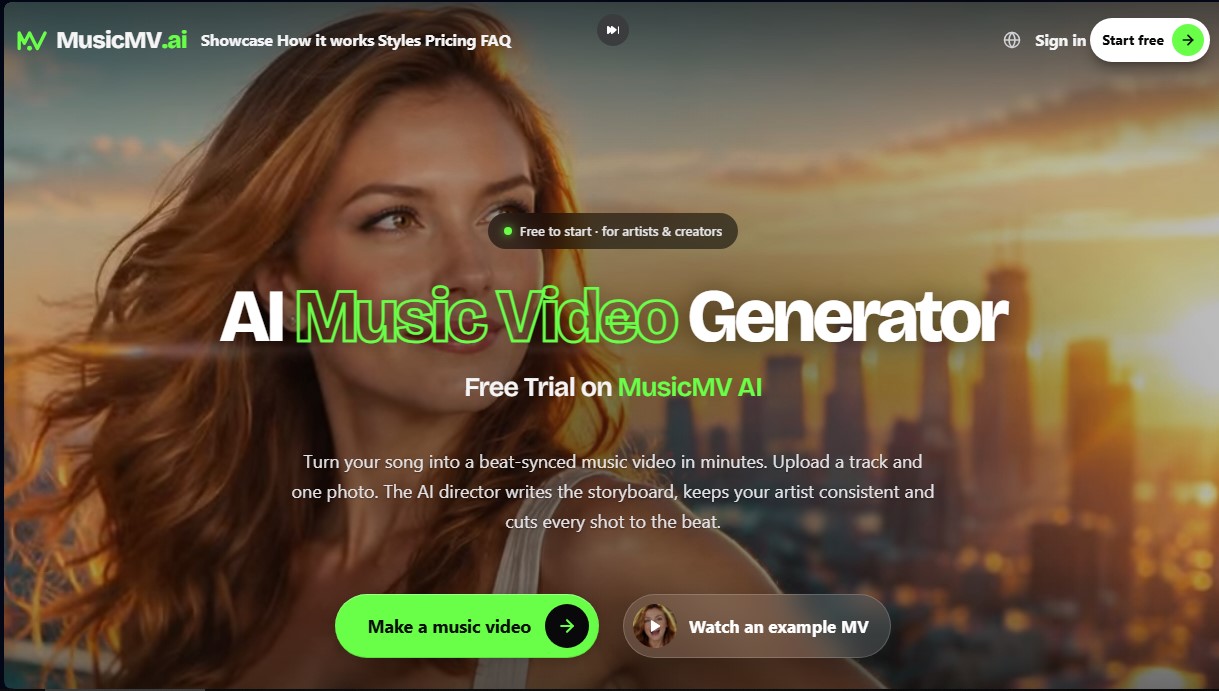
Create AI music videos using a song and a photo. Features lip-sync, beat-synced editing, consistent characters, and formats for YouTube and TikTok.
What is MusicMV?
MusicMV is an advanced AI music video creation tool designed for professional, automated results. Its core function is to transform an audio track and a single photograph into a complete music video, where every visual cut is perfectly synchronized with the beat of the music. This platform is built so independent artists, musicians, and content creators can generate high-quality visual content for their releases without the need to hire production crews or master complex desktop editing software.
The operation of MusicMV is based on an AI director that analyzes the song's structure, detecting the tempo, sections (choruses, verses, intros), and the overall mood of the composition. Starting from just one front-facing photo of the artist, the AI video generation technology creates a consistent character to star in the video. One of its most standout features is lip-syncing, which allows the character to "sing" the lyrics realistically during the vocal parts of the track.
The primary capabilities of this tool include:
- Automatic beat-sync: The system maps the beats of the music so that transitions and camera movements occur rhythmically.
- Interactive storyboard: Before generating the final video, the user can review a storyboard of every shot. If a frame doesn't match the artist's vision, the tool allows them to redraw it or modify the descriptive "prompt" to change the scene.
- Visual consistency: By using a reference image, the AI maintains the artist's identity across different environments and angles.
- Variety of artistic styles: It offers pre-configured options ranging from cinematic and 3D animation to anime, retro VHS, or lo-fi aesthetics.
- Social media-optimized formats: It allows for exporting videos in 9:16 for TikTok and Reels, 16:9 for YouTube, or 1:1 for the Instagram feed, with resolutions up to 1080p.
For users who do not have their own song, MusicMV also integrates an AI music generation feature through text descriptions. The creation process is streamlined: after uploading the file (MP3, WAV, or M4A) and the photo, the system generates the script in just a few minutes. Additionally, it offers the option to add dynamic karaoke-style subtitles, which is ideal for increasing the impact of videos on mobile devices. It is a comprehensive solution for managing the visual branding of a music catalog efficiently and at scale.
MusicMV features and use cases
How to use MusicMV
MusicMV FAQ
What is MusicMV and how does it create music videos?
MusicMV is an AI tool that automatically transforms your song and a photo into a music video synced to the beat.
Can the artist lip-sync to the lyrics in MusicMV?
Yes, the platform's technology includes lip-sync performance shots so the character appears to be singing your actual track.
Is the MusicMV tool free to use?
You can start for free with twenty credits to create a fifteen-second watermarked video, and then purchase credit packs with no subscription required.
What files do I need to upload to generate my video?
You just need to upload your audio track in MP3, WAV, or M4A format and a clear, front-facing photo of the artist.
Can I choose the aspect ratio for TikTok or YouTube?
The tool allows you to select specific dimensions, such as 9:16 for vertical social media or 16:9 for platforms like YouTube.
Is it possible to modify the storyboard before spending credits?
You can review every frame of the storyboard and redraw or rewrite any scenes you aren't happy with before the final rendering.
Do I have commercial rights to the videos created in MusicMV?
By purchasing any credit pack, you obtain commercial use rights for social media or streaming, provided you own the rights to the original audio and photos.
What happens if I don't have my own song for the video?
The tool itself allows you to generate a song using AI by describing your idea and choosing the genre and voice type.
MusicMV pricing and plans
Free Trial
Price: 0 $
- 20 welcome credits (enough for a 15-second video).
- Watermarked video generation.
- Access to storyboard and lip-sync features.
- Includes scene editing tools before rendering.
Starter
Price: 9,90 $ (one-time payment)
- 240 credits (approx. 4 minutes of video at 768p).
- Standard rendering speed.
- Watermark-free downloads.
- Commercial use license.
- Available formats: 9:16, 16:9, 1:1, 4:3, and 3:4.
- Resolution up to 1080p (consumes 2 credits per second).
Creator
Price: 29,90 $ (one-time payment)
- 800 credits (approx. 13 minutes of video at 768p).
- Fast rendering speed (1.25x faster than standard).
- No watermark and commercial use allowed.
- Lip-sync and beat-sync.
- Consistent characters from a photo.
- Credits never expire.
Studio
Price: 79,90 $ (one-time payment)
- 2,400 credits (approx. 40 minutes of video at 768p).
- Faster rendering speed (1.5x faster than standard).
- All storyboard customization and style features.
- Support for subtitles and dynamic lyrics.
- No watermark and commercial rights included.
Studio Plus
Price: 149,90 $ (one-time payment)
- 5,200 credits (approx. 86 minutes of video at 768p).
- Maximum rendering speed (2x faster than standard).
- Ideal for frequent creators and record labels.
- Access to all formats and resolutions up to 1080p.
- Full commercial use and no watermarks.
MusicMV Screenshots
MusicMV user reviews
Write a review
Checking your session...
MusicMV Reviews
Loading reviews...
MusicMV alternatives


MovieMaker Grok
Create cinematic, watermark-free videos from text or images powered by xAI. Animate scenes and chain clips using your own API key.


Rate My Clip
Analyze and score your YouTube Shorts with AI. Evaluate hooks, pacing, and visual quality to quickly optimize video performance.

freebeat AI
Generate beat-synced music videos and viral clips. Create cinematic scenes, dynamic lyrics, and AI-driven visuals from audio or links.