
Share
Create cinematic music videos by uploading your own music. AI automatically generates scenes synced to the beat—no technical editing skills required.
What is MusVideo?
MusVideo is an AI music video generator designed to automatically transform audio tracks into high-quality cinematic pieces. This tool allows musicians, producers, and content creators to generate professional visual content without needing editing skills, cameras, or a film crew. The system handles the entire creative process, from sound interpretation to final file rendering.
The platform’s operation is based on a deep analysis of uploaded audio (in formats like MP3 or WAV). MusVideo's AI identifies critical elements such as tempo, rhythm (BPM), mood, and song structure to plan a coherent storyboard. It utilizes advanced video generation models, including Seedance 2.0, which optimizes lip-syncing for more realistic results. Additionally, it integrates engines like Grok, Kling, and Wan to offer a wide variety of visual styles and precise scene composition.
Key capabilities of MusVideo include:
- Cinematic scene creation: Generates full sequences up to 4 minutes long, featuring professional framing and color grading that match the music's energy.
- Intelligent audio analysis: Unlike basic tools, it detects segments and lyrics so that the visual narrative directly relates to the sound composition.
- Advanced lip-syncing: Thanks to Seedance 2.0 technology, video characters can accurately follow the singer's voice.
- Social media optimized formats: Allows projects to be exported in 1080p resolution with 16:9, 9:16, and 1:1 aspect ratios—ideal for YouTube, TikTok, Instagram Reels, and Spotify Canvas.
- Visual consistency: Offers options to maintain character consistency through reference photos and control over artistic styles.
This AI music video generator is especially useful for independent artists who need to regularly post visual content to their official channels from their computer. It is also an efficient solution for record labels and social media managers looking to produce visualizers and promotional videos in minutes, drastically reducing the typical production costs and timelines in the industry.
The tool is compatible with any musical genre—from electronic and hip-hop to ballads or metal—and processes tracks in any language. Upon completion, users have a personal library where they can organize their work, re-render versions with new styles, or download material ready for commercial distribution. It is a comprehensive solution for quickly and easily turning audio into a stunning visual experience.
MusVideo features and use cases
How to use MusVideo
MusVideo FAQ
What is MusVideo and how does this tool work?
MusVideo is an AI-powered music video generator that transforms your audio tracks into cinematic videos by analyzing rhythm and mood to automatically create synchronized scenes.
What audio formats can I upload to MusVideo to generate a video?
The platform supports the most common audio formats, such as MP3, WAV, M4A, and AAC, allowing you to use full songs, instrumental tracks, or original demos.
Do I need any prior video editing knowledge?
No technical skills or editing experience are required, as the AI acts as a director, handling scene composition and the final edit for you.
Can I use the videos created with MusVideo on my commercial social media accounts?
Yes, videos generated under paid plans include commercial use rights, allowing you to post them on YouTube, TikTok, Instagram Reels, and Spotify Canvas without any licensing issues.
How long does the system take to process and render a music video?
The average rendering time is approximately sixty seconds, though the total process may vary by a few minutes depending on the length of the song and the complexity of the chosen visual style.
Does MusVideo offer different screen formats for various platforms?
The tool allows you to export your creations in 1080p high definition with vertical, horizontal, or square aspect ratios to perfectly fit any social media platform.
Can I try MusVideo for free before purchasing a plan?
Yes, you can start using the generator for free with fifteen credits included upon registration, with no credit card information required.
What musical genres are compatible with the tool's artificial intelligence?
The generator is compatible with any genre or language—from hip hop and electronic to ballads or metal—adapting the visual style and the energy of the imagery to the sound of the track.
Can I customize the visual style of my music video in MusVideo?
You have the option to choose a specific visual style or let the AI automatically select the aesthetic that best matches the energy and tempo of your music.
What happens to my videos once they have been generated?
All your work is automatically saved in your personal library, where you can re-render new versions, change visual styles, or download them in high definition at any time.
MusVideo pricing and plans
Free Plan: Free
15 free credits upon sign-up.
AI audio analysis and storyboarding.
Standard rendering queue.
1080p video export.
Basic Plan (Monthly): 29,99 $ al mes
2,000 monthly credits (equivalent to 4-8 minutes of video).
50 to 100 song generations per month.
1080p video export (16:9 and 9:16 formats).
AI audio analysis and storyboarding.
Commercial use rights and watermark removal.
Pro Plan (Monthly): 44,99 $ al mes
4,000 monthly credits (equivalent to 8-16 minutes of video).
100 to 200 song generations per month.
1080p video export (16:9, 9:16, and 1:1 formats).
Access to the latest music and video AI models.
Commercial use rights, no watermark, and priority processing.
Basic Plan (Annual): 14,99 $ al mes (billed annually)
6,000 monthly credits (equivalent to 12-24 minutes of video).
150 to 300 song generations per month.
1080p video export (16:9 and 9:16 formats).
AI audio analysis and storyboarding.
Commercial use rights, no watermark, and fast processing.
Pro Plan (Annual): 22,49 $ al mes (billed annually)
10,000 monthly credits (equivalent to 20-40 minutes of video).
250 to 500 song generations per month.
1080p video export (16:9, 9:16, and 1:1 formats).
Access to the latest music and video AI models.
Commercial use rights, no watermark, and fast processing.
Starter Pack (One-time payment): 39,99 $
3,000 non-expiring credits (equivalent to 6-10 minutes of video).
75 to 150 total song generations.
1080p video export (16:9 and 9:16 formats).
AI audio analysis and storyboarding.
Commercial use rights and no watermark.
Pro Pack (One-time payment): 99 $
9,000 non-expiring credits (equivalent to 18-30 minutes of video).
225 to 450 total song generations.
1080p video export (16:9, 9:16, and 1:1 formats).
Access to the latest music and video AI models.
Commercial use rights, no watermark, and fast processing.
MusVideo Screenshots
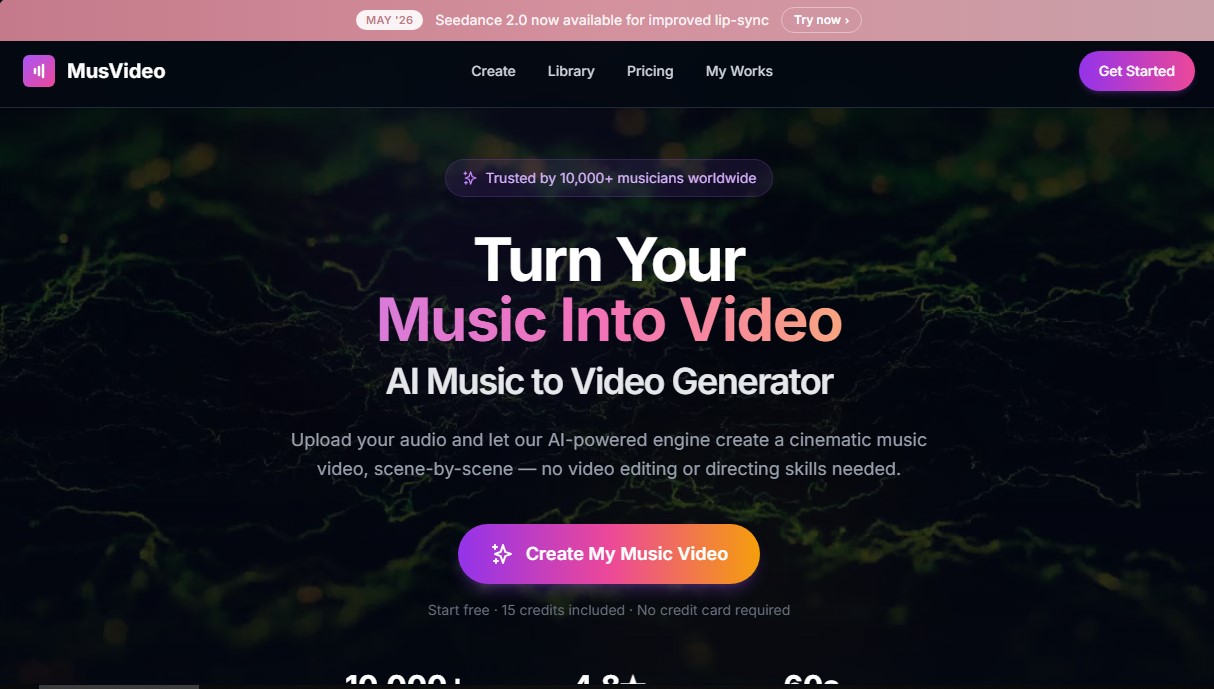
MusVideo alternatives

MovieMaker Grok
Create cinematic, watermark-free videos from text or images powered by xAI. Animate scenes and chain clips using your own API key.


Rate My Clip
Analyze and score your YouTube Shorts with AI. Evaluate hooks, pacing, and visual quality to quickly optimize video performance.

freebeat AI
Generate beat-synced music videos and viral clips. Create cinematic scenes, dynamic lyrics, and AI-driven visuals from audio or links.