Blinkvid
Share
Blinkvid
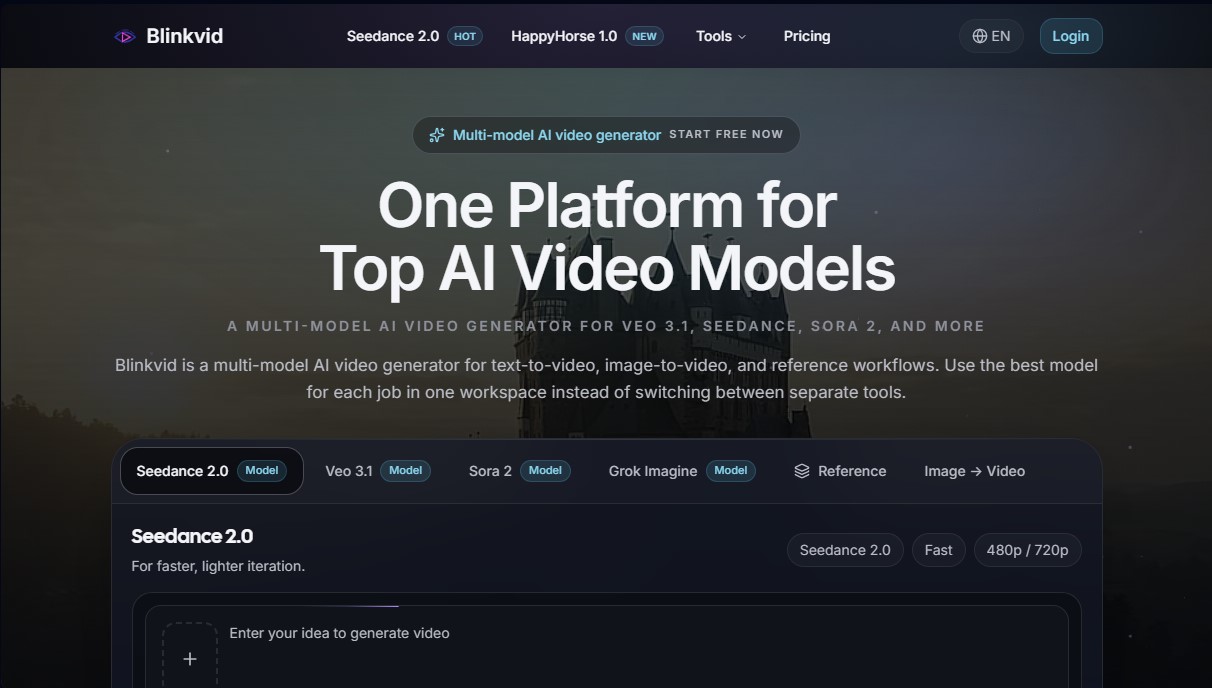
Multi-model AI video generator featuring Sora, Veo, and Seedance. Create content from text or images and use visual references in a single workspace.
General Information about Blinkvid
Blinkvid is a multi-model AI video generator that centralizes the capabilities of the most advanced engines on the market into a single platform. Its primary function is to allow users to create high-quality audiovisual content from text descriptions or static images without the need to switch between different standalone tools. This solution is designed for creative teams, marketing professionals, and content creators looking for a unified workflow for generating cinematic clips, social media ads, or quick visual prototypes.
The tool's technology is based on the integration of cutting-edge models such as Veo 3.1, Seedance 2.0, Sora 2, and Grok Imagine. As a multi-model platform, users can choose the algorithm that best suits their specific needs: Seedance stands out for its speed and efficiency during constant iterations, while models like Sora 2 are geared toward results with a more cinematic aesthetic and greater visual complexity. The system processes requests using natural language processing and computer vision to interpret both written instructions and provided visual references.
Blinkvid's operation is divided into three main workflows that optimize video production:
- Text-to-Video (T2V): Allows for transforming a detailed prompt into a video clip from scratch, ideal for quick cuts and initial creative concepts.
- Image-to-Video (I2V): This feature animates static images while keeping the composition, brand style, and visual elements intact, adding subtle or dynamic movement.
- Reference-Guided Generation: Uses a previous image or scene to dictate framing, tone, and lighting, ensuring the AI respects the project's visual identity.
Among its functional capabilities, the ability to generate videos in HD resolution with different aspect ratios stands out, such as 16:9 for computer screens or 9:16 for mobile devices. The platform facilitates the creation of advertisements, product scenes with complex camera movements (such as dolly-in), and editorial portrait animations. By working within a single workspace, comparing models and editing instructions is streamlined without losing progress.
The process is straightforward: enter a detailed description, optionally add a reference image to guide movement, and the AI generates the content in just a few minutes. Blinkvid positions itself as an efficient tool for those who need to scale video production with professional results, offering technical flexibility and an accessible interface for any AI tool-based workflow.
Features and Use Cases of Blinkvid
How Blinkvid Works
Frequently Asked Questions about Blinkvid
What is Blinkvid and how does it work?
Blinkvid is an AI video generation platform that lets you create content from text or images using several advanced models in a single workspace.
Can I try Blinkvid for free?
Yes, new users receive 20 free credits upon signing up to start creating videos without having to enter any credit card information.
Which AI models are integrated into Blinkvid?
The tool allows you to choose from various cutting-edge models like Veo 3.1, Seedance 2.0, and Sora 2 to tailor the generation to your preferred style and budget.
How does the credit system work?
Credits are used to pay for each video generation; consumption depends on the selected model, the length of the clip, and the final file resolution.
Can I turn a still image into a video using Blinkvid?
Yes, the platform features an image-to-video workflow that allows you to animate photos while maintaining the visual consistency and style of the original image.
Can I use videos generated with Blinkvid for commercial purposes?
Commercial use is generally permitted with paid subscription plans, allowing you to use your creations in advertising, social media, and client projects.
What happens if a video generation fails?
If a process fails due to a platform error, credits are typically returned to your account automatically following a review by the technical support team.
Does Blinkvid offer tools to control camera movement?
Yes, through reference-guided generation, you can define specific camera paths and movements when text descriptions aren't precise enough.
How can I contact customer support?
You can email our technical support team with your account details and a description of the problem to receive assistance within one business day.
Blinkvid Pricing
Free Plan
Precio: 0 $
- 20 free credits to get started.
- No credit card required.
- Access multiple AI models in a single workspace.
Basic Plan
Precio: 8,90 $/mes
- 260 credits.
- HD video generation.
- Fast generation speeds.
- No watermarks.
- Commercial use license.
- Priority support.
- API access.
Pro Plan
Precio: 28,90 $/mes
- 900 credits.
- HD video generation.
- Fast generation speeds.
- No watermarks.
- Commercial use license.
- Priority support.
- API access.
Team Plan
Precio: 69,90 $/mes
- 2,700 credits.
- HD video generation.
- Fast generation speeds.
- No watermarks.
- Commercial use license.
- Priority support.
- API access.
Blinkvid Screenshots