

Share
Read web pages, Kindle, and PDFs aloud with natural voices. Explain complex text in your language and highlight key points to improve comprehension of any document.
What is CastReader?
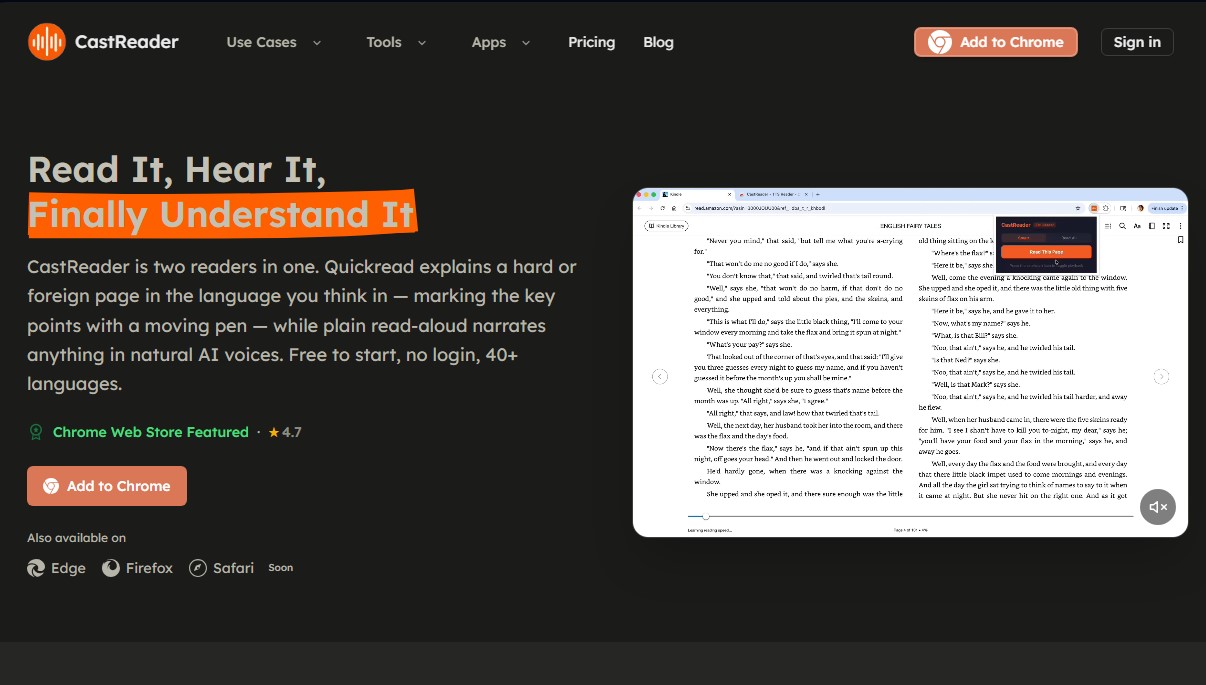
CastReader is an advanced browser extension designed to transform digital reading into an optimized auditory and visual experience using artificial intelligence. This tool functions as a dual reading assistant that not only converts text to speech with natural AI voices but also processes and explains complex content or foreign-language text to facilitate immediate understanding.
The application's architecture is built on two functional pillars: conventional reading and the Quickread system. While the standard mode narrates any web page, Quickread mode acts as a personal tutor that analyzes paragraph meanings, summarizing key points and explaining them in the user's native language. This feature utilizes a dynamic visual marker that underlines and circles important elements on the computer screen, allowing the eye to keep pace with the explanation without losing the train of thought.
Among CastReader's most notable technical capabilities are:
- Digital Library Integration: It is compatible with Kindle Cloud Reader, WeRead, and O'Reilly, using optical character recognition (OCR) technology to read DRM-protected books and turn pages automatically.
- Multilingual Support: It processes more than 40 languages, allowing articles in languages such as Chinese, German, or French to be explained directly in English.
- AI Chatbot Interaction: It adds play buttons to responses from ChatGPT, Claude, Gemini, and DeepSeek, making it easy to listen to long analyses or code explanations without leaving the interface.
- Mobile Device Synchronization: It allows users to send audio content to their mobile phone via Telegram to continue listening away from the desk.
- Smart Extraction: It automatically removes ads, sidebars, and navigation menus to focus exclusively on relevant content from articles, blogs, or PDF documents.
This tool is especially beneficial for students and researchers who need to process large volumes of technical information, as well as professionals looking to optimize their time by listening to emails in Gmail or reports in Google Docs. Additionally, its word-for-word visual tracking system is an effective solution for users with dyslexia or ADHD, as it reduces cognitive fatigue and improves retention.
CastReader is easily installed on browsers like Chrome, Edge, and Firefox. It is straightforward to use: simply select text or click the extension icon to start the narration. Requiring no complex configuration, it allows any user to convert the web into a podcast-like format while maintaining the integrity of the original content through high-quality natural language processing.
CastReader features and use cases
How to use CastReader
CastReader FAQ
What is CastReader, and how can it help me with my daily reading?
It’s a browser extension that converts any webpage, article, or document into audio using high-quality AI voices so you can listen while multitasking.
Is CastReader free to use?
Yes, there is a free version that allows you to listen for up to twenty minutes a day using standard voices, with no need to create an account or log in.
Can I use CastReader to listen to my Kindle books?
Absolutely. The extension is compatible with Kindle Cloud Reader and can narrate your books chapter by chapter with automatic page-turning.
What is CastReader’s Quickread feature, and how is it different from normal reading?
Quickread doesn’t just read the text; it explains the content in your own language and highlights key points with a virtual pencil to make complex texts easier to understand.
Which browsers currently support CastReader?
The extension is available for Google Chrome, Microsoft Edge, and Firefox, making it compatible with most computers.
How many languages does CastReader support for narration and explanation?
The tool supports over forty languages, including English, Spanish, French, German, Chinese, and Japanese, among others.
How does CastReader’s "send to mobile" feature work?
You can transfer the audio of any book or article to your mobile device via Telegram with a single click, allowing you to keep listening on the go.
Is CastReader compatible with responses from ChatGPT and other AIs?
Yes, the extension adds a play button next to every response on platforms like ChatGPT, Claude, or Gemini, so you can listen to them instantly.
Does CastReader help people with reading difficulties like dyslexia?
Yes, real-time paragraph highlighting and voice narration help maintain focus, reduce eye strain, and improve information retention.
What advantages does the CastReader Pro plan offer over the free version?
The Pro plan removes the twenty-minute daily limit, offers over a hundred ultra-realistic premium voices, and allows for the full reading of books and long documents.
CastReader pricing and plans
Free
0 $ per month
20 minutes of daily listening time.
Standard AI voices with up to 2x speed.
3 "AI Explains" per day.
Compatible with all sites: Kindle, WeChat Read, PDF, and ChatGPT.
Upload your own files in PDF, Word, or TXT formats.
No login required to get started.
Pro
4,99 $ per month (includes 3-day free trial)
No 20-minute daily listening limit.
Support for full e-books and long PDFs (Kindle and documents).
100+ premium AI voices with up to 3x speed.
No daily limit on the "AI Explains" feature.
Pro Yearly
35,99 $ per year (approx. 3,00 $ per month, billed annually)
Includes 3-day free trial.
No 20-minute daily listening limit.
Support for full e-books and long PDFs (Kindle and documents).
100+ premium AI voices with up to 3x speed.
No daily limit on the "AI Explains" feature.
Save 40% compared to the monthly subscription.
CastReader Screenshots
CastReader alternatives
PortuguesePal
Practice Brazilian or European Portuguese with an AI tutor. Improve your fluency and pronunciation with real conversations and instant corrections.


MakeLesson
Transform educational materials into interactive, auto-graded lessons. Includes student management, scheduling, and payments in an all-in-one platform for teachers.

GermanTutor.ai
AI German tutor for real conversations, pronunciation, and grammar correction. Improve speaking fluency and prepare for official exams at all levels.

MockLive AI
AI platform to practice interviews, exams, and presentations with real-time voice. Includes realistic simulations, response analysis, and detailed feedback.
SpanishPal.ai
Improve your Spanish speaking with an AI tutor. Practice real-world scenarios with instant corrections and choose from Spain, Mexico, or US regional variants.