

MakeLesson
Share
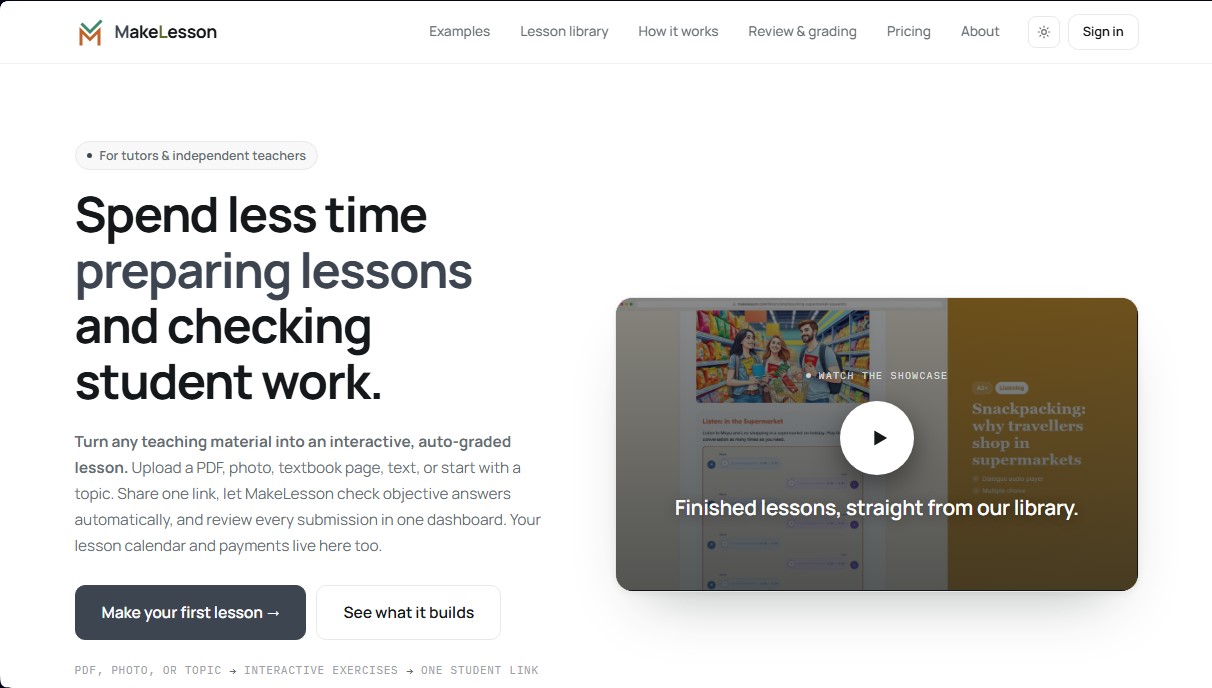
Transform educational materials into interactive, auto-graded lessons. Includes student management, scheduling, and payments in an all-in-one platform for teachers.
What is MakeLesson?
MakeLesson is an AI-powered educational platform designed for private tutors and independent educators to transform any teaching material into interactive lessons with auto-grading. This tool allows users to digitize notes, textbook photos, or PDF files, turning them into dynamic exercises that students can easily complete from their computer or mobile device. Its primary goal is to optimize class preparation and reduce administrative workload by automating assessments and student progress tracking.
MakeLesson’s workflow is driven by AI-assisted technology that simplifies content creation. Users can start by uploading a document or simply describing the desired topic via a text prompt. The AI generates a lesson draft in less than a minute, integrating exercises and, optionally, AI-generated audio and images. One of its most innovative features is chat-based editing: instead of navigating complex menus, teachers can request formatting or content changes by typing direct instructions. The tool uses advanced models to structure ten different activity types, including listening exercises with distinct voices for dialogues.
The capabilities of this AI application cover a wide range of needs within the digital educational environment:
- Exercise Variety: Automatically generates multiple-choice, fill-in-the-blanks, matching, crosswords, sentence ordering, and writing activities.
- Mobile-First Design: Exercises are optimized for touchscreens, making it easy for students to complete assignments anywhere without needing to install apps or create accounts.
- Auto-Grading and Review: The system instantly grades objective responses. For open-ended writing tasks, tutors have an AI review assistant that suggests grades and highlights errors before final validation.
- Miro Integration: Allows lessons to be embedded as interactive widgets directly into collaborative whiteboards while keeping results synced.
Beyond content creation, MakeLesson acts as a comprehensive management system for educators. It includes a tutor calendar to organize individual or group classes and a payment tracker to manage income and pending collections. To improve communication, it integrates with Telegram, sending automatic reminders to students about their upcoming sessions and notifications to the teacher when an assignment is submitted. This centralized approach allows teaching professionals to manage their entire workflow—from material creation to billing—within a single, functional, and efficient interface.
MakeLesson features and use cases
How to use MakeLesson
MakeLesson FAQ
What is MakeLesson?
MakeLesson is a platform designed for teachers and tutors to turn materials like PDFs or photos into interactive, auto-graded lessons.
How can I create a lesson using this tool?
You can upload a PDF, a photo of a textbook, or enter a topic to have the AI automatically generate exercises for you.
Do my students need to create a MakeLesson account to complete assignments?
No, students don't need to register or install any apps. They can access exercises directly via a shared link.
Are the exercises graded automatically?
Yes. Multiple-choice and fill-in-the-blank questions are self-grading, and the system allows you to review and provide feedback on open-ended responses from your dashboard.
Can I use MakeLesson to manage my schedule and payments?
Yes, the tool includes features to organize your weekly classes, track payments, and easily view your monthly earnings.
Is MakeLesson compatible with virtual whiteboards like Miro?
Yes, you can embed your interactive lessons directly into a Miro board as an add-on, allowing students to work without ever leaving the whiteboard.
What is included in the free version of the platform?
The free plan offers twenty lesson-creation credits, unlimited students, and calendar and payment management for up to five students.
MakeLesson pricing and plans
Free
$0
- 20 one-time credits (equivalent to about 3–10 AI-generated lessons).
- Unlimited students.
- Calendar and payment management for up to 5 students.
- Watermarked PDF exports.
Pro
$6 per month (introductory offer, regularly $11.99)
- 300 monthly credits (enough for 20–60 AI lessons per month).
- Unlimited students.
- Unrestricted calendar and payment management for all students.
- Clean, watermark-free PDF exports.
Max
$20 per month (introductory offer, regularly $39.99)
- 1,200 monthly credits (enough for 60–180 AI lessons per month).
- Unlimited students.
- Unrestricted calendar and payment management for all students.
- Clean, watermark-free PDF exports.
MakeLesson Screenshots
MakeLesson alternatives



GermanTutor.ai
AI German tutor for real conversations, pronunciation, and grammar correction. Improve speaking fluency and prepare for official exams at all levels.

Amuse Labs
Create AI-powered crosswords and interactive games to boost site retention and revenue. Customize puzzles to drive engagement and attract customers.

Ask BONBON
AI assistant for electricians that answers NEC and CEC code questions with official citations. Includes calculation tools, blueprint analysis, and a voice assistant.