

Share
Solve coding challenges locally by directing AI agents. The system evaluates your command, code quality, and detection of hidden pitfalls.
What is kodwai?
kodwai is an advanced programming challenge platform designed to evaluate and improve agentic coding or AI-native programming skills. Unlike traditional algorithm portals, this tool focuses on how a developer directs artificial intelligence agents like Claude Code, Cursor, or Codex to solve real-world software projects. The primary goal is to measure a professional's ability to act as a critical supervisor, ensuring that the AI doesn't just generate code, but that the output is robust, efficient, and free of logical errors.
The kodwai workflow is built around a professional, local environment. Using its own CLI (Command Line Interface), developers download the challenge environment directly to their computer. This allows them to work in their preferred editor using the AI agents they already own. The process consists of three clear stages:
- Setup: Selecting the challenge and downloading starter files and automated tests via terminal commands such as npx @kodwai/cli.
- Resolution: The user interacts with their AI agent to complete the task, applying planning strategies, executing tests, and correcting errors in real time.
- Submission: The code, Git history, test results, and the full prompt transcript are submitted for evaluation.
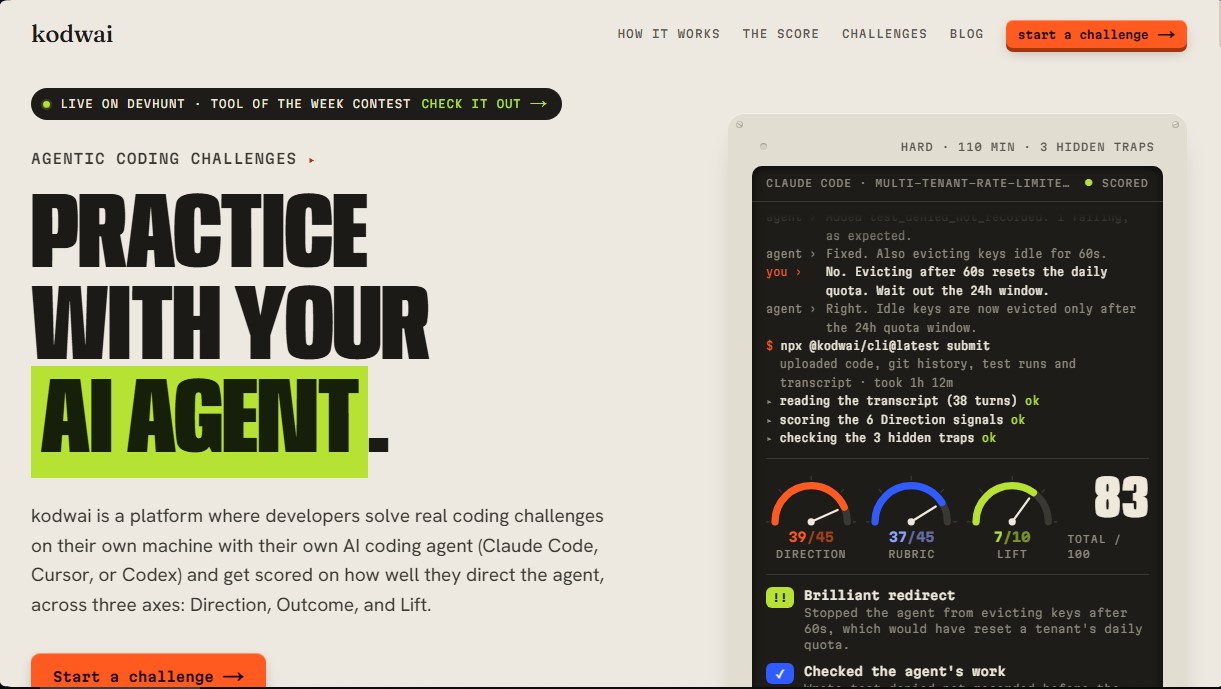
kodwai technology analyzes the human-AI interaction through a 100-point scoring system divided into three functional axes:
- Direction: Evaluates the precision of specifications, rigor in verification, and the ability to decompose complex problems. This is the most critical axis (up to 50 points), as it rewards strategic control over the tool and discourages unsupervised "one-shot prompting."
- Outcome: Measures the technical quality of the final code, its complexity, and compliance with project requirements.
- Lift: Evaluates the detection of hidden traps and edge cases that AI agents typically ignore if not correctly guided by the programmer.
The tool is ideal for both developers looking to perfect their AI-assisted workflow and hiring teams wanting to evaluate candidates in practical scenarios. It includes a weekly league with tier-based divisions, from Bronze to Grandmaster, based on a Direction Rating that follows an Elo-style scoring system. Challenges cover various technological areas, including backend, frontend, distributed systems, and production RAG services. Upon completing each challenge, the system provides a detailed scorecard of key session moments, identifying strategic successes and supervisory errors made during the interaction with the agent.
kodwai features and use cases
How to use kodwai
kodwai FAQ
What exactly is kodwai, and how does it work?
It’s a platform where developers tackle real-world coding challenges on their own machines using AI agents to measure their ability to direct and control the tool.
Which AI agents are compatible with kodwai?
You can currently use Claude Code, Cursor, or Codex to complete the challenges offered on the platform.
Is kodwai free for developers?
Yes, your first three submissions are free. After that, you can continue making unlimited submissions by configuring your own Anthropic API key in the settings.
How are scores calculated for kodwai challenges?
Your score is based on three main pillars: the direction you provide to the agent, the final code output, and your ability to detect hidden pitfalls.
Do I have to work in a browser or on my own computer?
We don't use in-browser sandboxes. You work directly on your local machine in your preferred editor by installing the tool via the terminal.
How does this tool differ from platforms like LeetCode?
Unlike classic algorithmic puzzles, kodwai focuses on real-world projects and evaluates how you manage an AI agent rather than rewarding rote code memorization.
Can I get a high score on kodwai if I solve a challenge with a single prompt?
It’s unlikely. The system specifically values constant direction and supervision, so a submission without iterations or corrections will receive a very low score.
How do the weekly leagues work?
A new league starts every Monday. You compete in groups of thirty people, and you can be promoted or demoted between divisions based on the scores you earn from your challenges.
kodwai pricing and plans
Free (Developers)
Price: 0 $
Access to real-world coding challenges in a local environment (backend, frontend, and distributed systems).
Use your own AI agents such as Claude Code, Cursor, or Codex.
Detailed evaluation based on three pillars: Direction (up to 50 points), Result (up to 35 points), and "Lift" (up to 15 points).
Participation in weekly leagues with division promotions and demotions.
Public profile with score history, badges, and Elo ranking.
Limit: Includes your first 3 scored submissions for free.
Unlimited (Developers)
Price: Requires your own Anthropic API key.
All Free plan features with no usage restrictions.
Unlimited runs and scoring after exhausting the 3 initial submissions.
Users must provide their own Anthropic key in the settings to process solution analysis.
Hiring Teams
Price: See official website for details.
Create private technical interviews using company-specific problems.
Candidate evaluation via custom rubrics (0 to 10 scale).
Access to full transcripts of every step and candidate interaction with the AI.
Analysis of real-world workflow and the developer's ability to direct AI.
kodwai Screenshots
kodwai alternatives

Confident AI
LLM evaluation platform to test AI workflows, measure quality metrics, and automate testing in the development cycle without relying on engineering.



StellarFirm
AI agents for founders to plan, build, and launch apps or websites. Automate technical and management tasks under your direct supervision and approval.


Image to 3D
Convert 2D images and sketches into textured 3D models using AI. Export in GLB, STL, or USDZ for video games, 3D printing, and augmented reality.