
HeyDeer
Share
Optimize GitHub code reviews with AI. Analyze pull requests, detect bugs, and generate automated fixes to accelerate software development.
What is HeyDeer?
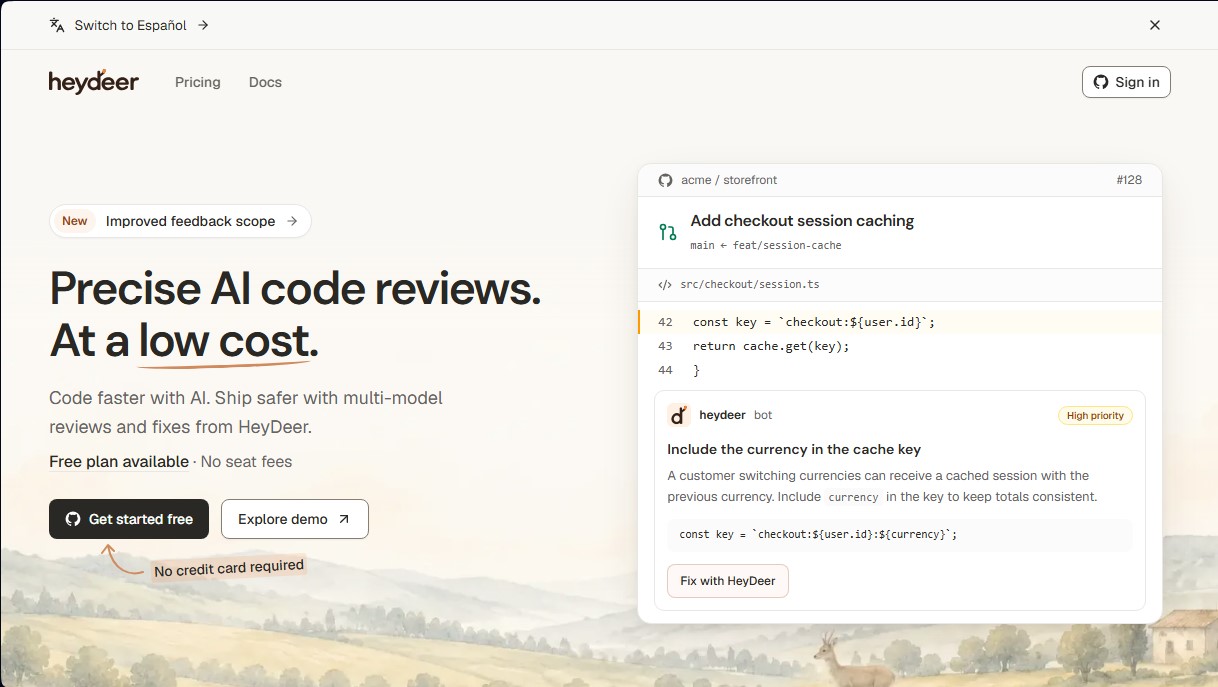
HeyDeer is an AI code review tool designed to optimize the workflow for GitHub pull requests. Its primary function is to act as an automated reviewer that detects bugs, suggests logic improvements, and applies direct fixes, enabling development teams to perform faster and more secure deployments. This solution is geared toward developers and companies looking to reduce manual code review workloads without compromising software quality or security.
The platform utilizes a multi-model review approach, integrating advanced technologies from OpenAI and Anthropic. To ensure maximum precision, HeyDeer employs several independent AI agents that analyze changes from different perspectives. Findings are verified and consolidated before being published, eliminating false positives and ensuring that only high-value, actionable issues are reported. Additionally, it uses isolated environments on Vercel to run these monitoring tasks efficiently and securely.
Key capabilities of HeyDeer include:
- High-fidelity reviews: The system is designed to generate less noise, focusing on critical findings that truly deserve a developer's attention.
- Custom Repository Checks: It allows you to define your own rules and specific standards for each project. You can configure dedicated agents for specific tasks, such as React best practices compliance or dependency reviews.
- Fix with HeyDeer feature: The tool doesn't just identify the problem; it can also write the necessary changes and automatically open a fix pull request against the original branch.
- Depth levels: It offers two analysis modes: Standard mode for everyday changes and Deep mode for more exhaustive investigations in complex codebases.
- Native GitHub integration: It connects directly to repositories to autonomously intervene in every new PR submitted by the team.
This AI tool for developers is particularly useful for maintaining consistency in large codebases and accelerating the development lifecycle. By delegating technical oversight to HeyDeer, engineers can focus on architecture and complex problem-solving, while the AI ensures that every line of code meets defined standards. Its operating model allows for unlimited developer collaboration, making it easy to scale for teams of any size using GitHub as their primary version control platform.
HeyDeer features and use cases
How to use HeyDeer
HeyDeer FAQ
What is HeyDeer and how does it help my development team?
HeyDeer is an AI-powered code review tool for GitHub pull requests that detects bugs and proposes precise solutions to improve software security.
Do I have to pay a fee for every developer who uses HeyDeer?
No, the tool's plans do not have per-seat costs and allow for an unlimited number of developers across all subscription tiers.
Is there a free version to test HeyDeer's features?
Yes, the free plan offers 1,000 credits during the first month and 300 monthly credits thereafter for personal projects, with no credit card required.
How does HeyDeer guarantee the privacy of my source code?
The platform enforces a strict zero-data retention policy with AI model providers to ensure your code is neither stored nor used for any other purposes.
What is the difference between Standard and Deep review levels?
The Standard level is designed for quick reviews of everyday changes, while the Deep level performs a more exhaustive and detailed investigation of complex code snippets.
Can HeyDeer automatically fix the detected issues?
Yes, using the fix feature, the tool writes the necessary changes and opens a new pull request against your original branch so you can review and merge it.
Is it possible to define custom review rules in HeyDeer?
Absolutely, you can configure your own project rules and standards so the AI reviewers focus specifically on compliance with those guidelines.
What happens if I use all my plan's credits before the end of the month?
You can add extra credits to your account at any time to continue performing reviews without needing to upgrade your subscription tier.
Does HeyDeer offer free support for open-source projects?
Yes, the tool provides free reviews for open-source repositories as long as they stay within a reasonable usage limit.
Which code hosting platforms is HeyDeer compatible with?
Currently, the tool offers full integration with GitHub to analyze pull requests and manage fixes directly within your repositories.
HeyDeer pricing and plans
Free
$0 per month
1,000 credits for the first month and 300 monthly credits thereafter.
1 parallel review per repository.
No per-user fees (unlimited developers).
Unlimited repositories.
Access to all review levels and repository checks.
Zero data retention by model providers.
Starter
$9 per month
2,500 monthly credits.
4 parallel reviews per repository.
Unlimited developers and repositories.
Frontier AI models.
Reviews with code context.
Ability to add extra credits as needed.
Pro
$39 per month
12,000 monthly credits.
12 parallel reviews per repository.
Unlimited developers and repositories.
Includes all features from previous plans.
Geared toward teams and heavy usage.
Open Source
Free
Available for open-source projects on GitHub.
Free up to a fair-use limit; standard charges apply thereafter.
Contact
Pricing available upon request
For companies requiring higher credit volumes or custom billing terms.
HeyDeer Screenshots
HeyDeer alternatives

StellarFirm
AI agents for founders to plan, build, and launch apps or websites. Automate technical and management tasks under your direct supervision and approval.


miniOrange MCP Server for WordPress
Securely connect AI agents to WordPress. Control permissions, protect sensitive data, monitor actions with audit logs, and manage human approvals.