
Choicer Voicer
Share
AI tool for voice cloning, video translation, and voiceovers. Design unique sounds and dub games, animations, or social media content.
What is Choicer Voicer?
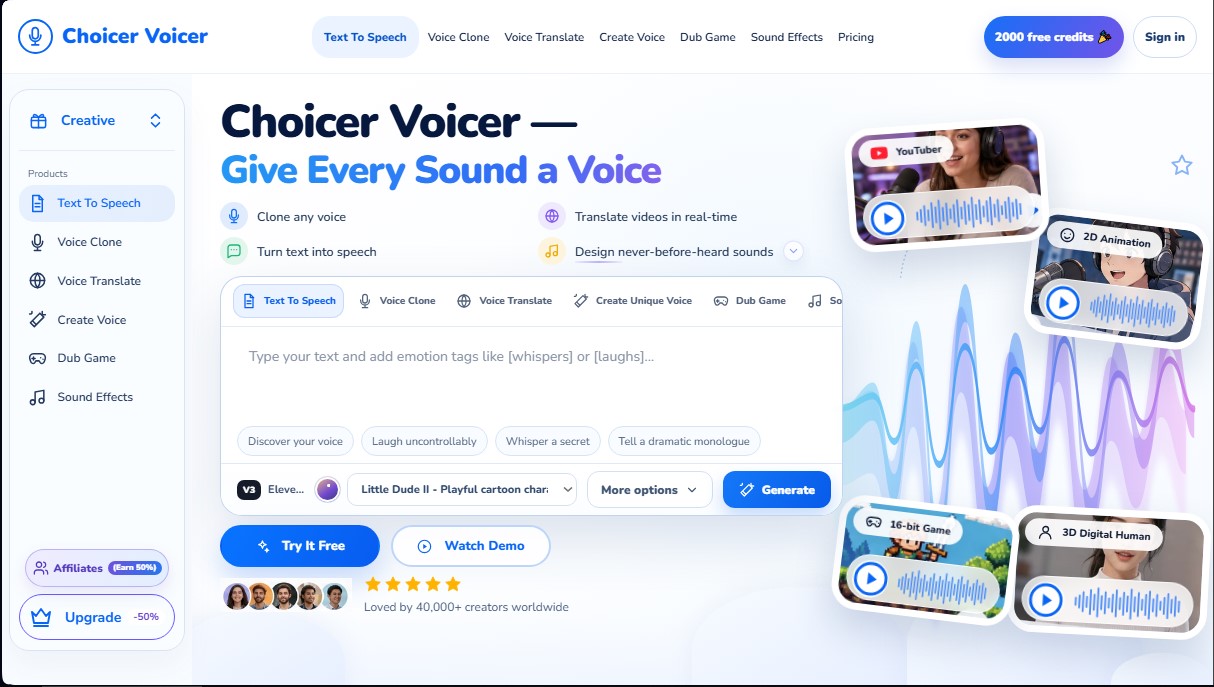
Choicer Voicer is a comprehensive AI platform specializing in audio and voice generation, designed to meet the needs of content creators, game developers, and businesses. This tool allows users to transform text into natural-sounding voiceovers, clone vocal identities, and perform high-fidelity multilingual translations. By utilizing advanced technology like the Eleven v3 model, the system is capable of interpreting complex emotional nuances, allowing users to insert specific tags such as whispers or laughter within the text-to-speech workflow.
The application’s functionality is divided into several core capabilities that optimize audiovisual production. Voice cloning enables the generation of a digital twin from a short audio sample, making it easy for any text to be narrated with a specific timbre. Additionally, the Voice Design feature offers the ability to create entirely new, non-existent voices by adjusting parameters like pitch, timbre, and emotion to bring fictional characters to life—from 8-bit heroes to fantasy creatures.
In the realm of localization and global marketing, Choicer Voicer stands out for its video translation tool. This system allows content to be translated into seven languages (including Spanish, English, German, French, Chinese, Italian, and Indonesian) while maintaining the speaker's original tone of voice. This feature is key for e-commerce and live streaming, as it allows ads and product presentations to be adapted for international audiences quickly and efficiently from any computer.
Practical capabilities and benefits:
- Video Game Dubbing (Dub Game): Voice synchronization for anime characters, 3D models, and digital humans with custom voice profiles.
- Sound Effect Generation: Creating unique environments and sounds through text prompts to enrich audio post-production.
- Automated Voiceovers for Creators: An ideal tool for YouTubers and editors looking to transform scripts, blogs, or notes into professional audio without the need for recording equipment.
- Digital Humans and Livestreaming: Optimization of sales videos and live streams through the use of high-quality synthetic voices that improve user interaction.
The Choicer Voicer interface is designed to be functional and straightforward, allowing users to manage everything from simple narration projects to complex professional dubbing tasks. Thanks to its focus on generative AI voice technology, the tool removes the technical barriers of traditional recording, offering a flexible workspace to elevate the audio quality of any digital project.
Choicer Voicer features and use cases
How to use Choicer Voicer
Choicer Voicer FAQ
What is Choicer Voicer and what are its main features?
Choicer Voicer is an AI platform that allows you to convert text to speech, clone voices, translate videos, and design custom sound effects.
Can I use Choicer Voicer for free?
Yes, the tool offers a free plan that includes 2,000 credits so you can test out the voice generation and sound effect features.
How does voice cloning work in Choicer Voicer?
You just need to upload an audio sample so the AI can learn the unique tone, allowing that voice to read any text you type.
Is it possible to translate videos into other languages while keeping my original voice?
The voice translation feature allows you to translate your videos into seven different languages while preserving the timbre and intonation of the original speaker.
Can specific emotions be added to the voiceovers?
Yes, you can insert emotion tags such as whispers or laughter within the text to make the generated voice much more expressive and realistic.
What is the difference between voice cloning and voice design?
Cloning replicates an existing real voice using a sample, while voice design allows you to create entirely new sounds by adjusting pitch and timbre.
Is Choicer Voicer suitable for video game and animation dubbing?
The tool includes specific features to bring anime and video game characters to life by applying different emotions and tones tailored to each role.
What advantages does the Creator plan offer for regular users?
This plan includes 120,000 monthly credits, enhanced voice cloning, and commercial rights to use the content in professional projects.
How many monthly credits are included in the Studio plan for production teams?
The Studio plan provides 500,000 credits per month and full access to professional voice design and scene dubbing tools.
How can I contact support if I have issues with my account?
You can access the contact section on the official website to resolve any technical or billing questions related to your subscription.
Choicer Voicer pricing and plans
Free Plan
Price: $0 per month.
2,000 credits.
Text-to-Speech.
Sound effects preview.
Standard generation queue.
Use for personal projects.
Creator Plan
Price: $9 per month (billed annually).
120,000 credits per month.
Text-to-Speech with expressive direction.
Enhanced Voice Cloning.
Voice Translation.
Access to sound effects.
Use for commercial projects.
Studio Plan
Price: $24 per month (billed annually).
500,000 credits per month.
Professional Voice Cloning.
Access to Speech-to-Text.
Full access to Voice Design.
Dub Game workspace.
Priority sound effects generation.
2 seats (users) in the workspace.
Business Plan
Price: $72 per month (billed annually).
2,000,000 credits per month.
Includes all Studio plan features.
5 professional voice profiles.
Advanced Voice Design capabilities.
High-volume translation and dubbing.
5 seats (users) in the workspace.
Priority support.
Choicer Voicer Screenshots
Choicer Voicer alternatives
TextInMyVoice
Clone your voice with a short sample to turn text into natural voiceovers. Generate and download MP3s in your own tone for free, no registration required.

SpeakCrate
Open-source API for local, private speech synthesis. Generate multilingual audio on your own servers with OpenAI standard compatibility.

Vidverse AI
Vidverse AI brings several AI video, image and voice models into one web and mobile app, so you can turn text or photos into clips, images and voiceovers.



AI ReFounder
24/7 AI voice agent for online stores. Automatically handle calls, resolve inquiries, and close sales with seamless Shopify integration.