

Share
AI assistant that converts articles, PDFs, and videos into study materials with bilingual reading, contextual explanations, auto-summaries, and vocabulary management.
What is ClaviSay?
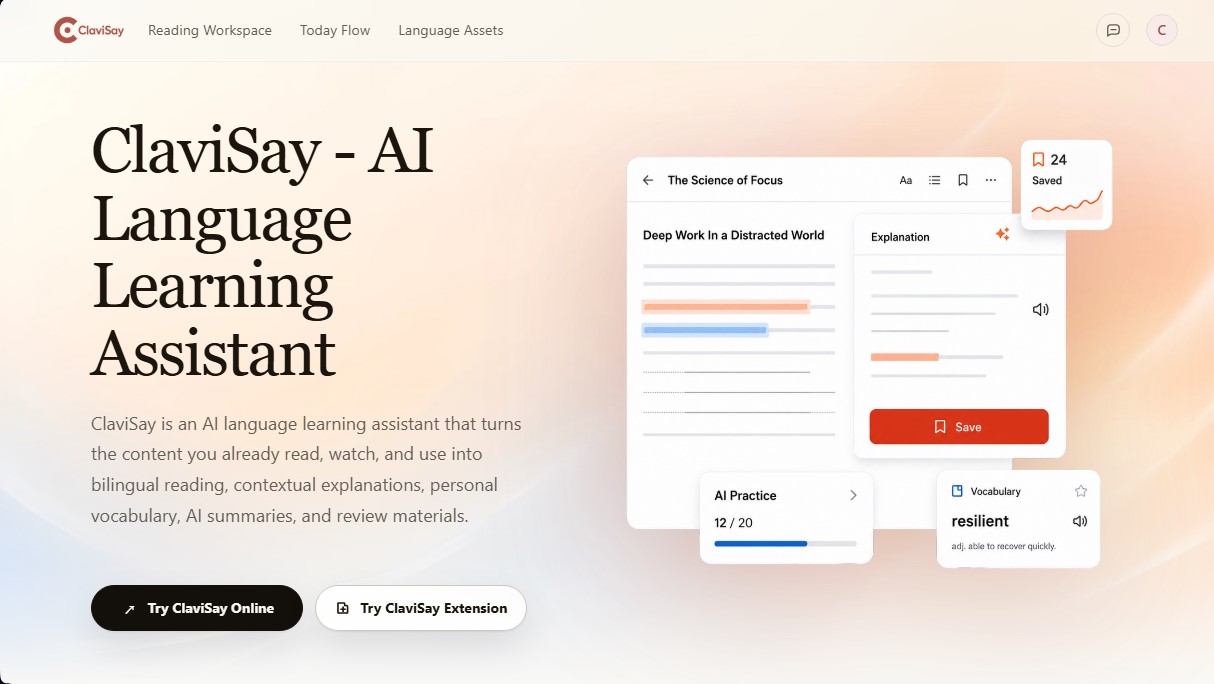
ClaviSay is an AI language learning assistant designed to transform everyday digital content into personalized and practical study materials. Unlike traditional teaching platforms that use predefined lessons, this tool allows you to learn from what you typically consume on your computer or mobile device, such as web articles, PDF documents, videos, or professional emails. Its primary function is to integrate comprehension, vocabulary building, and review into a single digital workflow.
The operation of ClaviSay leverages artificial intelligence to offer an immersive bilingual reading experience. The system allows you to compare the original English text with a fluid translation while maintaining the document's structure, making it easier to process complex passages without losing the narrative thread. Additionally, AI technology provides contextual explanations for terms, phrases, or entire paragraphs, analyzing not only the literal meaning but also the tone and communicative intent based on the setting—something essential in academic or professional environments.
The tool stands out for its functional capabilities in linguistic knowledge management:
- Bilingual Reading Assistant: Enables reading reports, research papers, and news with integrated simultaneous translation support.
- AI Explanations: Analyzes grammar and specific nuances based on the context of the original paragraph.
- Personal Vocabulary Builder: Facilitates extracting technical words and expressions directly from the source to save them in an asset library.
- Structured AI Summaries: Transforms long-form content into key points and essential vocabulary for rapid learning.
- Multi-Device Sync: Materials saved through the browser extension or web workspace are available for later review on any device.
ClaviSay is specifically aimed at professionals in international environments, technical students, and independent learners who need to master real-world English. By connecting learning with authentic sources, such as meeting notes or product manuals, the tool ensures that the acquired vocabulary is relevant and immediately applicable. The app's approach prioritizes user discretion, allowing them to choose which expressions to save and always linking them back to the original source so that learning is cumulative and contextualized. It is a practical solution for those who already have foundational knowledge but need to understand and use the language with precision in real-world work or study situations.
ClaviSay features and use cases
How to use ClaviSay
ClaviSay FAQ
What exactly is ClaviSay and how can it help me learn English?
It’s an AI-powered language learning assistant that transforms the content you read or watch into personalized lessons with contextual explanations and a personal vocabulary list.
What types of files and content can I import into ClaviSay?
You can use web articles, PDF documents, pasted text, and video or audio sources to generate study materials.
How is ClaviSay different from a standard translator?
Unlike a translator that only provides an immediate fix, this tool allows you to save vocabulary and phrases linked to their original context for later review.
Can I use bilingual reading to better understand complex texts?
Yes, the platform offers an immersive reading view where you can compare the original text with the translation while keeping the document’s structure visible at all times.
Is it possible to access my saved vocabulary from different devices?
ClaviSay automatically syncs your materials across the browser extension, the web workspace, and the mobile version so you can study anywhere.
Are the AI-generated explanations and summaries completely reliable?
While the technology is accurate, results may occasionally contain errors, so we recommend verifying important information directly with the original source.
What type of user is ClaviSay designed for?
It is geared toward professionals working in English, students of technical or academic content, and any independent learner who prefers learning with real-world content.
Is there a free version, or do I need to pay for a subscription?
The service offers free features as well as paid subscription plans with additional features; billing details and cycles are shown at the time of purchase.
How does the ClaviSay browser extension work?
The extension allows you to highlight words or phrases while browsing the web to get instant explanations and save useful expressions without leaving the page you’re reading.
ClaviSay pricing and plans
Free Version
Access to AI-powered bilingual reading assistance and contextual explanations.
Tools for building personalized vocabulary from real-world content.
Structured summary generation for long-form articles and documents.
Sync learning materials across the web platform, browser extension, and mobile devices.
Support for importing web articles, PDFs, videos, and audio recordings.
Paid Plans
Please visit the official website for detailed information regarding pricing, billing cycles, and additional features, as specific subscription rates are only displayed at the time of purchase.
ClaviSay Screenshots
ClaviSay alternatives
PortuguesePal
Practice Brazilian or European Portuguese with an AI tutor. Improve your fluency and pronunciation with real conversations and instant corrections.


MakeLesson
Transform educational materials into interactive, auto-graded lessons. Includes student management, scheduling, and payments in an all-in-one platform for teachers.

GermanTutor.ai
AI German tutor for real conversations, pronunciation, and grammar correction. Improve speaking fluency and prepare for official exams at all levels.

MockLive AI
AI platform to practice interviews, exams, and presentations with real-time voice. Includes realistic simulations, response analysis, and detailed feedback.

SpanishPal.ai
Improve your Spanish speaking with an AI tutor. Practice real-world scenarios with instant corrections and choose from Spain, Mexico, or US regional variants.