

Share
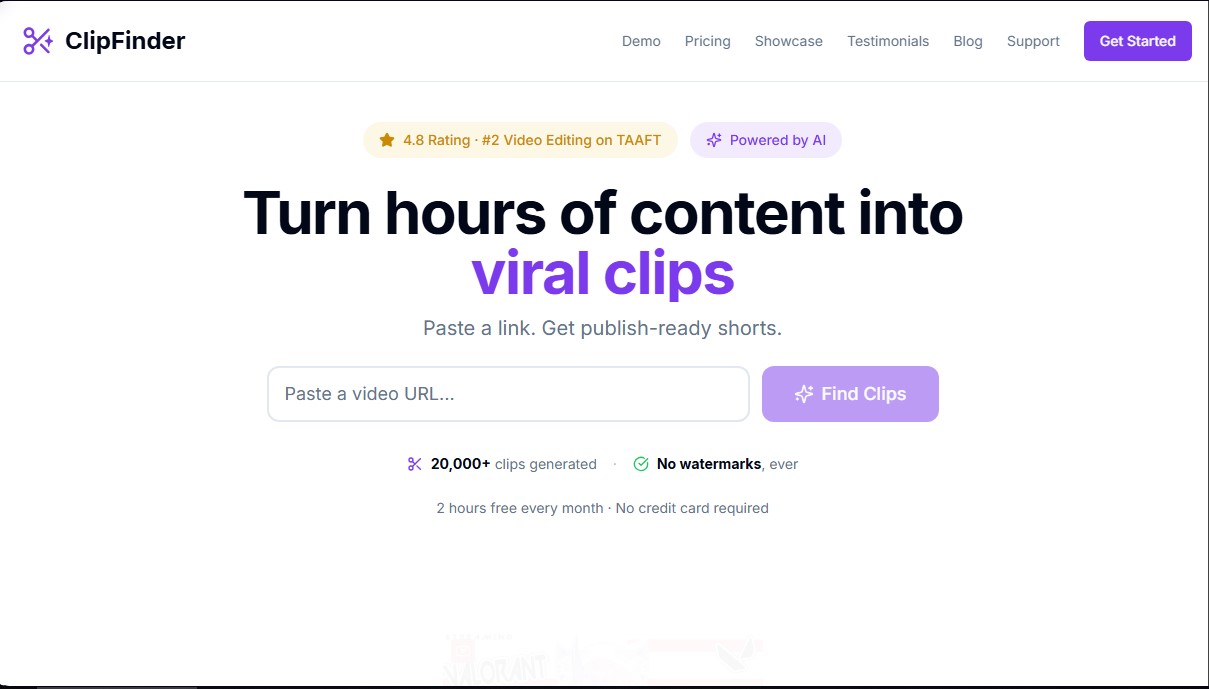
Transform long videos and livestreams into viral short clips. AI detects the best moments, adds captions, and automatically reframes to vertical format.
What is ClipFinder?
ClipFinder is an artificial intelligence tool designed to automate the creation of short-form content from long-form videos. Its primary function is to transform hours of footage—such as live streams, podcasts, or gaming VODs—into clips ready for social media platforms. The system eliminates the need to manually review all the material, saving time for content creators who want to maximize their social media presence without spending hours on technical editing from their computer.
The platform's operation is based on deep analysis using AI algorithms. By entering a video URL, ClipFinder's technology processes the content to identify key moments with viral potential, such as highlight reactions, game victories, funny fails, or memorable quotes. Once detected, the system categorizes and scores these snippets so the user can quickly select the best pieces of content.
Among its most relevant technical capabilities is smart auto-reframe. This feature automatically crops the original video into a 9:16 vertical format, ensuring that faces and the main action remain centered for mobile viewing. Additionally, it allows for the integration of dynamic captions with customizable styles, making it easier to maintain audience retention. Users have the option to download .srt or .vtt files if they prefer to make final touches in professional editing software.
The main features of ClipFinder include:
- Automatic moment detection: Identifies relevant milestones in long-duration videos, supporting files up to 10 hours.
- Direct publishing: Allows you to send generated YouTube Shorts directly to the platform from the interface.
- Export quality: Clips are downloaded in high definition (1080p) and without watermarks.
- Burned-in captions: Word-per-second highlighting styles to enhance visual impact.
- Cloud processing: Analysis is performed in the background, sending an email notification when the clips are ready.
This solution is especially useful for streamers and long-form content creators who need to consistently feed their short-video channels. By processing extensive videos in just a few minutes, ClipFinder acts as an efficient editing assistant that optimizes workflow, allowing the user to focus on creation while the AI handles the segmentation and visual adjustment of the clips. It is a practical tool for anyone looking for professional results without the need for advanced post-production knowledge.
ClipFinder features and use cases
How to use ClipFinder
ClipFinder FAQ
What is ClipFinder and how does it help content creators?
ClipFinder is an AI-powered tool that analyzes long-form videos to automatically extract the best highlights and convert them into short clips ready for social media.
What is the cost of using ClipFinder?
The service costs two euros per hour of analyzed video and does not require a monthly subscription. Plus, you get two free hours every month with no credit card required.
Do clips generated with ClipFinder have watermarks?
No, clips are always downloaded clean and without any watermarks to ensure a completely professional result.
How long does it take the system to process a long-form video?
Typically, analysis takes between ten and fifteen minutes for a one-hour video and about thirty minutes for three-hour streams, though processing times may vary depending on server load.
Can I automatically add captions to my videos?
Yes, the tool allows you to burn dynamic captions into the video with modern styles or download .srt files to edit them on your own.
What happens if my video analysis doesn't complete successfully?
If the analysis process fails for any reason, the system automatically refunds the usage hours to your account so you don't lose your balance.
Do I need to install any editing software to use ClipFinder?
It’s not necessary because the platform allows you to reframe to vertical format and add captions directly from your browser, although you can also download the original file to edit it wherever you prefer.
What types of videos work best with the tool?
The system provides the best results with videos between one and five hours long, such as gaming livestreams, podcast recordings, or long-form talks.
Can I post my videos directly to social media?
Yes, the platform allows you to publish your videos directly as YouTube Shorts, in addition to offering high-definition download options for other apps.
ClipFinder pricing and plans
Free Plan
Price: 0 $ (Includes 2 free hours every month).
- No credit card required.
- No watermarks on videos.
- AI-powered content analysis to identify viral moments.
Pay-As-You-Go Plan
Price: Starting at $2 per video hour (with volume discounts down to $1.50/hour).
- No monthly subscriptions or hidden fees.
- Purchased processing hours never expire.
- Generate multiple clips for every video analyzed.
- High-definition (1080p) downloads with no watermarks.
- Burned-in captions with two preset styles (TikTok-style).
- AI auto-reframing for 9:16 vertical format.
- Direct publishing to YouTube Shorts.
- Support for long-form videos (VODs and livestreams) up to 10 hours.
ClipFinder Screenshots
ClipFinder alternatives
OptimaClip
Turn long videos and podcasts into social clips. AI detects viral moments, adds captions, reframes, and schedules content automatically.


BeyondComments
Analyze YouTube comments with AI to extract video ideas, identify questions, and gauge audience sentiment. Optimize your strategy and fuel channel growth.

VideoVibe.io
Analyze YouTube comments with AI to gauge audience sentiment. Generate reports with key themes, sentiment metrics, and actionable recommendations for creators.