
Share
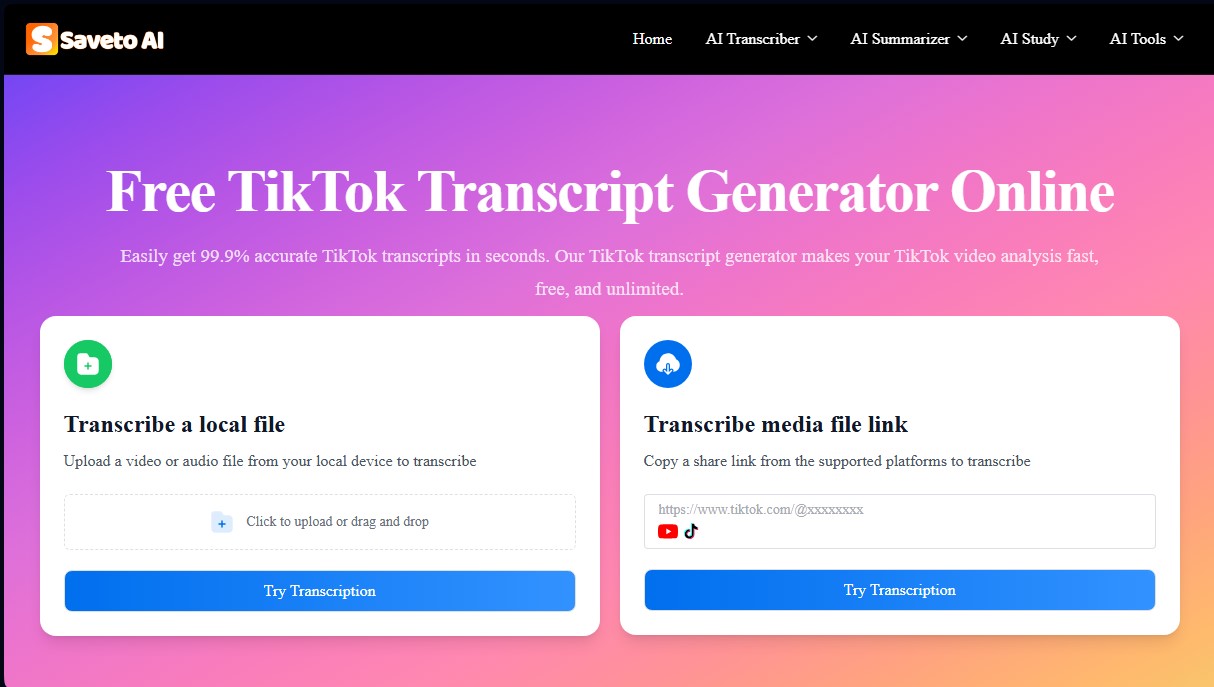
Transcribe and summarize videos from TikTok and other platforms for free. Generate text, captions, and key points in 200+ languages with no registration required.
What is Saveto AI?
Saveto AI is a platform specializing in video-to-text transcription and AI-powered summaries. Its primary function is to convert audiovisual content from platforms like TikTok, YouTube, and Instagram, as well as local files from a computer or mobile device, into accurate and structured text documents. This tool is designed to streamline the workflow for content creators, students, editors, and marketing professionals who need to process large volumes of information quickly and efficiently without the need for manual transcription.
Saveto AI’s operation is based on advanced natural language processing (NLP) algorithms and speech recognition, achieving an accuracy rate of up to 99.9%. The system can identify dialogue and narration in over 200 languages, overcoming linguistic barriers and challenges like complex accents or fast-paced speech. To use it, the user simply pastes a video link or uploads a media file; the AI processes the audio in seconds and delivers a transcription that includes timestamps to locate key moments within the footage.
Beyond simple speech-to-text conversion, the tool offers automatic AI summary capabilities. This allows for the instant extraction of main points and key ideas from long videos, optimizing study or research time. Additionally, Saveto AI facilitates the creation of multilingual subtitles and the repurposing of scripts for other formats, significantly improving video SEO by transforming spoken content into text that search engines can index.
Practical applications and functional benefits include:
- Content Creators: Extract ideas from viral videos and adapt scripts for different social networks, saving time in the production of derivative materials.
- Students and Academics: Facilitate the creation of study notes and outlines, and aid in language learning by comparing original audio with the generated text.
- Marketing Specialists: Detect emerging trends and topics of interest by analyzing the discourse within large volumes of social media videos.
- Video Editors: Streamline the post-production process by locating specific phrases and reviewing dialogue before the final export.
Accessibility is a fundamental pillar of this free AI tool, as it requires no registration and imposes no limits on the number of conversions. As a web-based application, processing is handled in the cloud, avoiding any strain on the user's device memory. Saveto AI positions itself as a comprehensive solution for converting any TikTok to text, allowing ephemeral social media content to be transformed into permanent, organized, and easy-to-reference digital assets.
Saveto AI features and use cases
How to use Saveto AI
Saveto AI FAQ
What is Saveto AI, and what exactly is it used for?
Saveto AI is a free tool that uses artificial intelligence to automatically convert videos from TikTok and other platforms into text.
Is Saveto AI's transcription generator free to use?
Yes, the service is completely free with no hidden costs, and it allows for unlimited transcriptions.
Do I need to create an account to use Saveto AI?
No registration or personal information is required to use all of the tool's features.
How accurate are Saveto AI's transcriptions?
The technology provides up to 99% accuracy, though this may vary slightly depending on the speaker's accent or the audio quality.
How many languages does Saveto AI support?
The system is compatible with over 200 different languages, allowing you to transcribe content from almost anywhere in the world.
Can I transcribe videos from platforms other than TikTok?
Yes. In addition to TikTok, you can paste links from YouTube, Instagram, and other social networks to get the video's text.
Can Saveto AI summarize the content of the transcribed videos?
Yes, the tool includes features to extract key points and generate automatic summaries, making it easier to study or create new content.
How do I convert a TikTok video to text using Saveto AI?
Simply copy the TikTok video link, paste it into the website's search bar, and click the button to generate the transcription in just a few seconds.
Is it possible to upload local files for transcription on Saveto AI?
Yes, the platform allows you to both paste external links and upload audio or video files directly from your local device.
Saveto AI pricing and plans
Free Plan: 0 €
100% free access—no registration required.
Unlimited transcriptions for TikTok, YouTube, Instagram, and other social media platforms.
Support for over 200 languages with up to 99.9% accuracy.
Generate summaries, captions, and key takeaways with timestamps.
Transcribe via direct link or by uploading local files from your device.
No video length restrictions or daily usage limits.
Saveto AI Screenshots
Saveto AI alternatives

BurningBridgesAI.app
Turn a photo into Drake’s viral dance. AI automatically recreates the choreography and gestures so you can star in the trend without recording a thing.
Amplify AI
Automatically generate and post daily TikTok and Instagram videos with AI creators. Create viral content for your brand and manage multiple accounts without filming.

Motion Transfer AI Video Generator
Animate character photos using reference videos. Precisely transfer gestures, dances, and body movements from a clip to an image for realistic results.
