
Share
Turn a photo into Drake’s viral dance. AI automatically recreates the choreography and gestures so you can star in the trend without recording a thing.
What is BurningBridgesAI.app?
BurningBridgesAI.app is an AI video generation tool designed to recreate the popular viral challenge based on Drake’s song "Burning Bridges." This app allows users to star in the music clip without needing to physically record themselves or learn any choreography. With just a single photograph, the system automatically applies the signature movements from the original video, including the famous final "where she at?" search gesture.
The technology behind this viral AI video creator is based on motion transfer and facial re-rendering. Users simply need to upload a clear image of a person or pet, and the platform processes the visual data to animate it to the exact beats of the track. No technical knowledge, manual editing, or complex prompts are required. The process is fully automated: after uploading the file, the tool generates a clip between 16 and 28 seconds long with a resolution of up to 1080p (Full HD).
Among its core capabilities, BurningBridgesAI.app offers customization options to enhance the scene:
- Protagonist and companions: It allows for the inclusion of the main user and up to three additional friends or pets to complete the group vibe.
- Scene templates: Different environments are available, such as a banquet hall or custom party settings.
- Music synchronization: The final video includes the integrated song and maintains the timing of the original gestures, such as the initial smile at the camera and the rhythmic dancing.
- Output quality: Users can choose from various resolutions, from standard 480p to Full HD, depending on their posting needs.
To get the best results with this Drake AI video generator, it is essential to use front-facing photos with good lighting, preferably mid-shots (from the waist up) or full-body shots. The system supports common formats like JPG, PNG, and WebP. Note that the platform enforces strict safety policies: it only allows processing images of consenting adults, prohibiting the use of photos of minors or celebrities.
This solution is ideal for content creators looking to jump on digital trends quickly and professionally. As a browser-based application, it works perfectly on both desktop and mobile devices, eliminating the need to install heavy apps. The result is content optimized for direct sharing on TikTok, Instagram Reels, or YouTube Shorts, realistically maintaining the aesthetic and visual impact of the original clip.
BurningBridgesAI.app features and use cases
How to use BurningBridgesAI.app
BurningBridgesAI.app FAQ
What is BurningBridgesAI.app and what is it for?
BurningBridgesAI.app is an AI tool that recreates the viral Drake video, allowing you to be the star using just a single photo.
What kind of photos should I use with Burning Bridges AI for the best results?
You should use clear, front-facing photos of a single person with good lighting. The photo should show the body from the head to the waist and should not have any filters or sunglasses.
Can I add my friends to my BurningBridgesAI.app video?
Yes, you can include up to three additional friends or pets to appear in the scene alongside you as the main star of the clip.
Do I need to install an app to use Burning Bridges AI?
No download is necessary because the tool works directly in your computer or mobile browser.
How long does it take for my video to be ready on BurningBridgesAI.app?
The creation process usually takes a few minutes, and you can close your browser tab while the system finishes generating the file.
Is Burning Bridges AI free to use?
The tool operates on a pay-per-credit system where you can purchase packs to generate individual videos without the need for a monthly subscription.
What happens if my video doesn't generate correctly on BurningBridgesAI.app?
If the creation process fails, the system automatically refunds the credits to your account so you can try again.
Can I use photos of celebrities or children on Burning Bridges AI?
The use of images featuring celebrities or minors is not permitted. You may only use photos of adults who have given their prior consent.
What resolution are BurningBridgesAI.app videos downloaded in?
You can choose from various download qualities ranging from standard 480p resolution to 1080p Full HD, depending on the credits you use.
Do the videos include the song from the Burning Bridges AI trend?
All generated videos include the official music, so your video is ready to download and share directly on your favorite social media platforms.
BurningBridgesAI.app pricing and plans
Single
9,90 $
100 credits.
Equivalent to 1 standard video.
Credits valid for 12 months.
Automatic credit refund if video fails.
Starter
19,90 $
300 credits.
Equivalent to 3 standard videos.
Credits valid for 12 months.
Automatic credit refund if video fails.
Creator
49,90 $
900 credits.
Generate 1 Full HD video or 9 standard videos.
Credits valid for 12 months.
Automatic credit refund if video fails.
Pro
89,90 $
1800 credits.
Generate 3 Full HD videos or 18 standard videos.
Credits valid for 12 months.
Automatic credit refund if video fails.
Credit consumption per video:
16-second video: 100 credits (480p), 200 credits (720p), or 600 credits (1080p).
28-second video: 200 credits (480p), 400 credits (720p), or 1200 credits (1080p).
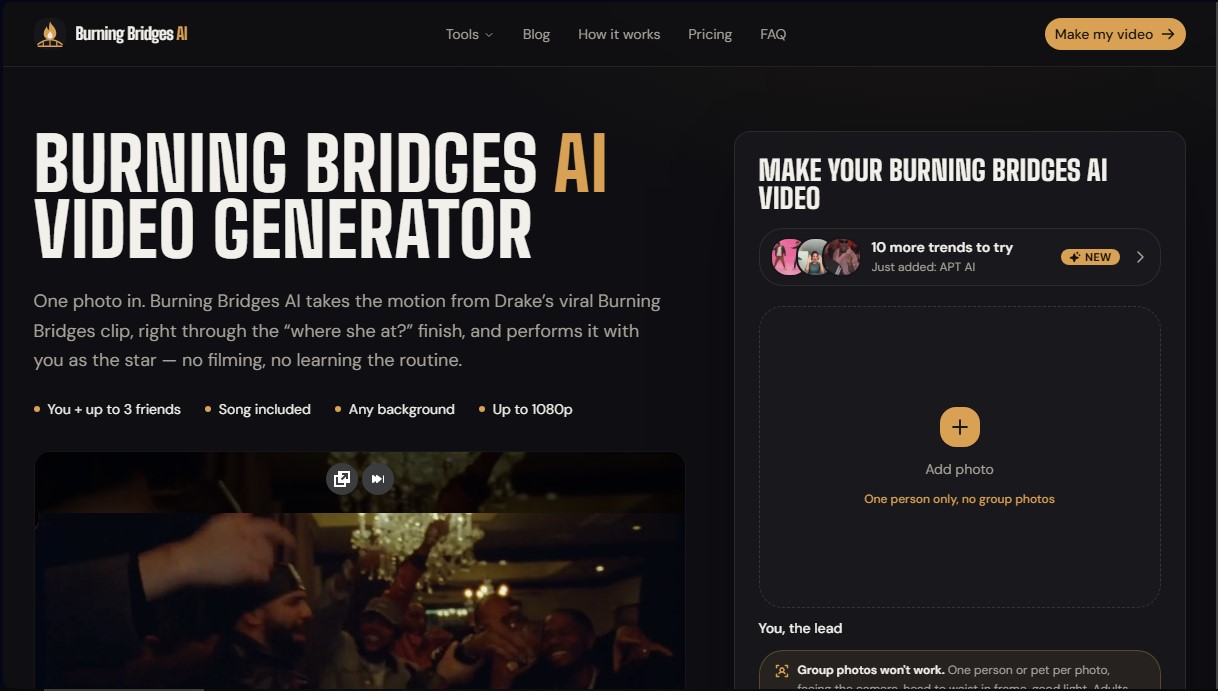
BurningBridgesAI.app Screenshots
BurningBridgesAI.app alternatives

VideoWeb Video Generator
Generate professional AI videos from text or images. Features realistic avatars, automated scripts, and optimized formats for marketing and social media.
Motion Transfer AI Video Generator
Animate character photos using reference videos. Precisely transfer gestures, dances, and body movements from a clip to an image for realistic results.


AlreadyRan
AlreadyRan brings dozens of AI image, video and audio models into one web studio with a single credit balance and the cost shown before every generation.


Vidverse AI
Vidverse AI brings several AI video, image and voice models into one web and mobile app, so you can turn text or photos into clips, images and voiceovers.