

Share
AI desktop assistant that organizes files, manages tasks, and creates content. It learns your habits to automate and optimize your workflow and productivity.
What is ColaOS?
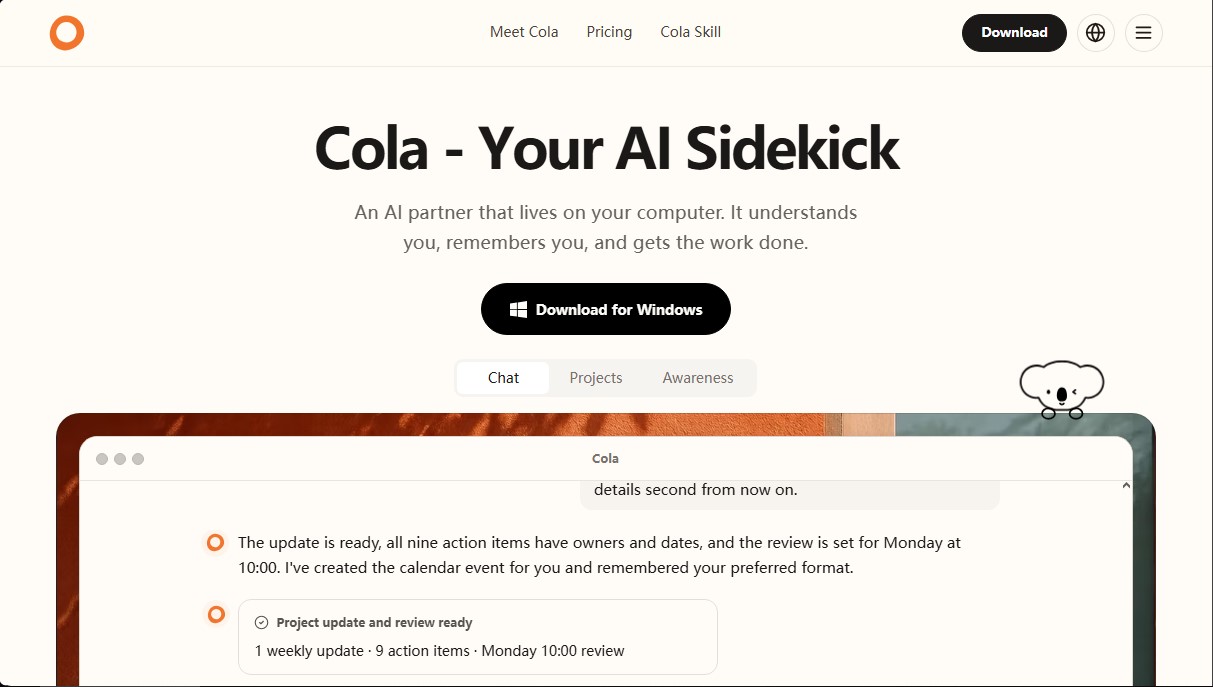
ColaOS is an AI assistant designed to run directly on your computer, acting as a digital companion that integrates task management, file organization, and content generation capabilities. Unlike conventional chatbots, this tool integrates into your daily workflow to execute specific actions within the operating system, boosting personal and professional productivity through an intuitive natural language interface.
The architecture of ColaOS is built on a multi-model infrastructure, utilizing advanced technologies from leading providers such as OpenAI, Claude, DeepSeek, Kimi, and Zhipu AI. This combination allows the software to process complex instructions with high precision. Its standout feature is Awareness, a learning system that assimilates user preferences, boundaries, and work methods through constant interaction. Thanks to this approach, the AI doesn't just execute commands; it understands the context to personalize itself to each user's profile.
Key capabilities and practical benefits include:
- Smart System Organization: The assistant can declutter your desktop, group screenshots with design files, separate installers from temporary files, and manage duplicates without deleting critical information.
- Project and Schedule Management: It can transform meeting notes and scattered files into structured updates, assign responsibilities, set deadlines, and automatically schedule events in your calendar.
- Multimedia Content Generation: It allows you to create custom images via descriptions, prepare slide presentations from rough outlines, and generate structures for podcasts.
- Workflow Automation: It can handle background processing tasks, such as preparing titles, tags, and timestamps for video publishing.
- Professional Preparation: It offers features to practice for job interviews using your resume and target role to refine your answers.
The concept of Imprints in ColaOS represents the tool's evolving memory. It isn't limited to storing static data; instead, it captures the user's intent and context. If a user mentions they prefer to avoid heavy meetings at certain times or values a specific communication tone with their team, the AI will remember these preferences for future interactions, acting proactively to protect the user's focus and time.
This AI tool is especially useful for professionals managing large volumes of information on their computers, content creators looking to streamline post-production, and any user who needs constant support with daily planning. Requiring no complex setup, it allows for the immediate delegation of administrative and creative tasks, efficiently optimizing the digital environment.
ColaOS features and use cases
How to use ColaOS
ColaOS FAQ
What exactly is ColaOS, and how can it help me with my daily routine?
It’s an AI companion that lives on your computer to understand your needs, remember your preferences, and autonomously handle complex tasks.
What operating systems is Cola available for?
Currently, you can download and install the tool on Windows devices to manage your files and tasks.
How does Cola organize my desktop files?
The tool can categorize screenshots, separate installers from temporary files, and group documents by category without deleting any of your data.
What is the Awareness feature, and why is it important in ColaOS?
It’s a feature that allows the AI to learn from your decisions, boundaries, and workflow to progressively adapt to your personal style.
Can Cola manage my calendar and schedule meetings for me?
Yes, you can ask it to set up project reviews or events based on your availability, downtime preferences, and energy levels.
Which AI models does ColaOS use?
The platform integrates industry-leading models such as OpenAI’s GPT, Claude, Kimi, DeepSeek, and various advanced models from Zhipu AI.
What are the differences between the Breeze, Wander, and Flow pricing plans?
Each plan offers a different level of access to specific models and daily usage limits tailored for everything from personal use to professional workflows.
Can I generate visual content or presentations with Cola?
Yes, the tool can create podcast covers, generate custom images, and turn rough outlines into presentation-ready slides.
ColaOS pricing and plans
Free Version
Free download of the Windows application.
Access to basic AI assistant features on your desktop.
Breeze Plan: $10/month (New user offer: $5 for the first month)
Available models: GLM 5.3 Flash, DeepSeek V4 Flash, and GPT 5.6 Luna.
Usage allowance resets daily.
Model usage limit equivalent to over 6x the subscription price.
Wander Plan: $30/month
Available models: GLM 5.3 Flash, DeepSeek V4 Flash, GPT 5.6 Luna, and GPT 5.6 Terra.
Usage allowance resets daily.
Model usage limit equivalent to over 6x the subscription price.
Flow Plan: $99/month
Available models: Access to frontier models, including GLM 5.3 Flash, DeepSeek V4 Flash, GPT 5.6 Luna, GPT 5.6 Terra, and GPT 5.6 Sol.
Includes image generation using the plan's allowance.
Usage allowance resets daily.
Model usage limit equivalent to over 6x the subscription price.
ColaOS Screenshots
ColaOS user reviews
Write a review
Checking your session...
ColaOS Reviews
Loading reviews...
ColaOS alternatives



HannahDream
Chat with virtual partners for adults with customizable memory. Build romantic bonds, evolve your relationship, and generate realistic photos with no explicit content.

SayLingo.ai
Practice 30 languages with AI tutors. Improve your pronunciation and grammar through real conversations, guided lessons, and official exam preparation.
JapanesePal
Practice Japanese conversation with an AI tutor. Improve your fluency and pronunciation for travel, work, or culture with instant corrections.