

Share
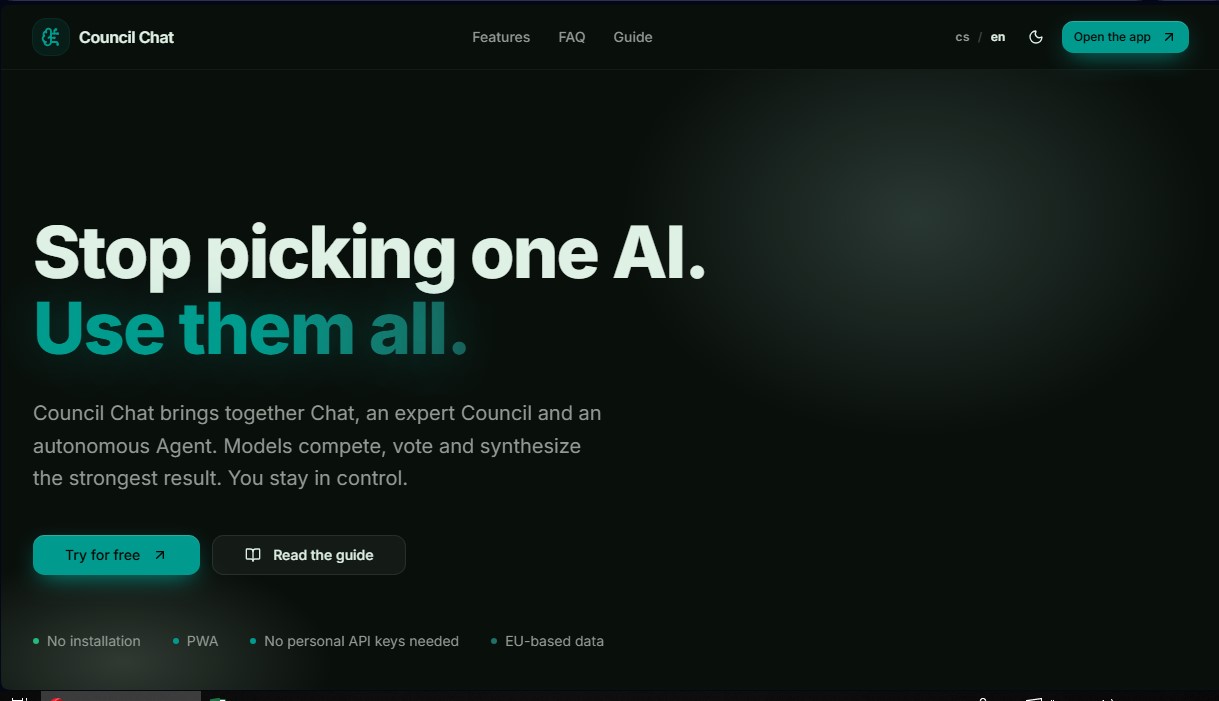
Unify the best AI models in one interface. Compare responses, run debates for consensus, and use autonomous agents for complex tasks and data analysis.
What is Council Chat?
Council Chat is an advanced AI platform designed as a unified workspace that integrates the most powerful models on the market into a single interface. Unlike conventional chatbots that limit users to a single language engine, this tool allows you to interact simultaneously with technologies from OpenAI, Anthropic, Google Gemini, xAI Grok, Mistral AI, and Perplexity. Its primary function is to centralize access to models such as GPT-4o, Claude 3.5 Sonnet, Gemini Pro, and Grok, optimizing professional workflows and eliminating the need to manage multiple individual subscriptions.
The core of the application's technology lies in its Council system. This approach allows 2 to 5 AI models to analyze the same query, compare their answers, and vote to reach a synthetic consensus. This inter-model debate method ensures more accurate results, reduces hallucinations, and offers a critical view from multiple technical perspectives. Within this functionality, the Expert Council specializes in complex topics requiring deep synthesis, while the Research Council incorporates internet access to work with information sources updated in real time.
In addition to chat interaction, the platform includes autonomous execution and data management capabilities:
- Autonomous Agent: Uses a ReAct approach to plan steps, perform web searches, process data, and deliver finalized solutions without constant user intervention.
- Smart Data Workspace: A workspace where you can upload PDFs, spreadsheets, and text files. The AI extracts context from these documents to allow for specific queries on large volumes of information.
- Creative Studio: An integrated suite for generating images, musical compositions, and voice tracks, unifying multimedia content creation in one place.
- Presentations and Portals: Allows you to convert AI responses and analyses into clean presentations or interactive mini-websites to share results with clients with a single click.
Council Chat is developed as a PWA (Progressive Web App), which makes it easy to use on desktops, mobiles, or tablets directly from the browser without the need for installation. The infrastructure manages access to the models, so users do not need to provide their own personal API keys. In terms of privacy, the tool processes data based in the European Union, offering a secure environment for professional and corporate use.
This tool is ideal for researchers, data analysts, and content creators who require constant AI model comparison and a superior layer of automation for complex tasks that a standard chatbot cannot resolve on its own.
Council Chat features and use cases
How to use Council Chat
Council Chat FAQ
What is Council Chat and what is it used for?
It is a platform that brings together the best AI models on the market into a single interface, allowing them to work together, compare results, and reach a consensus.
Do I need to install any software to use Council Chat?
No, it is a progressive web app that runs directly in your browser on both computers and mobile devices, with no downloads required.
What is the difference between the standard chat and the Council feature?
The standard chat uses a single model for quick answers, while the Council feature activates between two and five models to debate, vote, and generate a more robust response.
Do I need my own API keys to use Council Chat?
No, you don't need them. All models from OpenAI, Anthropic, Google, and other providers run through the platform's own infrastructure.
What tasks can the platform's autonomous Agent perform?
The Agent can independently plan steps, search the web for information, process data, and deliver complete solutions without needing constant prompts.
How does the credit system work in Council Chat?
Each plan includes a monthly credit allowance that is consumed based on model usage. You can also purchase additional top-ups if you run out of credits.
Is my data handled securely in this tool?
The application uses data hosted in the European Union and is designed for professional environments, following high security standards for information management.
What can I do with the smart data workspace?
It allows you to upload PDFs, spreadsheets, or text files so the AI can extract context, letting you interact directly with the content of your documents.
Can I generate multimedia content with Council Chat?
Yes, through the Media Studio, you can create images, short videos, music tracks, and voiceovers using the industry's most advanced models.
How do I share results with clients or collaborators?
The tool allows you to convert AI responses into clean presentations or interactive mini-websites that can be shared via a link with a single click.
Council Chat pricing and plans
Free ($0/month)
1,000 credits per month.
Access to the "Basic Council" (debate, voting, and consensus among 2 to 5 models).
Free text models included: Gemini Flash, GPT mini, Claude Haiku, Sonar, and Mistral Small.
No personal API keys required.
Spark ($29/month)
10,000 credits per month.
Access to the "Full Council" (Expert Council and Research Council).
All premium text models: Sonnet, Opus, GPT 5.4, Gemini 3.1 Pro, and Grok.
Voice conversation.
Nexus ($79/month)
40,000 credits per month.
Includes all features from the Spark plan.
Media Studio: image, video, and music generation.
Data Workspace: document management and chat (PDFs, spreadsheets, text files).
Quantum ($199/month)
120,000 credits per month.
Includes all features from the Nexus plan.
Autonomous agent (ReAct) and web automation with Skyvern.
Presentation creation, client portals, and email inbox management.
Note on credits: If you run out of plan credits, you can purchase additional top-ups of 5,000 credits for $15, 25,000 for $49, or 100,000 for $149.
Council Chat Screenshots
Council Chat user reviews
Write a review
Checking your session...
Council Chat Reviews
Loading reviews...
Council Chat alternatives



HannahDream
Chat with virtual partners for adults with customizable memory. Build romantic bonds, evolve your relationship, and generate realistic photos with no explicit content.

SayLingo.ai
Practice 30 languages with AI tutors. Improve your pronunciation and grammar through real conversations, guided lessons, and official exam preparation.
JapanesePal
Practice Japanese conversation with an AI tutor. Improve your fluency and pronunciation for travel, work, or culture with instant corrections.