

Share
Proactive on-device AI assistant that executes tasks autonomously. It learns your habits, plans goals, and integrates productivity tools.
What is CraftBot?
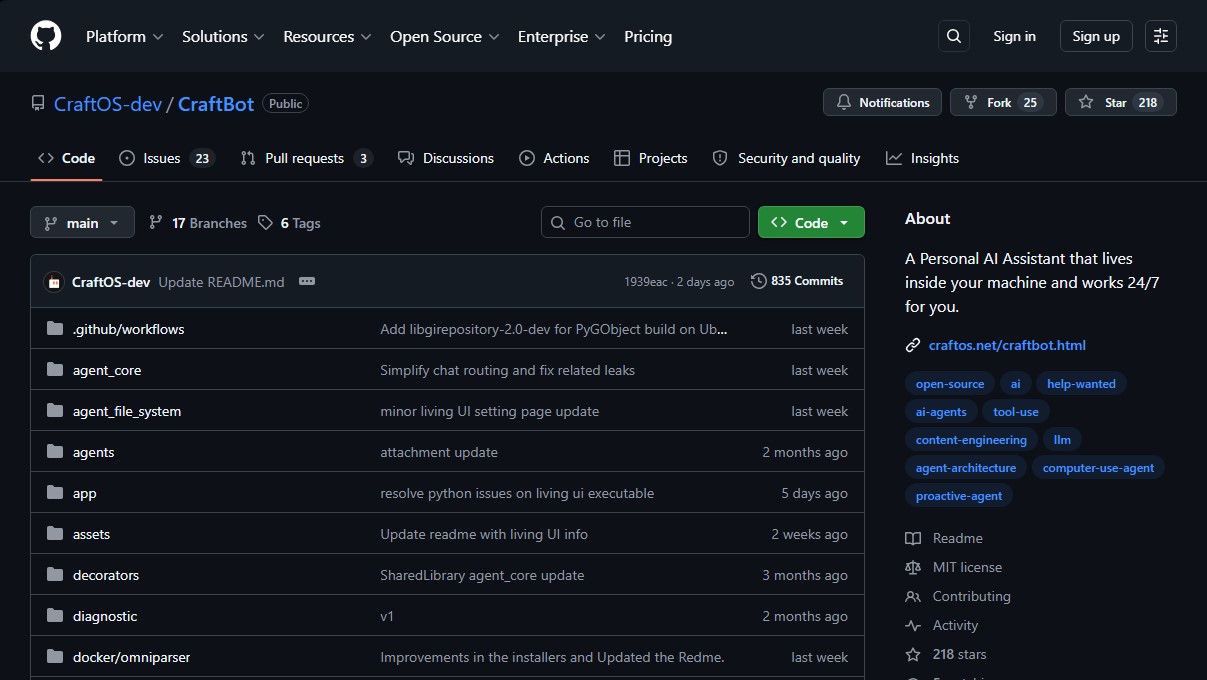
CraftBot is a proactive, self-hosted AI assistant designed to run locally on the user's computer. Unlike conventional chatbots, this tool operates autonomously 24/7, interpreting complex tasks, planning actions, and executing them to achieve specific goals. Its primary focus is privacy and personalization, allowing the agent to learn user preferences, habits, and goals to actively anticipate their needs.
The CraftBot architecture is based on a Bring Your Own Key (BYOK) system, providing total flexibility to choose your Large Language Model (LLM) provider. It is compatible with OpenAI, Google Gemini, Anthropic Claude, BytePlus, and local models via Ollama. It utilizes a robust infrastructure that includes an optimized context engine, a semantic memory system based on RAG (Retrieval-Augmented Generation) with ChromaDB, and an orchestration layer that efficiently manages the lifecycle of every task.
Key functional capabilities and practical benefits include:
- Advanced Memory System: Distills and consolidates daily events at midnight to maintain a relevant knowledge base.
- Living UI: Allows for building, importing, or evolving custom applications within the tool's ecosystem, where the agent interacts directly with interface data and states.
- External Tool Integration: Native OAuth connection with platforms such as Google Workspace, Slack, Notion, Zoom, LinkedIn, Discord, and Telegram.
- Model Context Protocol (MCP): Integration that expands the agent's skills by connecting it with external services in a standardized way.
- Skills Framework: An extensible system with built-in functions for research, code review, Git operations, and task planning.
- Interface Versatility: Support for browser mode (modern web interface), TUI (terminal user interface), and CLI (command line interface).
This local AI assistant is ideal for developers, productivity professionals, and power users looking to automate workflows without compromising data security. As a cross-platform solution, it offers full support for Windows, macOS, and Linux, while also allowing for Docker deployment in isolated environments.
Operation is powered by an intelligent Action Router that selects the best action based on task requirements and resolves input parameters using the chosen LLM. For setup, it requires Python 3.10+ and offers simplified installation methods that automatically manage dependencies and background service startup, ensuring the assistant is always available to execute commands or propose improvements for daily task management.
CraftBot features and use cases
How to use CraftBot
CraftBot FAQ
What exactly is CraftBot, and what is it used for?
It is a proactive, personal AI assistant that is hosted locally on your machine to perform tasks autonomously 24/7.
Do I need my own API keys to use CraftBot?
Yes, the tool uses a system where you provide your own keys, compatible with providers such as OpenAI, Google Gemini, Anthropic Claude, or local models via Ollama.
What is the recommended way to install CraftBot on my computer?
The easiest option is to install it as a service using the command python craftbot.py install, as this automatically configures the environment and allows it to run in the background.
What kind of external applications can I integrate with CraftBot?
The assistant can connect to popular tools like Google Workspace, Slack, Notion, Zoom, LinkedIn, Discord, and Telegram to manage your workflows.
Is Node.js required for the tool to work?
Node.js is only necessary if you want to use the web-based user interface, but you can run the assistant in terminal or command-line mode without this requirement.
What is the purpose of CraftBot’s memory system?
This system distills and consolidates events that occur throughout the day to learn your habits and preferences, allowing the assistant to plan tasks that help you achieve your goals.
Which operating systems can I currently run CraftBot on?
The platform offers full, native support for Windows, macOS, and Linux, and it can also be run using Docker containers.
What are the "Living UI" applications mentioned in the documentation?
These are custom dashboards and apps that evolve along with your needs, which the assistant can read or manage directly to perform actions on your behalf.
Can I use CraftBot for free?
The project is distributed under the MIT license, which allows you to use and host it for free, though you will be responsible for the costs of the API calls made to your AI providers.
Is the GUI-based desktop automation mode still available?
No, the desktop automation mode has been deprecated. It is recommended to use the browser or terminal modes to interact with the assistant instead.
CraftBot pricing and plans
Open Source Version (Free)
0 $
- MIT License: Open-source software that allows for use, hosting, and monetization with no licensing fees.
- Local and self-hosted execution: Compatible with Windows, macOS, Linux, and Docker containers.
- "Bring Your Own Key" (BYOK) system: Requires users to provide their own API keys from providers (OpenAI, Google Gemini, Anthropic Claude, BytePlus) or use local models via Ollama.
- Living UI: Build, import, and evolve custom applications within the assistant that it can read and manipulate.
- Third-party integrations: Connect via OAuth with Google Workspace, Slack, Notion, Zoom, LinkedIn, Discord, and Telegram.
- Semantic Memory: RAG-based system using ChromaDB to remember user preferences, habits, and goals.
- MCP (Model Context Protocol) Support: Integration to extend agent capabilities with external tools and services.
- Skills Framework: Built-in tools for task planning, research, code review, and Git operations.
- Interface Modes: Includes Browser mode (requires Node.js 18+), TUI (Terminal) mode, and CLI (command line) mode.
For information on corporate plans or additional services, please visit the official website.
CraftBot Screenshots
CraftBot user reviews
Write a review
Checking your session...
CraftBot Reviews
Loading reviews...
CraftBot alternatives


HannahDream
Chat with virtual partners for adults with customizable memory. Build romantic bonds, evolve your relationship, and generate realistic photos with no explicit content.

SayLingo.ai
Practice 30 languages with AI tutors. Improve your pronunciation and grammar through real conversations, guided lessons, and official exam preparation.
JapanesePal
Practice Japanese conversation with an AI tutor. Improve your fluency and pronunciation for travel, work, or culture with instant corrections.