
Share
Convert Excel, CSV, or PDF files into editable presentations. Automatically analyze your data to generate slides with charts and metrics in minutes.
What is Data2Slide?
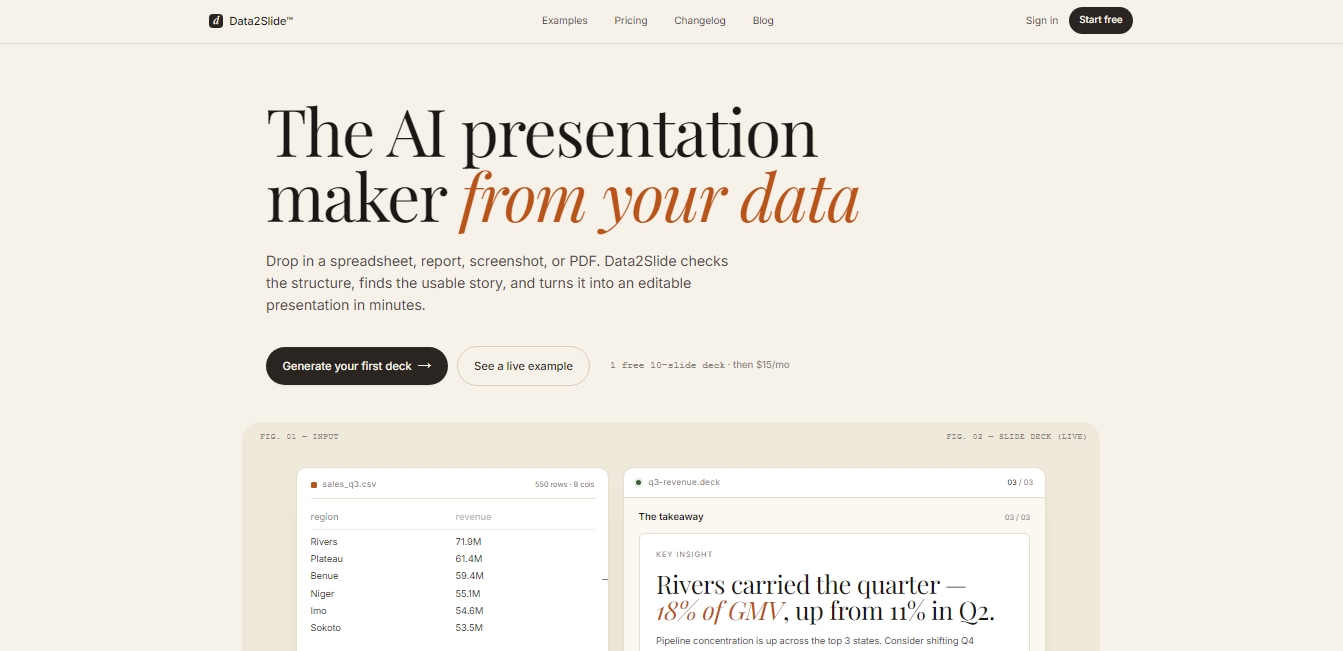
Data2Slide is an advanced AI solution designed to create professional presentations automatically from complex data. Unlike other generators that rely exclusively on text prompts, this platform specializes in data visualization, transforming spreadsheets, financial reports, and screenshots into interactive and editable slides in just minutes. It is an ideal productivity tool for sales, finance, HR professionals, and founders who need to communicate key metrics clearly without having to master design or Business Intelligence software.
Data2Slide’s workflow stands out for its focus on structure and information integrity. Users can upload files in CSV, Excel (XLSX), PDF, and Markdown formats, or even images in PNG and JPG. The application performs a preliminary technical analysis to detect metrics, timeframes, and categories. A key differentiator regarding data privacy is that local file processing takes place directly on the user's computer; raw data is never uploaded to the servers, as only a structured summary is sent to the AI to generate the final presentation.
Data2Slide technology uses advanced language models to interpret the narrative hidden within the numbers. After entering a brief instruction regarding the report's objective, the system selects the most appropriate chart types and organizes the information logically. Its core capabilities include:
Interactive charts and timelines: Slides include animations that allow for real-time visualization of data evolution, making it easier to present growth trends or seasonal changes.
Split-pane editor: Offers full control over the output. The data panel allows for correcting labels or values, while the formatting panel makes it easy to adjust colors, fonts, and element positioning.
Self-executing HTML output: The tool generates HTML files that preserve all interactivity and animations. These files work in any browser, even without an internet connection, and are compatible with presentation remotes.
This AI presentation automation platform is especially useful for generating weekly sales reports, HR hiring summaries, or investor traction slides. By focusing on data communication, Data2Slide eliminates the need to manually design every chart, allowing you to go from a CRM export or technical report to a mobile-ready or projector-ready presentation almost instantly. The result is a high-fidelity presentation that maintains the accuracy of the original data with a professional, modern aesthetic.
Data2Slide features and use cases
How to use Data2Slide
Data2Slide FAQ
What file formats can I upload to Data2Slide to create my presentations?
Data2Slide supports CSV, Excel, PDF, PNG or JPG images, and Markdown text files.
Is my data secure when using Data2Slide?
Yes, Excel and CSV files are processed locally in your browser, so your raw data never leaves your device.
Can I edit a presentation after it has been generated?
Yes, the platform includes an editor with specific panels to modify data, labels, and visual elements without having to recreate the presentation from scratch.
How can I share my Data2Slide results?
You can share a public URL or download a standalone HTML file that includes all charts and animations for offline use.
Can I export my slides to PowerPoint or Google Slides?
Currently, Data2Slide generates interactive HTML files. However, the option to export to traditional formats like PowerPoint is planned for future updates.
Is there a way to try Data2Slide for free?
Yes, when you sign up, your first presentation of up to ten slides is free so you can evaluate how the system works.
What happens if my data isn't perfectly organized in the spreadsheet?
Data2Slide analyzes the file structure and alerts you if the information is insufficient or too complex, suggesting adjustments before generating the presentation.
Data2Slide pricing and plans
Free Plan ($0 - One-time payment)
1 starter slide deck upon registration.
Up to 10 slides per deck.
Reports saved for 7 days.
Support for CSV, XLSX, PDF, PNG, JPG, and MD inputs.
Live shareable link.
HTML export and presentation mode.
Restriction: Does not include recurring free credits.
Starter Plan ($15/mo)
20 credits per month (allows you to generate 20 decks).
Up to 20 slides per deck.
Reports saved for 7 days.
Support for CSV, XLSX, PDF, PNG, JPG, and MD inputs.
Live shareable links.
HTML export and presentation mode.
Email support.
Pro Plan ($29/mo)
60 credits per month (allows you to generate 60 decks).
Up to 30 slides per deck.
Reports saved for 30 days.
Includes all Starter plan features.
AI slide agent for natural language editing (coming soon).
Priority processing.
Priority support.
Business Plan ($79/mo)
200 credits per month (allows you to generate 200 decks).
Up to 85 slides per deck.
Permanent report storage.
Includes all Pro plan features.
Traction landing page template (coming soon).
Early access to new features.
Dedicated support.
Data2Slide Screenshots
Data2Slide alternatives



Optimus by Iacon Autonomics
Autonomous researcher designing experiments and evaluating algorithms to train AI models. Automates improvement cycles for LLMs, robotics, and various complex systems.


Tradebreath
Tradebreath is a backtesting platform with tick-by-tick market replay and an AI agent that writes and tests trading strategies across 800+ symbols.