

Share
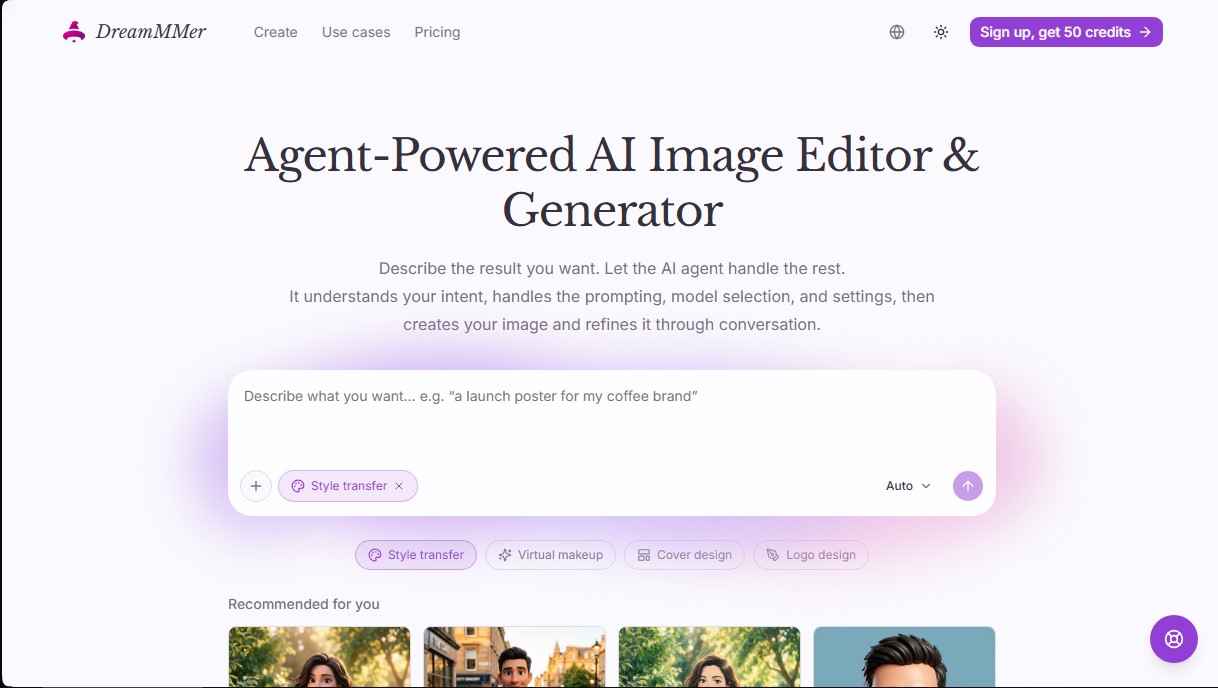
AI image generator and editor using an agent to create designs and retouch photos. Refine results with natural language—no complex prompts required.
What is DreamMMer?
DreamMMer is an advanced AI image generation and editing platform that stands out for its intelligent agent-based approach. Unlike traditional generators that require complex technical commands, this tool acts as an assistant that interprets user intent to manage prompt engineering, model selection, and configuration settings. Its primary goal is to simplify visual creation for both design professionals and non-technical users, delivering high-quality results from simple natural language descriptions.
DreamMMer’s technology is built on a cutting-edge multi-model architecture. Users can choose from various options depending on their desired aesthetic, including GPT Image 2.5 Flare, Sunburst, GPT Image 2, Nano Banana 2, and Nano Banana Pro. The system utilizes a conversational workflow where the agent transforms a brief initial summary into detailed instructions regarding composition, lighting, and style. This AI image editing capability allows users not only to create content from scratch via text-to-image but also to perform precise modifications on existing files or reference images uploaded from their computer.
Its most notable capabilities and practical benefits include:
- Poster and Billboard Generator: Create advertising layouts by integrating typography, visual hierarchy, and product references.
- Cover Design: An optimized tool for book and album covers where the user defines the tone, story, and title.
- Style Transfer: Transform real photos into digital art following specific aesthetics like Pixar 3D, Ghibli style, Disney, or anime.
- Virtual Makeup: A specialized feature for retouching portraits, allowing users to realistically test different aesthetic finishes and colors.
- Logo and Avatar Creation: Rapidly generate visual identities and personalized Chibi-style characters for social media.
The workflow in DreamMMer is iterative and fluid. After the first generation, the user can interact with the agent to refine the image through natural conversation. Specific changes—such as warming up background colors, adjusting the framing, or modifying text—can be requested without having to start from scratch. Additionally, the platform offers a centralized workspace where all versions and conversation history are saved, making it easy to organize projects and reuse visual assets within the same environment.
This tool is especially useful for content creators, marketing managers, and designers looking to optimize their workflow. By removing the learning curve of specific commands, DreamMMer allows users to focus on creative direction, ensuring the final result aligns with the project’s vision through AI-assisted graphic design.
DreamMMer features and use cases
How to use DreamMMer
DreamMMer FAQ
What is DreamMMer and how does its AI agent work?
DreamMMer is an image generation and editing system where an agent interprets your ideas in natural language, selects the appropriate model, and handles the technical details for you.
Do I need to know how to write complex prompts to use DreamMMer?
There is no need to learn special commands; simply describing your desired result—such as a poster or a cover—is enough for the agent to develop the detailed visual instructions.
What kind of projects can I create with DreamMMer's tools?
You can create advertisements, book covers, and logos, apply virtual makeup to portraits, or transform real photos into animated characters using style transfer.
Which AI models are available on DreamMMer?
The model selector includes advanced options such as GPT Image 2.5 Flare, Sunburst, GPT Image 2, Nano Banana 2, and Nano Banana Pro to suit various creative needs.
How are revisions and changes to generated images handled?
After viewing the initial result, you can request specific modifications through the chat, such as changing the background or adjusting the text, and the agent will generate a new version based on your feedback.
Can I use DreamMMer for free?
Account registration is free and does not require a credit card, but creating and editing images consumes credits based on the model and resolution you choose to use.
Where are my creations and editing history stored?
All your work is automatically saved in a personal workspace, where you can review previous versions, download final results, or resume a conversation to continue editing.
DreamMMer pricing and plans
Free Account
Free sign-up; no credit card required.
Use of generation and editing features requires credits (check balance upon account creation).
Lite Plan: $38 per month ($19 per month billed annually)
3,500 monthly credits (approx. up to 291 images per month).
Access to models: GPT-5.4 nano, 2.5 Flare, 2.5 Sunburst, GPT Image 2, Nano 2, and Nano Pro.
Standard support.
Restrictions: Does not include fast generation speed, images include watermarks, and AI chat consumes credits.
Pro Plan: $78 per month ($39 per month billed annually)
7,300 monthly credits (approx. up to 608 images per month).
Access to all models (GPT, Flare, Sunburst, Nano).
Faster generation speed.
Watermark-free image output.
Free, unlimited AI chat (does not consume credits).
Priority support.
Ultra Plan: $158 per month ($79 per month billed annually)
14,900 monthly credits (approx. up to 1,241 images per month).
Access to all available models.
Faster generation speed.
Watermark-free image output.
Free, unlimited AI chat.
Dedicated support and priority incident and ticket management.
Credit Packs (one-time payment)
250 credits: $9.9.
1,000 credits: $29.9.
2,400 credits: $59.9.
4,500 credits: $99.
10,000 credits: $199.
28,000 credits: $499.
DreamMMer Screenshots
DreamMMer user reviews
Write a review
Checking your session...
DreamMMer Reviews
Loading reviews...
DreamMMer alternatives
Sprite Fusion
Generate and animate professional pixel art for games using AI. Create sprites, character sheets, and normal maps with direct export to Unity and Godot.

AI Comic Builder
A platform to create comics and webtoons from text. Generate panels with consistent characters and diverse art styles—no drawing skills required.
Panel & Ink
Create comic series from an idea. Generate consistent characters, design panels in various styles, and get narrated episodes ready to publish. No drawing skills required.

ColorCraft
Create Amazon KDP books. Generate coloring pages, stories, puzzles, and print-ready full covers, plus promotional mockups in a single workflow.

Tesla Wrap Generator
Tesla Wrap Generator uses AI to paint designs onto the official UV template of each Tesla model for Paint Shop, with a 3D preview before you download.