Sprite Fusion
Share
Generate and animate professional pixel art for games using AI. Create sprites, character sheets, and normal maps with direct export to Unity and Godot.
What is Sprite Fusion?
Sprite Fusion is an advanced AI pixel art generation platform designed specifically for 2D game development. Unlike generic image generators, this tool uses a proprietary model specialized in creating production-ready assets while respecting the technical constraints of retro styles, such as exact grids and controlled color palettes. Its primary function is to streamline the workflow for indie developers and studios, allowing them to create sprites, icons, and animations through text descriptions without needing to master manual drawing techniques.
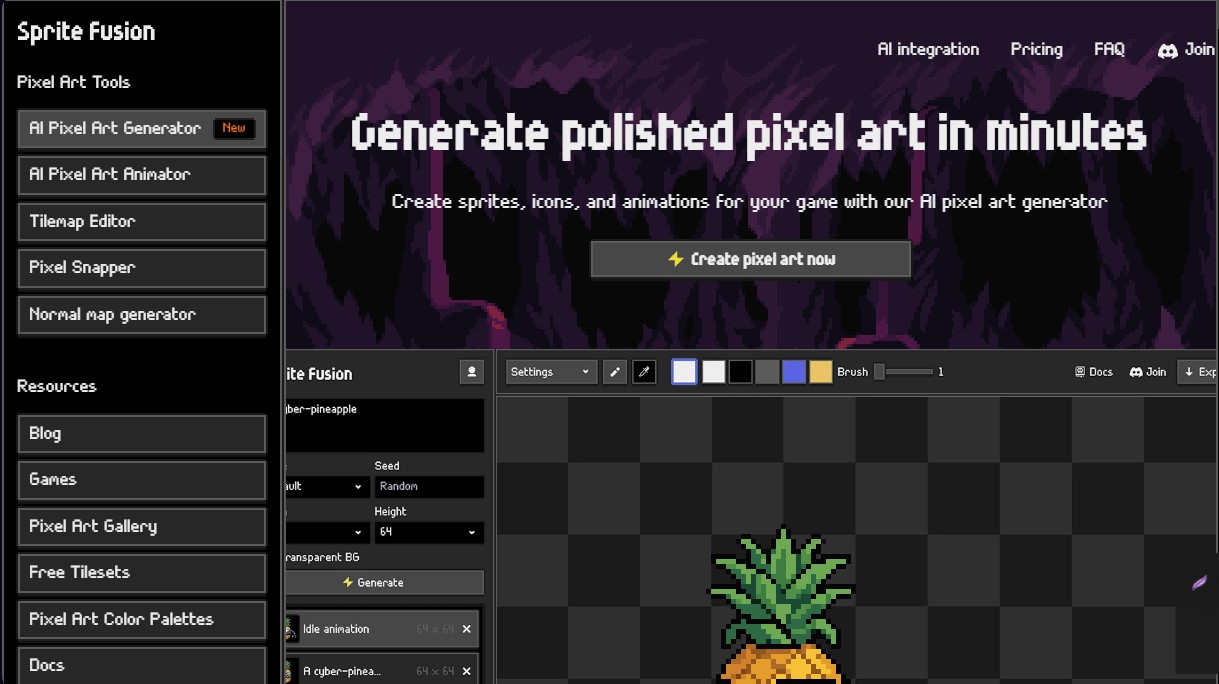
Sprite Fusion’s technology stands out for its ability to generate "true pixel art." The system doesn't simply apply pixelation filters to existing images; instead, it builds the art from scratch in native resolutions of 16x16, 32x32, and 64x64 pixels. This ensures sharp edges, consistent proportions, and assets that fit perfectly on a PC or console without distortion. Additionally, it includes complementary tools such as a normal map generator to add depth via dynamic lighting and the Pixel Snapper, which automatically fixes blurry or off-grid pixels.
Its core capabilities and practical benefits include:
- AI Animation Generator: Create walk cycles, attacks, or idle states from a simple prompt or by animating an existing static sprite.
- Style Consistency: Use a reference image to generate new elements that maintain the same color palette and visual proportions.
- 8-Directional Generation: Automatically create the necessary perspectives for isometric or top-down games from a single base design.
- Integrated Pixel Art Editor: Includes manual tools to touch up details, swap colors, or correct AI-generated pixels before final export.
- Tilemap Editor: Design entire levels in the browser, featuring support for collision layers and direct export.
To optimize implementation, Sprite Fusion offers native integration via plugins for Unity and Godot, making it easy to create assets directly within the editor. It is also compatible with other engines like GameMaker, Phaser, or Bevy. One of its most innovative features is compatibility with AI agents and coding tools like Claude Code or ChatGPT through its API and MCP protocol. This allows developers to request asset creation via commands, automating the generation of sprite sheets and facilitating rapid iteration on projects of any scale.
This tool is ideal for rapid prototyping and creating final content for games with a retro aesthetic. Users can transform abstract concepts into animated characters, inventory items, or environmental elements in minutes, eliminating the time and learning barriers traditionally required for manual pixel art. By offering one-click export, it positions itself as a comprehensive solution for modern 2D game development.
Sprite Fusion features and use cases
How to use Sprite Fusion
Sprite Fusion FAQ
What is Sprite Fusion and what is it used for?
It is an AI-powered pixel art generator designed to create characters, objects, and animations ready for use in professional video games.
Can Sprite Fusion be integrated with game engines like Unity or Godot?
Yes, the tool features native plugins for Unity and Godot that allow you to generate and export assets directly from within their respective editors.
Does Sprite Fusion generate authentic pixel art or just apply a filter?
The platform uses specific models that create genuine pixel art with exact dimensions and aligned grids, rather than simply applying pixelation filters to standard images.
Can I create animations from a single image using Sprite Fusion?
Yes, you can import or generate a static asset and use the built-in animator to create movement or attack cycles using text prompts.
Does Sprite Fusion allow exporting eight-directional character sheets?
Yes, the tool can automatically generate eight-way views for isometric or top-down games from a single base design.
What output resolutions does the tool support?
You can choose exact sizes of 16x16, 32x32, or 64x64 pixels for your assets.
Can I use the generated assets in commercial projects?
Yes, assets created with the tool are eligible for commercial use in indie games or studio projects, depending on your selected plan.
Does Sprite Fusion include an editor for manual touch-ups?
Yes, it features a built-in pixel editor that allows you to refine details, change colors, or draw manually over the AI-generated assets.
What is the Sprite Fusion normal map generator?
It is a feature that calculates the direction each pixel is facing, allowing game engines to apply dynamic lighting and shadow effects to 2D sprites.
Can an external AI agent use this tool?
Yes, Sprite Fusion offers an API and MCP compatibility so that agents like Codex or Claude Code can generate pixel art during the development process.
Sprite Fusion pricing and plans
Free Version:
Normal map generator (no account required).
Tilemap Editor for level design.
Access to free assets like tilesets and color palettes.
Starter ($9/mo):
450 monthly credits.
Commercial use included.
Access to all tool features.
Recommended for prototyping.
Creator ($19/mo):
1,050 monthly credits.
2.3x the capacity of the Starter plan.
Commercial use included.
Access to all tool features.
Recommended for small game development.
Pro ($49/mo):
3,000 monthly credits.
6.7x the capacity of the Starter plan.
Commercial use included.
Access to all tool features.
Recommended for large-scale game projects.
Sprite Fusion Screenshots
Sprite Fusion user reviews
Write a review
Checking your session...
Sprite Fusion Reviews
Loading reviews...
Sprite Fusion alternatives
AI Comic Builder
A platform to create comics and webtoons from text. Generate panels with consistent characters and diverse art styles—no drawing skills required.
Panel & Ink
Create comic series from an idea. Generate consistent characters, design panels in various styles, and get narrated episodes ready to publish. No drawing skills required.

ColorCraft
Create Amazon KDP books. Generate coloring pages, stories, puzzles, and print-ready full covers, plus promotional mockups in a single workflow.

Tesla Wrap Generator
Tesla Wrap Generator uses AI to paint designs onto the official UV template of each Tesla model for Paint Shop, with a 3D preview before you download.