AI Comic Builder
Share
A platform to create comics and webtoons from text. Generate panels with consistent characters and diverse art styles—no drawing skills required.
What is AI Comic Builder?
AI Comic Builder is an advanced AI-driven platform designed for the automated creation of comics and storyboards. This tool allows any user, regardless of their artistic skills, to transform text-based ideas into complete visual narratives in a matter of minutes. Its primary function is to simplify the illustration process using generative algorithms that interpret descriptions to create detailed and coherent panels, optimizing the workflow from a computer or any compatible device.
The operation of AI Comic Builder is powered by an innovative Image-to-Image pipeline that ensures character consistency throughout the entire work. This technology allows you to design a character once and reuse it across multiple panels and chapters while maintaining facial features, clothing, and style without unwanted variations. The system includes an integrated story manager that assists in structuring the narrative before proceeding to AI panel rendering.
Key capabilities of this AI comic generation tool include:
- Intelligent panel rendering: Generates complex illustrations from text prompts, handling both composition and drawing.
- Over 20 aesthetic styles: Choose from aesthetics such as manga, anime, American comic, cyberpunk, noir, pixel art, and Pixar-style, among others.
- Character Builder: A tool to clone and maintain fixed characters, even allowing the use of real photos to integrate them into the narrative.
- Webtoon Slicer: A specific feature to adapt and crop images into the vertical reading format typical of mobile devices.
- Inspiration Library and Community: Access to prompt templates and a community where you can share, explore, and remix panels created by other users.
This application is especially useful for scriptwriters, content creators, and graphic novel enthusiasts looking to prototype ideas quickly or publish final content without the need to hire a professional illustrator. By removing the technical drawing barrier, AI Comic Builder democratizes visual creation, allowing the primary focus to remain on creativity and storytelling.
The process is straightforward: the user enters a description of their idea, the AI helps develop the plot, and after selecting the style and characters, the system automatically generates the panels. Additionally, the platform offers the ability to manage commercial rights for the generated art, facilitating the monetization of works across various digital or print channels.
AI Comic Builder features and use cases
How to use AI Comic Builder
AI Comic Builder FAQ
What is AI Comic Builder and how does it work?
AI Comic Builder is an artificial intelligence platform that automatically transforms your written ideas into illustrated comics, with no drawing skills required.
How many free credits does AI Comic Builder offer upon registration?
Each new user receives fifty welcome credits to test the creation tools and generate their first panels at no cost.
Do I need to know how to draw to use the platform?
No prior artistic skills are necessary because the AI handles rendering the panels and managing the story for you.
How is character consistency maintained in AI Comic Builder?
The tool allows you to create specific character profiles that maintain their physical appearance and clothing throughout every page of your comic.
What art styles can I choose for my stories?
You have access to over twenty different aesthetic styles, including options such as manga, anime, American comic, cyberpunk, watercolor, and Pixar-style, among others.
Can I use the generated comics for commercial purposes?
Yes, as long as you are subscribed to the Studio plan, which is the subscription level that grants full commercial rights to all created images.
What happens if a panel generation fails?
The system automatically detects the error and immediately refunds the used credits to your account balance so you don't lose them.
Is the content I create on AI Comic Builder private?
By default, creations are public in the community hub, but Studio plan users can set their projects to private.
What is the Webtoon Slicer tool?
It is a free feature designed to crop and adapt your comics to the specific vertical format required by webtoon publishing platforms.
How can I get more credits if I run out of free ones?
You can obtain additional credits by subscribing to one of the Pro or Studio monthly plans or by purchasing one-time credit packs.
AI Comic Builder pricing and plans
Free Plan
0 $/month
50 welcome credits.
7 basic styles.
Standard rendering.
Restriction: Created comics are public by default in the community hub.
Pro Plan
19.99 $/month
1,500 credits per month.
Access to all 20+ available art styles.
Fast panel generation.
Studio Plan
39.99 $/month
4,000 credits per month.
High-resolution Turbo rendering.
Commercial usage rights (allows you to print, sell, or monetize your comics).
Total privacy: option to make comics completely private.
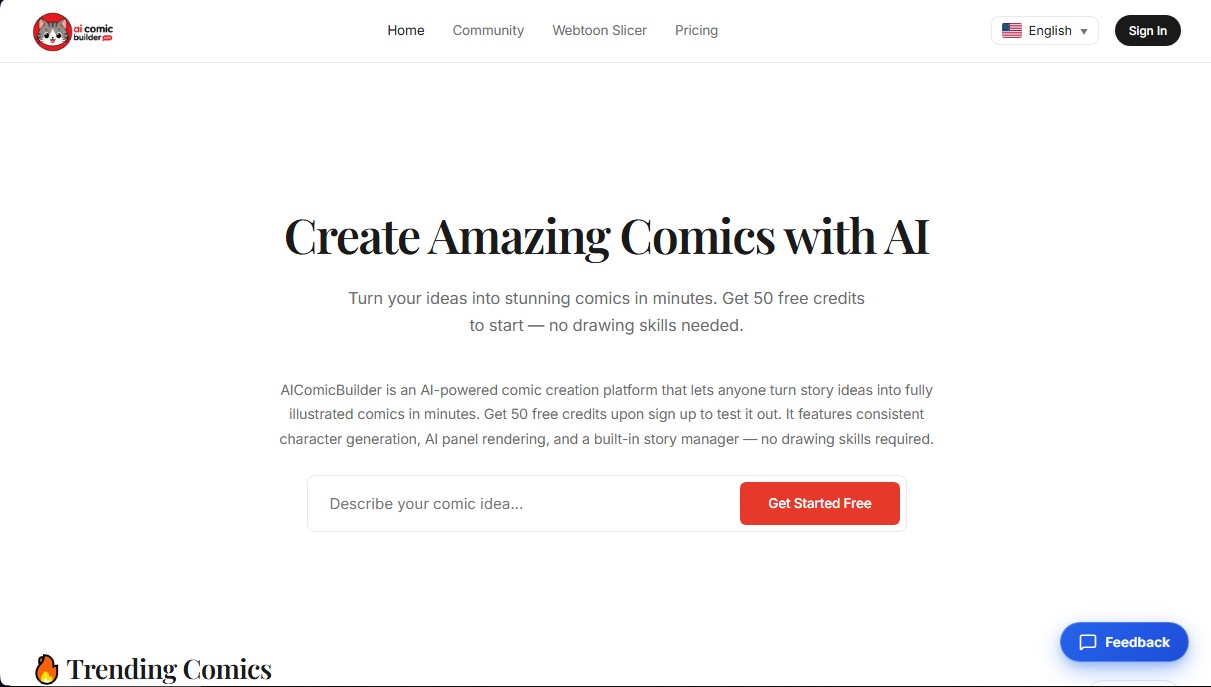
AI Comic Builder Screenshots
AI Comic Builder user reviews
Write a review
Checking your session...
AI Comic Builder Reviews
Loading reviews...
AI Comic Builder alternatives
Panel & Ink
Create comic series from an idea. Generate consistent characters, design panels in various styles, and get narrated episodes ready to publish. No drawing skills required.

AI Manga Colorizer
AI Manga Colorizer uses AI to color black-and-white manga pages and panels in 25+ styles, and adds video and anime tools on a credit system.

StarVeil AI
Generate AI comics and webtoons with consistent characters across every panel. Easily create serialized stories and visual narratives from text.