
Share
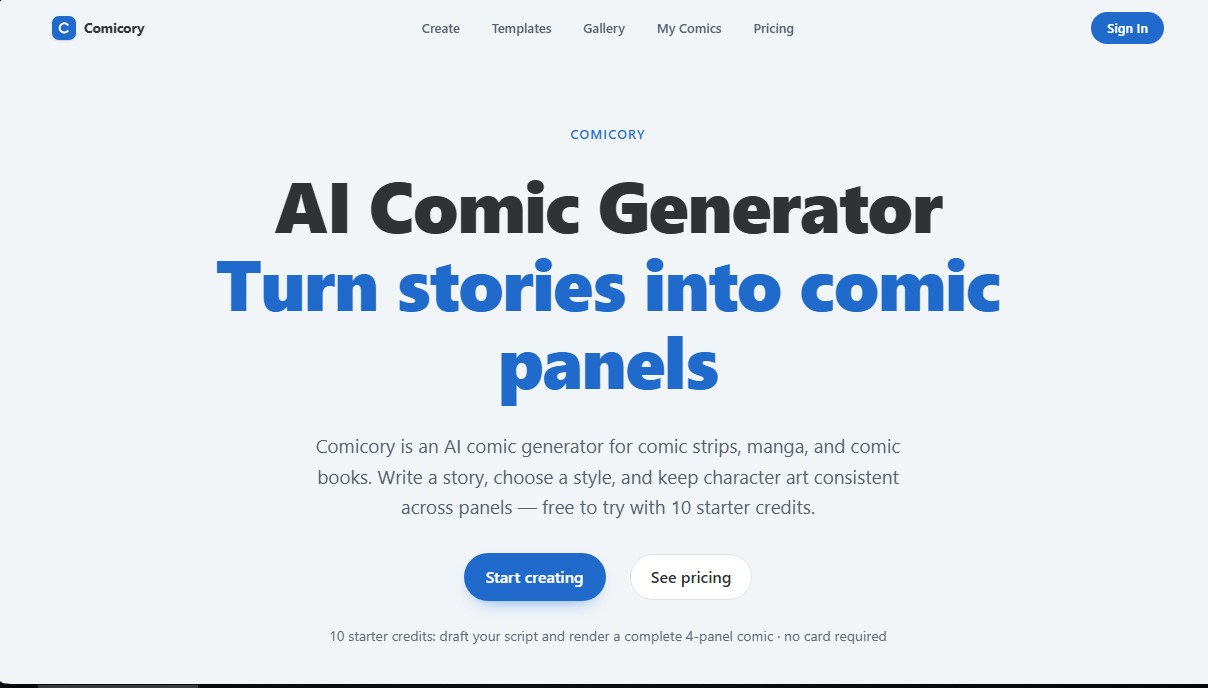
Transform stories into comics and manga with consistent characters. Features diverse art styles, custom page layouts, and chapter-based series creation.
What is Comicory?
Comicory is an AI comic generator designed to transform written stories into structured visual panels. This tool allows writers and creatives to produce comic strips, manga, graphic novels, and webtoons without needing manual drawing skills. Its technology is based on processing a short story to automatically break it down into a technical script that includes dialogue, camera angles, and detailed descriptions for every scene.
The workflow of Comicory is divided into logical steps that facilitate creative control over the final result. After entering a story description, the platform uses artificial intelligence to propose a draft script. Users can review and edit every line of text before proceeding to image rendering. One of its most standout features is the ability to maintain character consistency (staying "on-model"), ensuring that facial features, hair, and clothing remain identical across all panels and chapters through the use of previously generated reference portraits.
The application offers significant aesthetic versatility with 16 built-in art styles, including anime, cyberpunk, pixel art, noir, watercolor, cinematic, and the classic American comic style. Additionally, it allows for output customization through various page layouts, such as classic 2x3 grids, splash pages, horizontal strips, or the vertical scroll format optimized for mobile reading.
Key features and practical benefits of Comicory include:
- Comic Series Generator: The "Continue Story" feature allows users to add new chapters sequentially, automatically reusing the same character cast and the visual style of the established world.
- Custom Character Uploads: Users can upload reference photos so the AI can generate panels based on real people or specific original designs.
- Editing and Correction Tools: This allows for redrawing or correcting specific areas of a panel using editing brushes without having to regenerate the entire page.
- Cloud Rendering: The image generation process runs on the platform's servers, allowing users to continue with other tasks while the work is being completed.
- Themed Templates: It features predefined settings for specific use cases, such as birthday stories, marriage proposals, or pet tales.
This tool is highly useful for content creators, educators, and hobbyists looking for a fast way to prototype visual narratives. Once a project is finished, Comicory facilitates high-resolution exporting in PDF, PNG, ZIP files with individual panels, or long-form images for digital platforms. The system ensures that every render respects the chosen composition, offering a professional workflow from the initial paragraph to the finished page.
Comicory features and use cases
How to use Comicory
Comicory FAQ
What is Comicory and what is it used for?
Comicory is an AI-powered comic generator that automatically transforms written stories into comic panels, manga, or graphic novels.
Can I try Comicory for free?
Yes. When you sign up, you receive ten free starter credits, which allow you to generate a script, two characters, and a full four-panel comic without needing to enter any credit card information.
How does Comicory ensure that characters look the same in every panel?
The tool first generates reference portraits for each character and bases all subsequent panels on them to maintain consistent facial features, hair, and clothing throughout the story.
Is it possible to create a multi-chapter series with this tool?
Yes. Using the "continue story" feature, you can add new chapters to an existing comic while keeping the same cast of characters and the original art style.
What types of art styles does the platform offer?
There are sixteen different styles available, including manga, anime, superheroes, watercolor, pixel art, cyberpunk, and cinematic style, among many others.
Can I upload my own images to use as characters in Comicory?
Users on paid plans can upload photos of real people or their own designs for the AI to use as consistent models across all of their panels.
What formats can I use to download my final creations?
You can export your projects as multi-page PDFs, high-resolution PNG images, ZIP files containing individual panels, or a long-form image optimized for Webtoons.
Can I edit a single panel without changing the rest of the comic?
Yes, Comicory allows you to rewrite the description of a specific frame or redraw a particular area to make corrections without affecting the rest of the pages.
Comicory pricing and plans
Free Plan
10 starter credits upon sign-up (no credit card required).
- Allows you to generate one full 4-panel comic (4 credits for the script, 2 for characters, and 4 for panels).
- Access to basic art styles.
- Exports with Comicory watermarks.
First Comic (One-time payment)
$4.99 (one-time payment).
- 20 credits valid for 1 year.
- Ability to upload up to 5 custom characters.
- Watermark-free exports in PDF, PNG, ZIP, and long image formats.
Creator Pack (One-time payment)
$19.99 (one-time payment).
- 200 credits valid for 1 year (enough for approximately 20 4-panel comics).
- Ability to upload up to 5 custom characters.
- Watermark-free exports in multiple formats.
Studio Pack (One-time payment)
$49.99 (one-time payment).
- 600 credits valid for 1 year (enough for approximately 60 4-panel comics).
- Ability to upload up to 5 custom characters.
- Watermark-free exports in multiple formats.
Plus (Subscription)
$9.99 per month or $99.90 per year.
- 100 credits per month.
- Access to all 16 art styles (including Noir, Watercolor, Pixel Art, Realistic, Shonen Jump, Gekiga, and Cinematic).
- Upload up to 5 custom characters.
- Watermark-free exports and email support.
Pro (Subscription)
$19.99 per month or $199.90 per year.
- 250 credits per month.
- Upload up to 20 custom characters.
- Optimized for multi-chapter stories.
- Includes all Plus plan features and priority support.
Max (Subscription)
$49.99 per month or $499.90 per year.
- 700 credits per month.
- Upload up to 50 custom characters.
- Designed for high-volume creators and weekly chapters.
- Includes all Pro plan features and top-priority support.
Comicory Screenshots
Comicory user reviews
Write a review
Checking your session...
Comicory Reviews
Loading reviews...
Comicory alternatives

AI Comic Builder
A platform to create comics and webtoons from text. Generate panels with consistent characters and diverse art styles—no drawing skills required.
Panel & Ink
Create comic series from an idea. Generate consistent characters, design panels in various styles, and get narrated episodes ready to publish. No drawing skills required.

AI Manga Colorizer
AI Manga Colorizer uses AI to color black-and-white manga pages and panels in 25+ styles, and adds video and anime tools on a credit system.

StarVeil AI
Generate AI comics and webtoons with consistent characters across every panel. Easily create serialized stories and visual narratives from text.