Share
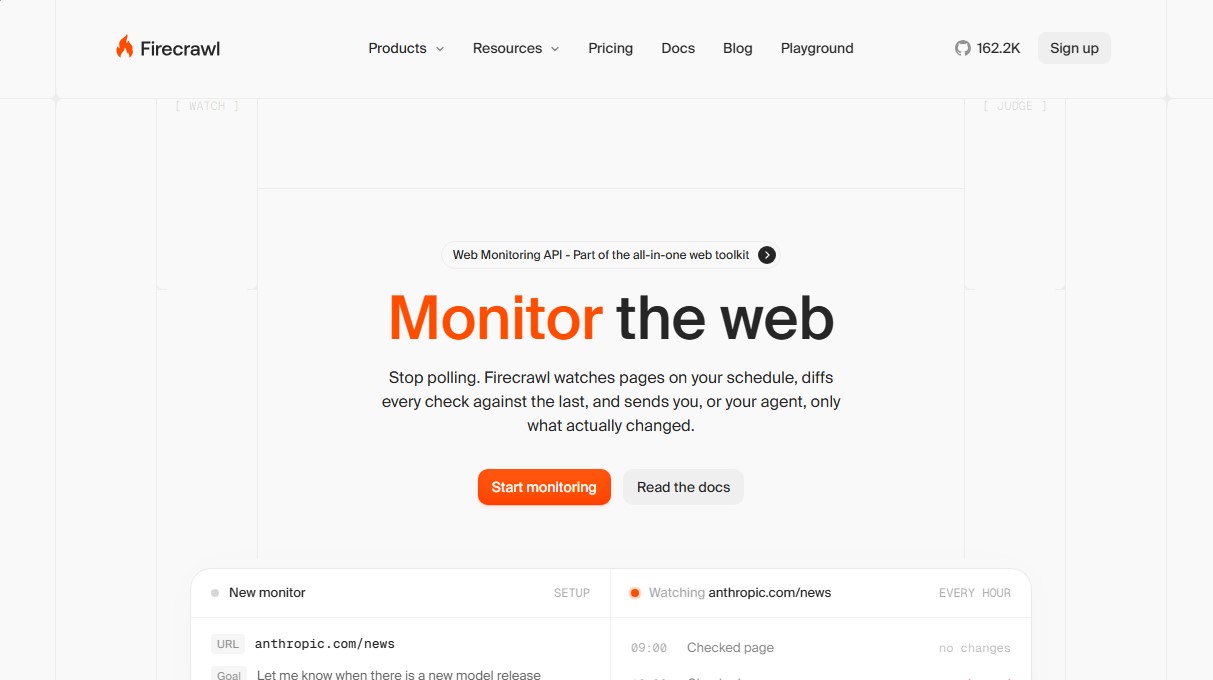
Monitor websites and receive alerts for relevant AI-detected changes. Filter noise, save tokens, and get differences in structured JSON.
What is Firecrawl Monitor?
Firecrawl Monitor is an advanced web monitoring API designed to transform how artificial intelligence applications and agents interact with changes across the internet. Unlike traditional polling systems that repeatedly download entire pages, this tool allows users to subscribe to specific events, sending notifications only when relevant changes are detected based on user-defined criteria.
The operation of Firecrawl Monitor is based on scheduling automatic crawls at intervals ranging from every five minutes to once a week. The platform analyzes the content, performs a comparison or diff against the previous version, and processes the changes through an AI judge. This intelligent filter evaluates whether the detected modification meets a goal defined in natural language—such as alerting only if a product price changes or if a new technical news story is published. This eliminates false positives caused by irrelevant changes in the footer, rotating ads, or copyright date updates.
Among its core capabilities is the delivery of data in text and structured JSON formats. Using deterministic JSON mode, users can define a specific schema to extract particular fields, ensuring that data is consistent and easy to integrate into databases or RAG (Retrieval-Augmented Generation) systems. By sending only the information that has changed, the tool can reduce token consumption in language models by up to 90%, optimizing operating costs and processing efficiency.
The versatility of Firecrawl Monitor allows for monitoring everything from a single URL or a batch of addresses to entire websites through crawling processes. Additionally, it offers a global web monitoring feature, where users can track specific search terms to receive alerts about new results that match their interests, without needing to know the destination URL in advance.
This solution is especially useful for various professional use cases:
- Tracking competitor pricing and changes in business plans.
- Detecting updates in technical documentation and changelogs.
- Maintaining data freshness in generative AI systems and knowledge bases.
- Monitoring regulatory compliance and changes in privacy policies.
- Notifying of new job openings or product launches on specific sites.
Integration is easily handled via its API, SDK, or CLI, allowing alerts to be received through signed webhooks or email. This facilitates implementation into any automated workflow from a computer or server, enabling AI agents to react to the web in real time with precision and efficiency.
Firecrawl Monitor features and use cases
How to use Firecrawl Monitor
Firecrawl Monitor FAQ
What is Firecrawl Monitor and how does it work?
It is a tool that monitors websites based on a schedule you choose and sends you notifications only when it detects relevant changes by comparing the current version with the previous one.
How does Firecrawl Monitor’s AI Judge help avoid unnecessary alerts?
The AI Judge analyzes detected changes based on your configured goal to filter out irrelevant elements, such as copyright date updates or rotating testimonials.
What is a "goal" and how is it configured?
A goal is a simple natural language phrase that describes the specific information you want to monitor, allowing the AI to determine if a change is truly significant.
What types of notifications can I receive with Firecrawl Monitor?
The tool allows you to send alerts via signed webhooks for technical integrations or through emails sent to up to twenty-five recipients.
Is it possible to monitor an entire website instead of just a single page?
Yes, you can configure the tool to monitor an individual URL, a specific batch of addresses, or perform a full crawl of an entire domain.
What advantages does the "diffs" system offer compared to conventional crawling?
By sending only the exact content that has been added or removed, it reduces token consumption by up to ninety percent during your agents' data ingestion.
How often can Firecrawl Monitor check a webpage?
You can set custom schedules ranging from checks every five minutes to weekly reviews using cron expressions or simple language.
How does web-wide search monitoring work?
Instead of a fixed URL, you can monitor a search query, and the tool will crawl the web to notify you only when new results appear that match your goal.
How many credits does each check consume?
Each time the system checks a specific page within your monitor, one credit is deducted from your available balance.
Can I extract structured data with Firecrawl Monitor?
Yes, the tool allows you to define a JSON schema to extract specific fields deterministically, ensuring you receive clean, ready-to-process data.
Firecrawl Monitor pricing and plans
Free Plan
$0 per month.
1,000 scraping pages.
2 concurrent requests.
Low rate limits.
No credit card required.
Hobby
$16 per month (billed annually).
5,000 scraping pages.
5 concurrent requests.
Basic support.
Standard
$83 per month (billed annually).
100,000 scraping pages.
50 concurrent requests.
Standard support.
Growth
$333 per month (billed annually).
500,000 scraping pages.
100 concurrent requests.
Priority support.
Scale
$599 per month (billed annually).
1,000,000 credits/pages per month.
150 concurrent requests.
Priority support.
Enterprise
Custom pricing (see official website).
Unlimited scraping pages.
Custom number of concurrent requests.
Dedicated support and Service Level Agreement (SLA).
Volume discounts.
Zero data retention.
SSO authentication and advanced security.
Credit usage (applies to all plans):
Scrape, Crawl, Map, and Monitor: 1 credit per page or check.
Search: 2 credits per 10 results.
Interact: 2 credits per browser minute.
Agent (Preview): 5 free daily runs.
Firecrawl Monitor Screenshots
Firecrawl Monitor alternatives

Tradebreath
Tradebreath is a backtesting platform with tick-by-tick market replay and an AI agent that writes and tests trading strategies across 800+ symbols.

Confident AI
LLM evaluation platform to test AI workflows, measure quality metrics, and automate testing in the development cycle without relying on engineering.