
Share
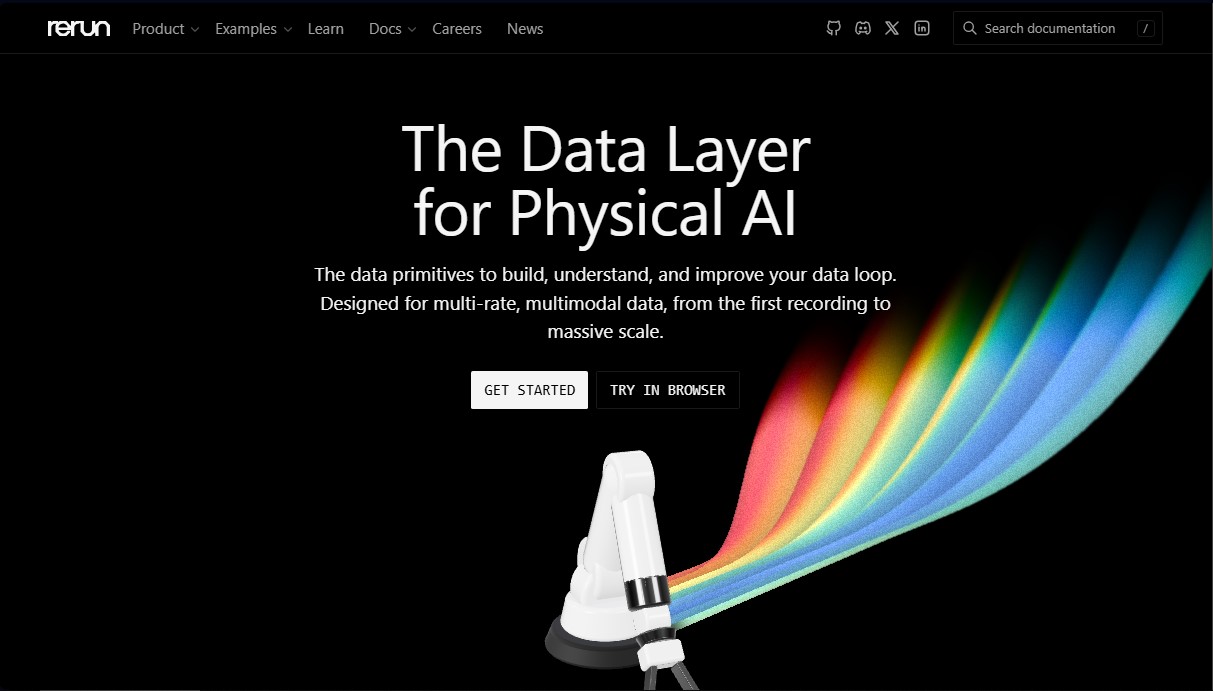
Visualize and debug multimodal data for robotics and physical AI in real-time. Log, transform, and query complex data streams quickly and efficiently.
What is Rerun?
Rerun is an open-source data layer designed specifically for the field of Physical AI and robotics. This tool functions as a complete ecosystem that allows users to log, transform, query, and visualize multimodal and variable-frequency data. Its primary goal is to facilitate the creation of efficient data loops—from the initial recording phase to large-scale model training—by providing a highly flexible and extensible open-source SDK.
Rerun's architecture stands out for its high performance and versatility, offering native APIs for Python, Rust, and C++. It utilizes a data-primitives-based approach that allows developers to integrate the tool into their existing workflows without needing to migrate to closed platforms. Thanks to its compatibility with WebAssembly (Wasm), the interactive visualizer can run both on a desktop and directly in the browser, providing quick access to visual representations of sensors and system states in real time.
Key functional capabilities include the ability to perform SQL and dataframe queries directly on robotics recordings. This allows for filtering and processing information by time ranges or specific values without performing heavy data copies. The storage system utilizes .rrd files, which organize information into columnar blocks, optimizing read speeds and conversion from other formats.
Its core features include:
- Multimodal Visualization: Review complex datasets, debug issues at a granular level, and create custom views for every development stage.
- Physical AI Debugging: Simplify the diagnosis of calibration errors, trajectories, and misalignments in 3D systems and computer vision.
- Direct Training: Stream data directly to the GPU, eliminating intermediate export steps and optimizing resource usage.
- Data Transformation: Add derived columns and evolve schemas without breaking history, maintaining the consistency of the original data.
This tool is used by engineering teams in cutting-edge projects, such as Hugging Face’s LeRobot or Meta’s Project Aria, for training inspection and egocentric data sequence visualization. For environments requiring scalability, the platform offers Rerun Hub, a managed backend that adds centralized catalog features, byte-range indexing, and S3-compatible cloud storage. By integrating Rerun, developers of artificial intelligence applied to the physical world achieve total failure traceability and a significant acceleration in the model development lifecycle.
Rerun features and use cases
How to use Rerun
Rerun FAQ
What is Rerun and what exactly is it used for?
Rerun is a data layer for physical AI that lets you log, transform, query, and visualize multimodal data at different frequencies within a single tool.
Which programming languages are compatible with the Rerun SDK?
The Rerun SDK currently supports Python, C++, and Rust to facilitate integration into various robotics and AI workflows.
Is Rerun's software free to use?
The Rerun SDK is open source under Apache-2.0 and MIT licenses, making it completely free for both research and production use.
What is the main difference between the SDK and Rerun Hub?
The SDK is the open-source toolkit for local use, while Hub is the managed commercial infrastructure that allows you to scale cataloging and cloud storage.
How does Rerun store data logged during testing?
Data is saved as columnar chunks in .rrd files, which enables efficient storage and fast querying via SQL or dataframes.
Can Rerun be used to train AI models?
Yes, it allows you to express dataset mixes as queries and stream them directly to GPUs without the need for manual file export steps.
Is it possible to host Rerun Hub on my own local servers?
Rerun manages Hub as a single-tenant cloud service to ensure performance, though your data always remains in your own S3-compatible storage buckets.
Does the company offer Rerun discounts for academic projects?
Yes, there is a discount program and close collaboration with academic labs and research groups working in the field of physical AI.
What types of visualizations can be created with this tool?
Rerun allows you to visualize point clouds, images, tensors, time series, and 3D transforms, making it easier to debug complex systems in real time.
How can I start using the Rerun SDK on my computer?
You can get started by installing the package via pip in Python or by checking the official documentation to easily set up C++ or Rust environments.
Rerun pricing and plans
Open Source SDK
Price: Free (under Apache-2.0 / MIT licenses).
- APIs available for Python, Rust, and C++.
- Interactive viewer for desktop and web environments.
- Queries via SQL and dataframes.
- Declarative visualization framework.
- PyTorch dataloader.
- Integrated local layers and catalog.
- .rrd columnar file format.
- Community support via Discord and GitHub.
Hub
Price: Contact us via the official website (custom pricing based on team size and data scale).
- Includes all features from the Open Source SDK plan.
- Managed and persistent catalog.
- Byte-range indexing on user object storage.
- Streaming dataset blends directly to GPUs from object storage.
- Link-sharing functionality for team members.
- Authentication and Single Sign-On (SSO).
- Single-tenant isolation in your chosen cloud region.
- Data remains in the customer's own S3 (or compatible) buckets.
- Dedicated technical support ranging from a shared Slack channel to a designated engineer.
Rerun Screenshots
Rerun alternatives
Confident AI
LLM evaluation platform to test AI workflows, measure quality metrics, and automate testing in the development cycle without relying on engineering.

StellarFirm
AI agents for founders to plan, build, and launch apps or websites. Automate technical and management tasks under your direct supervision and approval.


Image to 3D
Convert 2D images and sketches into textured 3D models using AI. Export in GLB, STL, or USDZ for video games, 3D printing, and augmented reality.