
Share
Convert HTML animations into high-quality MP4 videos via frame rendering. Export Claude code to 4K social media formats without screen recording.
What is Framecast?
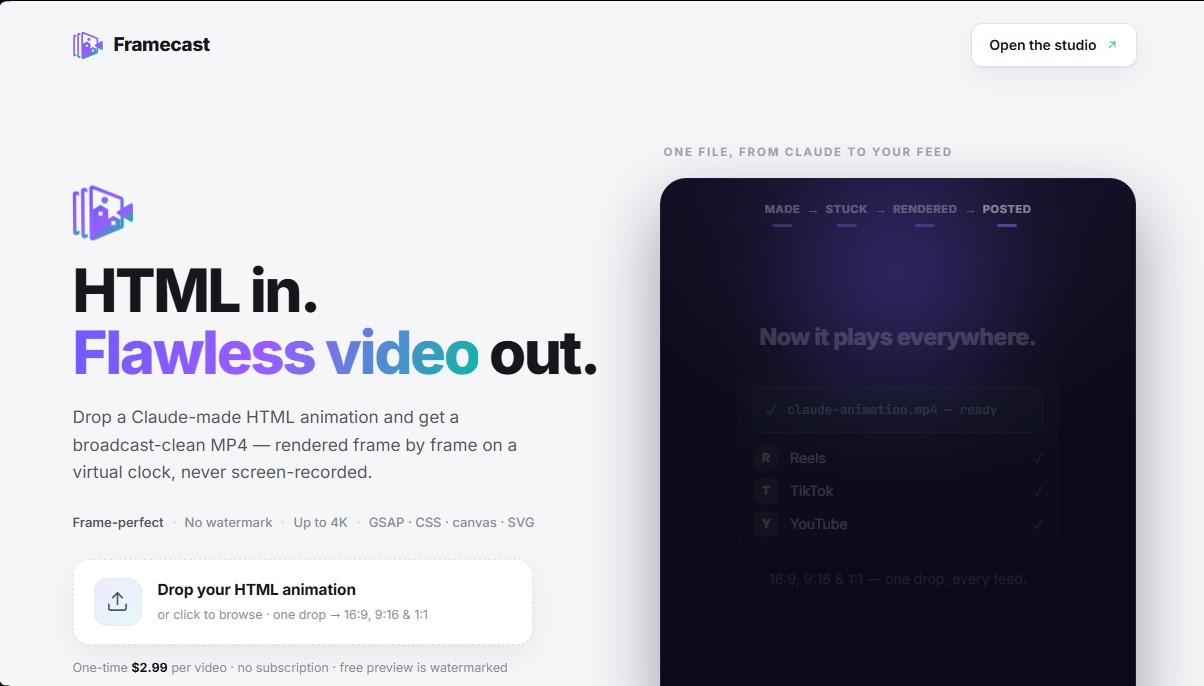
Framecast is a specialized tool for converting HTML animations to professional, high-quality MP4 video. Its primary function is to transform code files—typically generated by AI tools like Claude—into video files ready for publication on social media and audiovisual platforms. Unlike conventional methods, this application does not use screen recording; instead, it processes content natively to ensure an impeccable technical finish.
Framecast's technology is based on a frame-by-frame rendering engine. It utilizes a deterministic virtual clock that advances one frame at a time, allowing it to capture every detail without the user's computer performance affecting the final result. This technical approach eliminates common issues such as dropped frames or screen tearing, ensuring that complex animations created with GSAP, CSS, canvas, and SVG are exported with total fluidity and precision.
One of the tool's most standout capabilities is its ability to generate multiple formats from a single upload. When processing an animation, Framecast allows you to simultaneously obtain versions in 16:9, 9:16, and 1:1 aspect ratios. This significantly optimizes the workflow for content creators who need to adapt their visual pieces for YouTube, TikTok, and Reels without having to manually adjust the code for each platform.
The tool's main features include:
- High-Precision Rendering: Captures each frame individually, guaranteeing the final video is identical to the original animation in the browser.
- Advanced Compatibility: Supports leading web animation technologies, including GSAP libraries, standard CSS animations, and complex SVG or Canvas graphic elements.
- Professional Resolution: Enables file exports in up to 4K quality, delivering a crisp result suitable for professional environments and high-density displays.
- Optimized Workflow: Specifically designed to convert Claude animations or manual HTML code into MP4 files compatible with any player or social network.
Framecast is highly useful for designers, developers, and marketing specialists who use artificial intelligence to prototype visuals. By removing the barrier between web code and video format, it allows any digital creation to be shared directly on mobile devices and social platforms. It is a technical solution for those looking to transform web animations into video content without the quality limitations imposed by traditional screen capture software.
Framecast features and use cases
How to use Framecast
Framecast FAQ
What is Framecast and what is it used for?
It is a tool that converts HTML animations created with Claude into high-quality MP4 video files, ready for social media.
How is Framecast rendering different from a screen recording?
Instead of recording in real-time, we use a frame-by-frame virtual clock to ensure no details are lost and the footage remains perfectly smooth.
What video formats do I get when I upload my file?
With a single upload, the tool automatically generates 16:9, 9:16, and 1:1 versions optimized for YouTube, TikTok, and Reels.
What is the maximum resolution supported?
You can export your animations in up to 4K resolution, ensuring crisp quality for CSS, GSAP, canvas, and SVG elements.
Do I need a subscription to use Framecast?
No, the service operates on a one-time fee of $2.99 per processed video, and it also offers a free watermarked preview.
What file types can I upload to the platform?
You must upload a single HTML file containing your animation—like those generated by Claude—to convert it directly into a professional MP4 video.
Do the final videos include a watermark?
Videos downloaded after the one-time payment do not include any watermarks and are ready for commercial or personal use.
Framecast pricing and plans
Free Version (Preview)
Price: Free.
Preview of videos generated from HTML files.
Output includes watermarks.
Pay-Per-Video
Price: 2,99 $ per video (one-time payment, no subscription).
High-quality conversion of HTML animations (GSAP, CSS, canvas, and SVG) to MP4.
Frame-accurate rendering (no dropped frames or recording glitches).
No watermarks.
Resolution up to 4K.
Simultaneous generation of 16:9, 9:16, and 1:1 formats from a single file.
Framecast Screenshots
Framecast alternatives



Osmo Studio
AI animation studio for professional motion graphics and videos. Control every detail, collaborate with teams, and export with transparent backgrounds.

Victoria Secret Runway
Create fashion show videos by integrating your face into real scenes. Just upload a photo to replace professional models and walk the runway.


VideoWeb Video Generator
Generate professional AI videos from text or images. Features realistic avatars, automated scripts, and optimized formats for marketing and social media.