Share
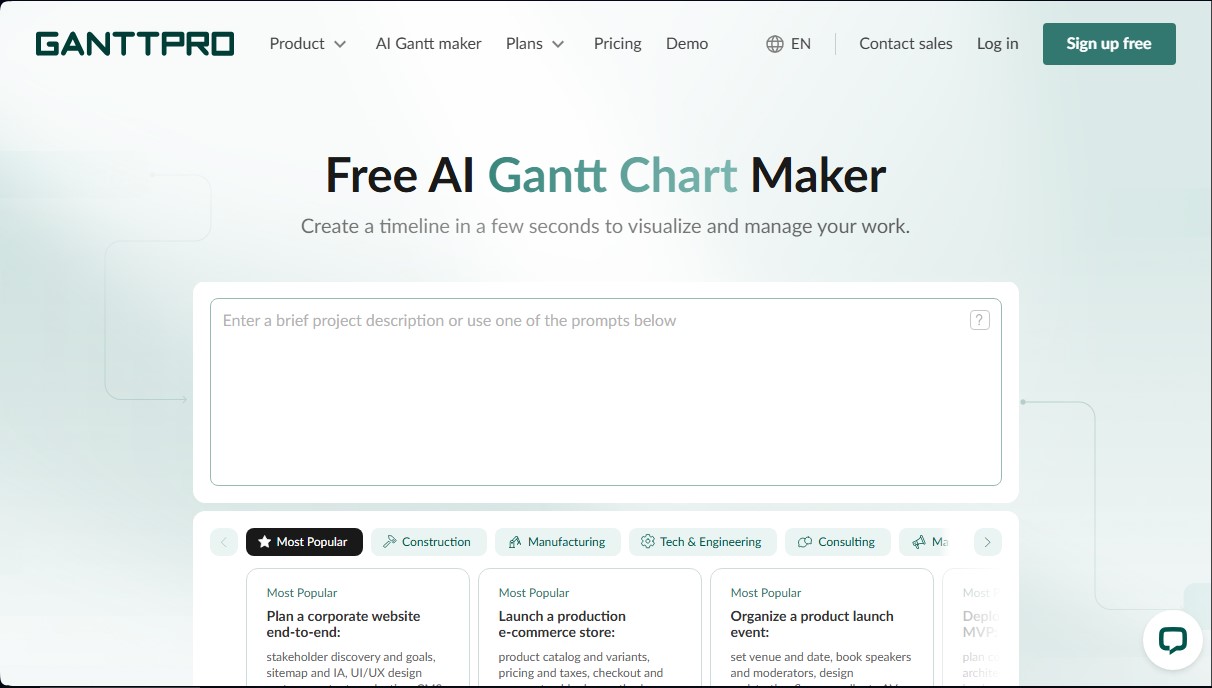
Generate Gantt charts and timelines in seconds with AI. Organize project phases, tasks, and dependencies from a brief description.
What is GanttPRO?
GanttPRO is an advanced AI-powered tool designed for automated Gantt chart creation and project management. This application allows you to transform a simple text description into a complete project schedule in a matter of seconds, eliminating the struggle of starting a plan from scratch. Its primary function is to facilitate the visualization and organization of complex tasks through an intuitive interface accessible from your computer.
This solution is ideal for project managers, software development teams, marketing agencies, and professionals in sectors such as construction, engineering, manufacturing, and healthcare. By automating initial planning, GanttPRO helps both technical profiles and users who need a clear structure for events, product launches, or consulting, helping them avoid "blank page syndrome."
The operation of this Gantt chart generator AI is based on natural language processing. The user enters a brief project summary or uses specific prompts, and the algorithm identifies the industry and type of work. GanttPRO’s technology maps out the standard project roadmap, breaking it down into logical phases, task groups, and detailed subtasks. Additionally, it automatically establishes logical dependencies and key milestones, and assigns realistic roles to ensure a professional and coherent workflow.
Key capabilities and practical benefits include:
- Automatic task breakdown: Instantly organizes the project into structured, easy-to-read phases.
- Dependency and milestone management: Intelligently connects tasks to reflect operational reality and critical points on the calendar.
- Full customization: All generated charts are fully editable, allowing you to adjust dates, durations, and assignees, as well as add custom fields.
- Team collaboration: Enables you to invite other users to work together on the generated plan, making resource allocation seamless.
- Versatile export options: Charts can be downloaded in PDF, PNG, XML, or Excel formats, providing the flexibility needed to share reports or presentations.
Using GanttPRO results in significant time savings compared to manual planning. By providing a professional draft immediately, teams can focus on execution and monitoring. The tool ensures that the plan is aligned with industry standards—whether you are deploying a SaaS platform, producing a documentary, or organizing a corporate event—offering a solid and flexible foundation for task and resource management. Ultimately, it is an intelligent assistant that turns ideas into structured, ready-to-execute action plans.
GanttPRO features and use cases
How to use GanttPRO
GanttPRO FAQ
What is the GanttPRO AI Gantt chart generator?
It’s an automated tool that creates ready-to-use project schedules based on a text description, saving you hours of manual planning.
Is the GanttPRO Gantt chart maker free to use?
The generator is free for creating initial plans; however, a subscription is required to customize charts and continue working after the 14-day free trial ends.
Can I customize the charts generated by the AI?
Yes, all charts are fully editable. You can modify dates, durations, and dependencies, as well as assign roles and adjust milestones to fit your specific workflow.
Do I need advanced prompt engineering skills to use GanttPRO?
No, you just need to provide a clear, detailed description of your project in natural language so the tool can structure the plan correctly.
What file formats are available when exporting my schedules?
You can export your Gantt charts as PDF, PNG, XML, or Excel files, providing the flexibility needed to share information with stakeholders.
Does GanttPRO support real-time collaboration with team members?
Yes, you can invite colleagues to your project to work together and take advantage of all the collaboration features available on the platform.
How does the tool ensure the project plan is tailored to my specific industry?
The AI identifies the industry you describe—such as construction or software development—and adapts the schedule to include the phases and tasks typical for that field.
What elements are automatically included in the AI-generated plan?
The system breaks the project down into task groups, establishes logical dependencies, adds key milestones, and assigns realistic roles for completing each phase.
What subscription options are available after the trial period ends?
There are several plans tailored to different needs—Core, Advanced, Business, and Enterprise—each with varying levels of features and resource management tools.
GanttPRO pricing and plans
Free AI Generator: Free for the initial creation and generation of plans and projects via text descriptions. To customize diagrams, collaborate, or continue working on them, a subscription or the use of a 14-day free trial is required.
Core: $9 per month per user ($7/mo with annual billing).
Powerful Gantt charts.
Project calendar.
Auto-scheduling.
Virtual resources.
Advanced: $15 per month per user ($10/mo with annual billing).
Includes all Core plan features.
Overdue task visualization.
Custom fields and filters.
Calendar exceptions.
Custom project templates.
Business: $24 per month per user ($17/mo with annual billing).
Includes all Advanced plan features.
Workload management.
Project portfolios and reports.
Budget planning.
Time tracking.
Enterprise: $20 per month per user (annual billing).
Includes all Business plan features.
Single Sign-On (SAML SSO).
Custom roles and permissions.
Personalized onboarding assistance.
Priority support.
GanttPRO Screenshots
GanttPRO user reviews
Write a review
Checking your session...
GanttPRO Reviews
Loading reviews...