

Share
Centralize documents, conversations, and tools in a shared AI brain. Provide verified, secure context to your teams and AI agents.
What is HeyBrain?
HeyBrain is an advanced platform designed to function as a company's centralized AI brain. Its primary role is to unify documents, conversations, and tools into a shared workspace that serves as the operational context for both employees and artificial intelligence agents. This solution organizes approved corporate knowledge, preventing information fragmentation and ensuring the entire organization works from a single source of truth accessible from any computer or device.
The tool operates by integrating common data sources such as Google Drive, Notion, Slack, Gmail, and calendars. It utilizes a Knowledge Graph architecture to structure information and enable precise enterprise searches. One of its most notable technological innovations is the implementation of the MCP (Model Context Protocol), which facilitates seamless connections with external AI clients and development environments like Claude, OpenAI, Gemini, Cursor, and Codex. This allows users to "Bring Your Own Model" (BYOM) while leveraging pre-processed internal context.
In the realm of AI governance, HeyBrain offers rigorous control over security and information access. The system evaluates user identity, defines agent scope, and maintains detailed audit logs of all activity. It includes Role-Based Access Control (RBAC), ensuring that sensitive data is only accessible to authorized profiles. Furthermore, the platform guarantees privacy by not using connected content to train external AI models, maintaining the integrity of the corporate repository.
Its core capabilities and practical benefits include:
- Shared context for teams: Unifies projects, decisions, and data sources for operations, sales, engineering, and marketing departments.
- Grounded answers with citations: When performing queries, the system generates evidence-based responses, directly citing original documents so users can verify the information’s lineage.
- Reusable Skills: Allows users to save specific task instructions and workflows that can be executed repeatedly by both humans and autonomous agents.
- Advanced enterprise search: Locates relevant material, identifies outdated documents, and detects information gaps in the knowledge base.
HeyBrain is especially useful for development teams, financial services firms, consultancies, and IT departments that need to optimize information retrieval and improve the accuracy of their AI tools. By providing an environment where knowledge is persistent and well-structured, the platform reduces time spent on manual data searches and boosts intelligent automation in daily workflows, whether through mobile apps or direct browser integrations.
HeyBrain features and use cases
How to use HeyBrain
HeyBrain FAQ
What exactly is HeyBrain and what is it used for?
HeyBrain is a hosted workspace that acts as your company’s AI brain, allowing you to organize knowledge from documents, conversations, and tools in a single shared location for both people and AI agents.
Can I try HeyBrain for free before committing to a paid plan?
Yes, there is a 14-day free trial for the Personal Pro plan that allows you to explore the platform’s advanced features before deciding on a subscription.
Does HeyBrain use my private data to train AI models?
No, the privacy policy states that the tool does not use connected content to train AI models, and its providers operate under terms that guarantee the privacy of your information.
What information sources can I currently connect to my HeyBrain account?
You can directly connect tools like Google Drive, Notion, Slack, and Gmail, as well as manually upload documents through the system's built-in library.
How does HeyBrain manage access permissions for my company's documents?
The platform allows you to evaluate user identity and scope before adding sensitive content; however, you must review permissions manually as source system rules are not automatically inherited.
What is the MCP configuration that HeyBrain offers for compatible AI clients?
It is a configuration path that allows external AI clients like Claude or Cursor to use the context and tools provided by the server to generate responses based on your corporate knowledge base.
Is it possible to verify the accuracy of the responses generated by the tool?
Yes, the system includes direct citations from the sources used, allowing you to inspect the original document and confirm that the evidence supports the AI-generated answer.
What makes HeyBrain different from other note-taking tools like Obsidian?
Unlike local storage tools, this platform offers a cloud-hosted workspace specifically designed for team collaboration and integration with AI agents.
How does the billing system work for using managed AI models?
If you use the platform’s keys, you will be charged per token based on usage; however, you have the option to link your own provider key to run models without any additional fees from the tool.
HeyBrain pricing and plans
Free Trial
HeyBrain offers a 14-day free trial of the Personal Pro plan (credit card required).
Personal Pro
Price: $30 per month.
1 user.
20 GB storage.
8 connectors and 10 third-party agent platforms.
3 workspaces.
Advanced Knowledge Graph.
MCP (up to 2 custom servers).
API included.
90-day version history.
Priority sync and email support.
Includes $8 per month of managed AI (or $0 additional cost if you use your own API key).
Personal Pro Max
Price: $100 per month.
1 user.
100 GB storage.
8 connectors and 25 third-party agent platforms.
10 workspaces.
Enterprise-grade Knowledge Graph.
Access to premium, experimental, and early-access AI models.
Unlimited version history and API.
Priority processing and priority support.
Includes $40 per month of managed AI.
Pro Team
Price: $30 per user per month.
Up to 10 users.
100 GB storage.
8 connectors and 20 third-party agent platforms.
10 workspaces and unlimited departments.
Advanced permission management (RBAC) and approval workflows.
Shared AI memory.
Webhooks and custom branding included.
Audit logs and enterprise support.
Includes $8 per month of managed AI.
Pro Max Team
Price: $100 per user per month.
Up to 30 users.
500 GB storage.
Unlimited connectors and third-party agent platforms.
25 workspaces.
Advanced security controls and scoped agent keys.
Custom integrations and cloud deployment.
Personalized priority support.
Includes $40 per month of managed AI.
Managed AI (Additional Costs)
If using the HeyBrain key, billing is per token based on the model (2x the provider's list price).
Available models: Opus ($30 input / $150 output per 1M tokens), Sonnet ($6 / $30), and Haiku ($1.60 / $8).
If the user provides their own API key, the cost from HeyBrain is $0.
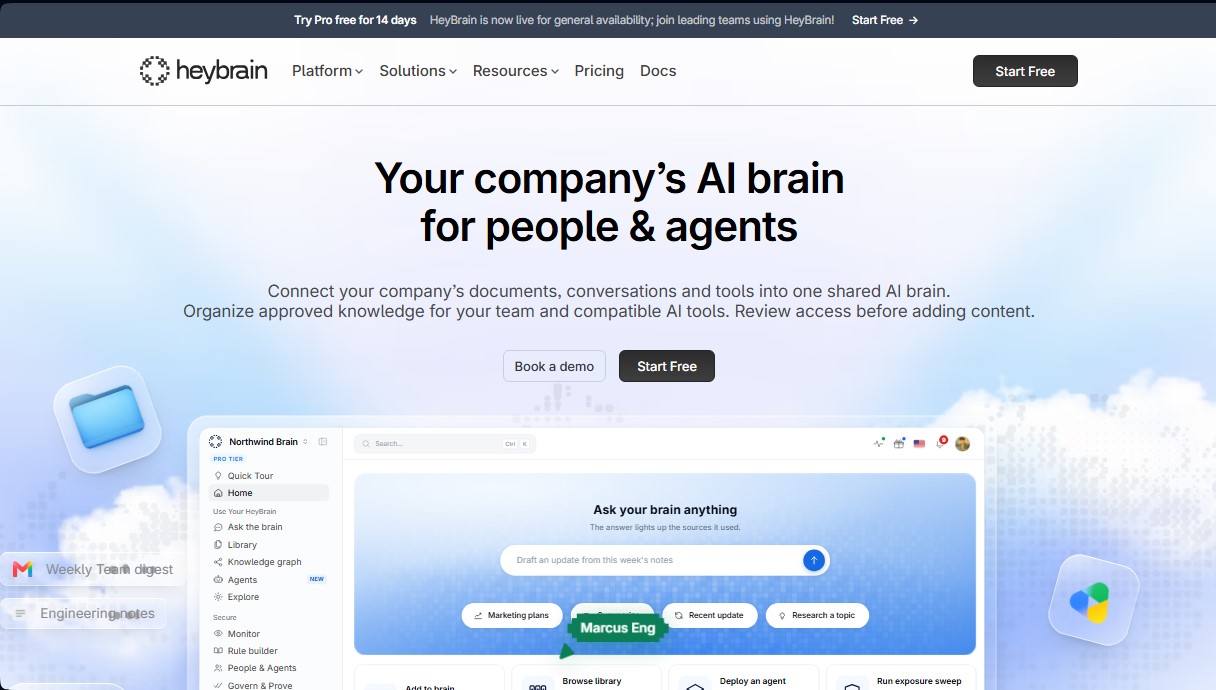
HeyBrain Screenshots
HeyBrain alternatives

rabbit OS3
Agentic OS that automates tasks and manages files, connecting your computers with AI models to run workflows using natural language.


The Drive AI
AI assistant that automatically organizes, renames, and summarizes team files. Answers questions about content and automates your team’s cloud document management.


inboxpilot
AI assistant that sorts emails and drafts automated replies in Gmail and Outlook based on your company’s documents and data.